Solved 3cx free startup. typo for department name. how do i change it?

Status
Not open for further replies.

boxman00

Free User
Joined
Aug 15, 2024
Messages
1
Reaction score
0
I've just created a new instance of 3CX free and i misspelled the company name. With the free edition of v20 there is no department tab. How do i create a new department or change the current one? Any ideas?
 
I've just created a new instance of 3CX free and i misspelled the company name. With the free edition of v20 there is no department tab. How do i create a new department or change the current one? Any ideas?
Delete the instance and renew.
 
I have my new 3CX SMB setup and users added then realized I need a different department name. I really don't want to blow it all away and start over. Is there another way to edit / change the department name?
 
I have my new 3CX SMB setup and users added then realized I need a different department name. I really don't want to blow it all away and start over. Is there another way to edit / change the department name?
No, you would need to make sure you have the proper company name in your portal, then deploy the instance. So you would need to delete the instance and recreate it.
 
  • Like
Reactions: IrinaP_3CX
Thank you for the response. I'm new to 3CX, is there a how-to document that explains the process of removing the instance and recreating it?
 
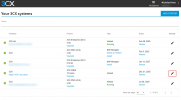
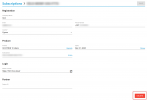
Log in to your portal and just delete the instance

1733836332474.png

1733836412668.png

Then just go to and "Add System" again from the main page (see 1st screenshot)

Please make sure you are deleting the correct instance!!!!
 
  • Like
Reactions: IrinaP_3CX
Ok I will have a go at it. Thank you for the information. I appreciate it.
 
Ok I got it right now. Thanks again for your assistance!
 
Status
Not open for further replies.

Members Online Now

No members online now.

Forum statistics

Threads
111,831
Messages
589,277
Members
164,660
Latest member
RJenkinsROCK