3CX HA with the same procedure of 3CX SBC HA

Status
Not open for further replies.

Riccardo M.

Silver Partner
Basic Certified
Joined
May 21, 2020
Messages
42
Reaction score
7
Hi,

just a question, I've realized a 3CX failover (Active/Passive) for an our customer but I've an issue about the script to change the private FQDN on Windows server 2019 DNS service.
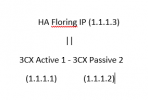
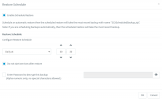
Seeing the procedure used on 3CX SBC to create a HA, it's possibile to replicate the same procedure and create an floating virtual IP also for the 2 3CX PBX and set just 1 IP on record A on DNS server?
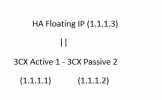

1644570877477.png


Thanks a lot.
 

Attachments

  • 1644570822752.png
    1644570822752.png
    4.1 KB · Views: 3
Last edited:
I'm afraid not, 3CX PBX Failover works a lot differently than the 3CX SBC HA.

Regarding the script, did you take a look at our examples too?
 
I'm afraid not, 3CX PBX Failover works a lot differently than the 3CX SBC HA.

Regarding the script, did you take a look at our examples too?
I know that....
but the script for changing of the FQDN on DNS server must be run manually? or is there a way to make that automatically each time that the passive becomes active?

Another think, in a my customer I noted that each day HA switches and I've to change the passive manually. it's an virtual environment and there aren't problems during the day on active, do you have any suggest? thanks

I've opened also this post
 
but the script for changing of the FQDN on DNS server must be run manually? or is there a way to make that automatically each time that the passive becomes active?
Not necessarily, that is why we have the "Failover Script Operations" options in the "Failover" section. If you have your script ready, you can simply add it to the Passive server so it gets automatically run whenever a failover event occurs. It goes without saying that what script you will use and how you will implement it is up to you. We merely provide the option to have a script automatically run by the passive server when it switches to active.

Another think, in a my customer I noted that each day HA switches and I've to change the passive manually. it's an virtual environment and there aren't problems during the day on active, do you have any suggest? thanks
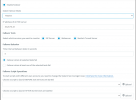
If by anything to suggest you mean as to why the failover is being triggered then I recommend anything specific as you would have to investigate this further and gather more information. What you might want to consider is what services the passive server is monitoring:
1645004812580.png
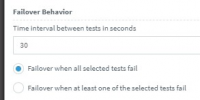
Also if the passive server is waiting for all to fail or just one:
1645004833397.png

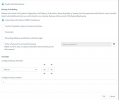
If the failover is indeed being triggered due to one or all of these services dropping then you would have to determine why this is happening. You might want to enable the following email notification on the Active server so that you can confirm if this is the case:
1645004928549.png
You can do this under "Settings >> Email >> Notifications".

For instance, If no services are dropping on the active server, it may be that you have connection issues and the Passive server simply cannot reach the active server at some point during the day. In which case you might have to investigate on the network level.

Hope this helps!
 
Not necessarily, that is why we have the "Failover Script Operations" options in the "Failover" section. If you have your script ready, you can simply add it to the Passive server so it gets automatically run whenever a failover event occurs. It goes without saying that what script you will use and how you will implement it is up to you. We merely provide the option to have a script automatically run by the passive server when it switches to active.


If by anything to suggest you mean as to why the failover is being triggered then I recommend anything specific as you would have to investigate this further and gather more information. What you might want to consider is what services the passive server is monitoring:
View attachment 27939
Also if the passive server is waiting for all to fail or just one:
View attachment 27940

If the failover is indeed being triggered due to one or all of these services dropping then you would have to determine why this is happening. You might want to enable the following email notification on the Active server so that you can confirm if this is the case:
View attachment 27941
You can do this under "Settings >> Email >> Notifications".

For instance, If no services are dropping on the active server, it may be that you have connection issues and the Passive server simply cannot reach the active server at some point during the day. In which case you might have to investigate on the network level.

Hope this helps!

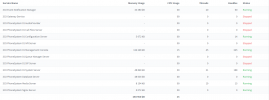
ok perfect I've checked and on passive my settings are that:
1645021452100.png

and the notification received says that:
The following service(s) were interrupted:

3CXAudioProvider01
3CXSystemService01
3CXCallFlow01
3CXGatewayService
3CXQueueManager01
3CXPhoneSystemMC01
3CXIVR01
3CXPhoneSystem01

and now the passive is changed again in active without any issue on active!!!! I try to rechange that and after few minutes it changes.
 

Attachments

  • 1645021648705.png
    1645021648705.png
    42.1 KB · Views: 4
  • 1645021675677.png
    1645021675677.png
    31.7 KB · Views: 4
Last edited:
If you're 100% sure the services on the Active server are not stopping, the issue might be that the passive server occasionally cannot reach the active server. I know that both are on the same LAN but still, confirming the connectivity between the two PBXs would probably be what you should check next. Especially since you've set checks to be every 5 seconds which means that a small network hiccup might trigger a failover event. You actually might want to consider increasing the value a bit to something like 30 seconds.
 
If you're 100% sure the services on the Active server are not stopping, the issue might be that the passive server occasionally cannot reach the active server. I know that both are on the same LAN but still, confirming the connectivity between the two PBXs would probably be what you should check next. Especially since you've set checks to be every 5 seconds which means that a small network hiccup might trigger a failover event. You actually might want to consider increasing the value a bit to something like 30 seconds.
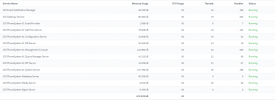
Active
1645023971671.png
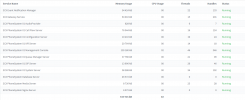
Passive
1645023985960.png
both are VM on the same network. I've to make the modify changing the new active in passive and reboot it. Now the situation is correct but I don't sure that will change...
 
As my colleague said, please also increase the check interval from 5s to 30s, at least as a test and monitor.
 
Great, let us know if the situation improves. Also, if you happen to have a way to monitor connectivity between the two PBXs I recommend doing that too.
 
Great, let us know if the situation improves. Also, if you happen to have a way to monitor connectivity between the two PBXs I recommend doing that too.
absolutely yes!!!!!
being 2 VM on VMware it is very strange having a problem on the connectivity between the 2 server but could be .... I'll give you feedaback soon
 
I've found the same issue of yesterday this morning, now both of that have the services in running
active
1645092050623.png
passive/active
1645092066506.png

the failover on the passive, that is begun active, this morning at the 8:30
1645092125624.png

?????? :-(
 
That means that the Active server dropped at some point, triggering the Passive server to switch to active, but then the original active server recovered on it's own. The Passive server will not automatically switch to passive if it has been triggered to switch to active. This has to be done manually by the system administrator. Since this is happening daily, what you have to investigate is what is causing the failover events in the first place.

EDIT: You said that both VMs on the same Hypervisor. Is there any chance you are running any scheduled snapshots or anything else related to the hypervisor/VMs that might be causing disrupting communication between the two VMs even for a brief moment? Have you noticed if the failover gets triggered always around the same time?
 
I tried to make the switch manually changed the secondary as passive but after few minutes the situation is changed again...i don't undestand why!!!! the services on active are all in running!!!!
 
If services do not stop then what I'd recommend is monitor the communication between the two servers at all. What you can do to start of is run a packet capture on the Passive server and check if at the time the issue occurs, the Active server stops responding.

What you should see is the Passive server start a TCP connection with the Active Server every 30 seconds (fi that's what you have set).

If you have all three selected SIP Server, Web Server and Tunnel, you should see three separate TCP connections on the following ports 5060, 5001 and 5090, provided of course these are the ones the PBX is configured with.

You will see the Active Server replying and then the TCP connection being ended by the Passive server. As mentioned this repeats every 30 seconds or whatever you set the interval to.

The packet capture I would suggest you run outside of 3CX (Not via the Management Console) with a tool such as tshark. You can SSH to the Linux machine and install it with
apt install tshark
Create a directory for the capture:
mkdir pcap
Give permissions for that folder:
chmod +7777 pcap
Run the packet capture:
tshark -i any -b filesize:10240 -w pcap/capture.pcap
Once a failover event occurs you can stop the packet capture with CTRL+C.

This is going to create multiple .pcap files so you'll have to look at the ones closest to the time the issue occurred so figure out what is happening. I recommend analyzing them using wireshark on a windows pc.
 
Status
Not open for further replies.

Forum statistics

Threads
111,974
Messages
590,083
Members
164,901
Latest member
Silent_Guru