3CX installation running out of space

GIB

Customer
Joined
Oct 25, 2025
Messages
3
Reaction score
0
Following alert is being received on a 3CX v20U7 enterprise system:
"3CX installation FQDN is running out of space. (986.4 Mb Space left out of 1000 Mb).
As a result of this, recordings, logging and voicemail services are disabled until this problem is resolved."
However, when looking at the available space, no device corresponds to the stated space usage, which, by the way, makes no much sense indicating 14.6 Mb/1.4% usage!
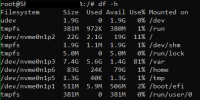
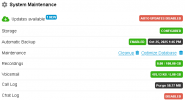
1761395133930.png 1761395610205.png
Any idea about what we should look at ?
 
Last edited:
The pending update is presumably the hotfix for the syslog size issue so that wouldn’t hurt to install. Then/and check /var/log.
 
  • Like
Reactions: Nathan@Voxtelesys
Most of the installed software – including nginx, postgresql, and the complete 3CX system with all programs, the database, all data, firmware, logs, recordings, etc. – is located in /var.

There is not much storage space left on your volume containing /var, only 1.4 GB. One should seriously reconsider the chosen partitioning, especially the presumably unnecessary space allocated for /home. A 3CX system is not (and should not) a work environment. It's a server. The need for partitioning is completely different in that case.
 
  • Like
Reactions: Evolute IT
Yeah that looked off to me too. If it wasn’t installed via the 3CX ISO, it could be reinstalled and restored from backup. (New installs default to port 443)
 
  • Like
Reactions: Evolute IT
Yeah that looked off to me too. If it wasn’t installed via the 3CX ISO
I don't even believe that. Partitioning can be set and manually configured perfectly during installation via 3CX ISO. It is not possible to tell from the image whether the 3CX ISO was used or not. I'm also a little surprised by the very long hostname of the system.

We always do that too, but not like the original poster did. That makes little sense, especially with such a small installation and small disk: /home is separated and unnecessarily large, /tmp is small, /var is far too small, and the order of the partitions is suboptimal.
 
I don't even believe that. Partitioning can be set and manually configured perfectly during installation via 3CX ISO. It is not possible to tell from the image whether the 3CX ISO was used or not. I'm also a little surprised by the very long hostname of the system.

We always do that too, but not like the original poster did. That makes little sense, especially with such a small installation and small disk: /home is separated and unnecessarily large, /tmp is small, /var is far too small, and the order of the partitions is suboptimal.
Regular basic partitioning works fine. Nobody needs to modify or customize it. It just creates more issues than it fixes, specially since most people don't understand linux partitions.
 
Thanks for your replies. The 3CX installation was made from the 3CX-ISO, but w/ V16. Meanwhile it was upgraded, which of course doesn't change disk-partitionning.
You're perfectly right in saying that /var is too small and /home too big. Is there any possibility to change this remotely via SSH as I'm not on site?
 
Ours started as v16 and doesn't have /home as a partition. Or /tmp or /var.

Safest is probably to reinstall but you can search for "debian delete home partition make var bigger" or similar...I don't have a specific page to recommend.
 
@GIB
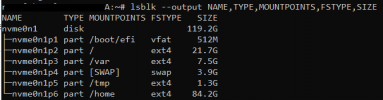
Please do a lsblk --output NAME,TYPE,MOUNTPOINTS,FSTYPE,SIZE and post the output.
I assume /dev/nvme0n1p4 is swap and all data partitions are ext4 but i want to know, just to be sure.
 
Is there any possibility to change this remotely via SSH as I'm not on site?
... and yes - if you post the output of the above lsblk and it roughly matches, I might have a solution ;)
 
  • Like
Reactions: KyriacosS_3CX
And here is our friendly reminder to take a backup of absolutely everything before doing anything that might be suggested in this thread.

This is the path to glory or unwanted overtime :)
 
  • Like
Reactions: bitn
lsblk --output NAME,TYPE,MOUNTPOINTS,FSTYPE,SIZE
Sorry for the late response. Let's see what you have in mind. Here's the output:
1762333207127.png
 
Let's see what you have in mind.
  1. create a backup of the 3CX
  2. ctore the backup outside of the 3CX, somewhere safe
  3. check the backup to ensure it’s complete - a simple, error-free extraction should be enough
  4. prepare yourself mentally and emotionally for the possibility that you’ll still have to go on-site to the 3CX in case something goes wrong :)
Then:
execute the following completely in a shell on the 3CX (copy the entire content and, for example, right-click in PuTTY to paste it, then press Enter to run it)

part 1
Bash:
for _service in $(systemctl list-unit-files --state=enabled |grep -i 3CX |awk '{printf "%s\n", $1}'); do systemctl stop $_service; done
systemctl stop cron
systemctl stop nginx
systemctl stop postgresql
systemctl stop rsyslog
systemctl stop syslog
systemctl stop systemd-journald

swapoff -a
umount /home
umount /tmp
umount -l /var

mkdir /mnt/home
mount /dev/nvme0n1p6 /mnt/home
cp -a /mnt/home/ /
umount /mnt/home

mkdir /mnt/var
mount /dev/nvme0n1p3 /mnt/var
cp -a /mnt/var /
umount /mnt/var

fdisk /dev/nvme0n1 << FDISKCMD
d
6
d
5
d
4
d
3
d
2
n
2

-4G
n
n
3


t
3
19
w
FDISKCMD
resize2fs /dev/nvme0n1p2
echo 1 > /sys/block/nvme0n1/device/rescan_controller
perl -i -pe "s|^(.*/home.*)|# \1|igs" /etc/fstab
perl -i -pe "s|^(.*/tmp.*)|# \1|igs" /etc/fstab
perl -i -pe "s|^(.*/var.*)|# \1|igs" /etc/fstab
perl -i -pe "s|^(UUID=\S+.*swap.*)|####\1|igs" /etc/fstab
echo "" > /etc/initramfs-tools/conf.d/resume
update-initramfs -u
update-grub
touch /forcefsck
reboot

the 3CX will reboot, then execute the following completely in a shell on the 3CX - part 2
Bash:
mkswap -f /dev/nvme0n1p3
swapid=$(blkid /dev/nvme0n1p3 | awk '{printf $2}' | sed -n 's/.*UUID="\(.*\)"/\1/p')
perl -i -pe "s|^####UUID=\S+(.*swap.*)|UUID=$swapid\1|igs" /etc/fstab
echo "RESUME=UUID=$swapid" > /etc/initramfs-tools/conf.d/resume

update-initramfs -u
update-grub
touch /forcefsck
reboot

I can explain all of this to you if you want — it’ll just take a little bit longer…
 

Attachments

1762333207127.png
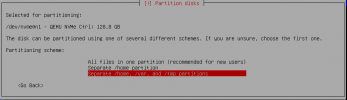
I assume that during the 3CX installation, the last option was selected in the partitioning menu:

1762337222384.png

In this case, for this small 3CX, the first option would have been the correct choice.
 
  • Like
Reactions: Evolute IT

Forum statistics

Threads
111,954
Messages
589,919
Members
164,851
Latest member
DrunkeMeister