3CX integration not journaling or creating contacts

Status
Not open for further replies.

Akki78

New User
Joined
Mar 23, 2023
Messages
6
Reaction score
0
Hi,
We have followed the steps outlined here: https://www.3cx.com/docs/hubspot-pbx-crm-integration/ and we are able to "test" the integration and look up contact information from HubSpot however we aren't seeing calls get journaled against known contacts in HubSpot nor are we seeing new contacts being created for unknown callers.


So I'm guessing we are just missing something obvious within HubSpot or 3CX but any help is appreciated.
 
Last edited:
The call journaling requires that the extension's email matches the email of the agent in the CRM as it is also explained below:
https://www.3cx.com/docs/hubspot-pbx-crm-integration/#h.e9lryrrb431u

Furthermore your issue seems to be related with the contact lookup matching. You need to ensure that numbers are stored in the CRM in E164 format and also the number is coming in the PBX from the provider with the same format.

If there is also no contact creation you need to check in the 3CX Phonebook for any duplicates and also please ensure that when making the test DO NOT make calls with a number that is also configured as a mobile number of an extension.
 
Hi @TheodorosG_3CX
I have verified the steps that you have mentioned

1:-The Extension's email and CRM emails are matching
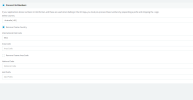
2:-from the contact lookup you mean number formatting? from CRM and 3CX then it's settled to E164 and Country code is selected attaching the screenshot
1679573187754.png
As we are using 3CX browser extension when we click on contact's phone number we are getting redirected to 3CX Dialpad and able to make call which means E164 is working fine?

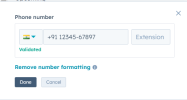
In HubSpot numbers are stored in this format as per image attached
1679573014642.png

Also in Contact Matching Strategy As we know contact match strategy is set on "Match Exactly" which is set.
but still calls journaling is not showing.
Thanks for helping me out
 
Have you ensured that that number that is used for testing is not configured as a mobile number of an extension?
 
Have you ensured that that number that is used for testing is not configured as a mobile number of an extension?
Yes this is a sample data. In screenshot the number used for test was my other cell number If you are available can we please connect to resolve this issue?
 
Last edited:
Can you please check if this number is also a mobile number of an extension?
 
Can you please check if this number is also a mobile number of an extension?
I have checked the number is not set as mobile number for any extension, but yes after testing with new number, I got the contact created in hubspot with New 3cx contact but still there is no call logs generated.
 
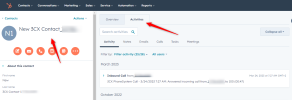
If you check in the contact activities as per below screenshot, you cannot see any logging?

2023-03-24_07h28_51.png
 
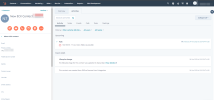
Yes, I am not able to see any logging in activities here is screenshot
1679636005591.png
 
In this case you need to check the PBX system service log file for further troubleshooting. Set the PBX in Verbose and restart the services. Then replicate the issue and generate the support info. In the log files check the system service log file to see if there is match returned from the CRM.
If this is not possible you may create a ticket to the 3CX Support Team in order to proceed with further troubleshooting.
 
Status
Not open for further replies.

Members Online Now

No members online now.

Forum statistics

Threads
111,831
Messages
589,277
Members
164,660
Latest member
RJenkinsROCK