- Joined
- Mar 5, 2021
- Messages
- 58
- Reaction score
- 15
Hi,
Following the implementation of the Salesforce Integration with a new instance of 3CX, I believe I am falling at the final hurdle.
I have followed the step-by-step instructions and have authorized the integration succesfully.
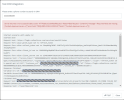
However, when testing this using a number assigned to a known contact on the system, I am receiving the following error message:
Server returned a non successful status code - HTTPStatusCode=BadRequest - Reason=Bad Request - Content=[{"message":"\nContact(Id,FirstName,LastName,AssistantPhone,Fax,HomePhone,MobilePhone\n ^\nERROR at Row:1:Column:71\nNo such column 'AssistantPhone' on entity 'Contact'. If you are attempting to use a custom field, be sure to append the '__c' after the custom field name. Please reference your WSDL or the describe call for the appropriate names.","errorCode":"INVALID_FIELD"}]
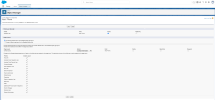
As per @edossantos instructions in this ticket (https://www.3cx.com/community/threads/salesforce-integration-testing.65979/), I have made the Assistant Phone field visible within Salesforce (below), however I am still encountering the same error message.
Please can anyone advise?
All the best,
Reece
Following the implementation of the Salesforce Integration with a new instance of 3CX, I believe I am falling at the final hurdle.
I have followed the step-by-step instructions and have authorized the integration succesfully.
However, when testing this using a number assigned to a known contact on the system, I am receiving the following error message:
Server returned a non successful status code - HTTPStatusCode=BadRequest - Reason=Bad Request - Content=[{"message":"\nContact(Id,FirstName,LastName,AssistantPhone,Fax,HomePhone,MobilePhone\n ^\nERROR at Row:1:Column:71\nNo such column 'AssistantPhone' on entity 'Contact'. If you are attempting to use a custom field, be sure to append the '__c' after the custom field name. Please reference your WSDL or the describe call for the appropriate names.","errorCode":"INVALID_FIELD"}]
As per @edossantos instructions in this ticket (https://www.3cx.com/community/threads/salesforce-integration-testing.65979/), I have made the Assistant Phone field visible within Salesforce (below), however I am still encountering the same error message.
Please can anyone advise?
All the best,
Reece