3CX iPhone app not working on LAN with split DNS

Status
Not open for further replies.

RobG

Customer
Joined
Nov 20, 2023
Messages
12
Reaction score
2
This weekend I've moved our 3CX install from Windows to Debian and have configured split DNS on our Draytek 3910 as per the guide and during the install I chose the split DNS option.

However iPhone's on the LAN cannot connect. Turn off WiFi and all works fine (over 4G). All iPhones were re-provioned with QR code after fresh install.

Just says "Connecting..." and the box remains grey.

Any throughts?
 
Hi @RobG In principle you should check that the smartphones via wifi are using as DNS the Draytek IP address where you have set the split dns.

Validate that you are using the correct Network interface for registration and provisioning.

Open the webclient using the FQDN on your browser and then scan the QR code.

From the pbx management console ---- settings --- network --- fqdn ---- local sip domain --- check it is configured with the pbx FQDN.
 
  • Like
Reactions: OlegR_3CX
Thanks for this. I clicked on the (i) for the WiFi connection and set DNS to manual and entered the 3910's IP address and it now works. No idea what DNS server the iPhone was using (possibly Google DNS).
 
Thanks for this. I clicked on the (i) for the WiFi connection and set DNS to manual and entered the 3910's IP address and it now works. No idea what DNS server the iPhone was using (possibly Google DNS).
You should check which dns the dhcp delivering to the phones.
 
Thanks for this. I clicked on the (i) for the WiFi connection and set DNS to manual and entered the 3910's IP address and it now works. No idea what DNS server the iPhone was using (possibly Google DNS).
Good to know it is working now.

Have a great day!
 
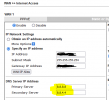
Turns out the 3910 by default hands clients the DNS servers that you've set for the WAN connection, which in my case was Google DNS.

1700559334306.png

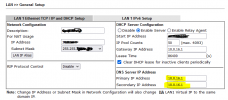
To force the 3910 to give out it's own IP address to DHCP clients for DNS I had to set the LAN DNS to the 3910's LAN IP. It's important to do BOTH primary and secondary. In my example if you just set the primary, the secondary is still taken from the WAN DNS (8.8.4.4).

1700559529498.png

Many thanks again for all the help.
 
  • Like
Reactions: bitn2 and Vali_3CX
Status
Not open for further replies.

Forum statistics

Threads
111,974
Messages
590,081
Members
164,899
Latest member
mazet