3cx self-hosted plus SNOM phones - Not passing DTMF

Status
Not open for further replies.

gw99

Customer
Basic Certified
Joined
Jul 30, 2022
Messages
5
Reaction score
0
  • 3CX Version, 18.0 (Build 965)
  • Server OS, e.g. Debian 10 (3cx ISO)
  • Is the 3CX Server Hosted and where? Cloud / Vultr
  • IP Phone Make/Model/Firmware version, SNOM D785 10.1.84.15
  • Provisioning Method: STUN
  • Trunk Provider or VoIP Gateway Make/Model, BulkVS (Bulk Solutions)
  • Has the Firewall Checker passed: YES
  • Are custom Phone Templates being used: YES

Users calling external IVRs are unable to enter touch tones / DTMF, the IVRs do not recognize them. The soft phone / App works just fine with DTMF / touch tone. Only the SNOM Desk phones are affected. Doesnt appear to be an issue with the SIP provider/trunk. Any assistence would be greatly appreciated!
 
Hello,
Can you first unplug and reconnect the phone to clear the cache and tell me if the problem persists please.
 
Yes - I read how this was happening with some older SNOM phones, so we tried this a couple times with no success..
 
I see that you are using custom templates. Do the test on one phone, do a manufacturer reset and provision it with the default template, do you reproduce the problem?
 
I have tried this as well. Same problem. I have a pool of about 20 phones i can test with and 5 different locations :)

The template does not seem to make a difference. In fact the template is a new addon after the issue existed.
 
Also a note - These phones were working fine with same SIP provider on freepbx, I migrated to 3cx.. we factory reset all phones before associating with the 3cx system.
 
A question/thought, since I am using STUN, do i need "PBX Delivers Audio" to be selected on all extensions?
 
Yes with STUN you need "PBX Delivers Audio" to be selected on all extensions.
 
For the DTMF you should try to call one of your IVR to see if internaly the dtmf are working.
 
What DTMF method are the phones set to use, and what method does your provider support?
 
I have the same problem with SNOM 785. No DTMF... The telefone is connected over SBC. DTMF on the SNOM admin website ist set to 1673603980949.png

I try to call the voicebox over BLF with 99,30,0000# that doesnt work. Same 3cx with Yealink T46s works fine.
 
I have the same problem with SNOM 785. No DTMF... The telefone is connected over SBC. DTMF on the SNOM admin website ist set to View attachment 33553

I try to call the voicebox over BLF with 99,30,0000# that doesnt work. Same 3cx with Yealink T46s works fine.
That's not what that means.

1673605521651.png

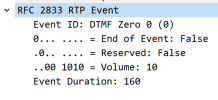
3CX uses RFC2833 DTMF, and a capture on the phone confirms that:
1673605642563.png

You don't actually need to go that far though, just call a 3CX IVR or your voicemail and confirm that you can type options or login to voicemail.

The problem we often see is usually AFTER leaving 3CX through the trunk where either:

  1. your provider is not handling the DTMF correctly
  2. the destination provider is not handling the DTMF correctly
  3. or the destination IVR is not handling the DTMF correctly

There is not guarantee ever that remote IVRs will work, even if you send in-band audio DTMF. The failure can occur anywhere in the chain. Just confirm via capture that 3CX is sending it out, and if this is ok, you then need to speak with your provider but keep the above in mind at the same time. Your provider might not be able to do something about it, it may not even be their fault.

Note: By default this is how your phone should be
1673606025593.png
 
Note: By default this is how your phone should be
Yes this was by default and doesnt work also. If you try to call by hand to reach the voice mail, that works. But if i use the blf with "," between the numbers it doesnt. The 3cx thinks it is a real phone number and tries to call outside like 0123499,30,000# and than you will get an "not found". I think the "," will be ignored.
 
I try to call the voicebox over BLF with 99,30,0000# that doesnt work

Ok to be fair is not something we recommend doing or claim to support.
But my comment is irrelevant here anyway because the problem is not caused by 3CX.
It is related to how each phone manufacturer handles this command you tried to use:

Yealink = dials the number first, enters the pin# after the call is answered.

Snom = Tries to call the entire number as a whole and fails because 3CX does not have an outbound rule for such a number.

Do a capture on both phones to see what I mean, and look at their invite.

It's a nice trick that works for Yealink, but the Snom does not understand what you are asking it to do and it fails :)
 
  • Like
Reactions: Evolute IT
Ok thx, for your help. I will see how to find a solution for this customer.
 
Found a solution: you have to define the blf on snom phones like this: 99;dtmf=EXTENSIONNUMBER,PIN#

Now everything works like expected.
 
  • Like
Reactions: Evolute IT
Status
Not open for further replies.

Members Online Now

Forum statistics

Threads
111,832
Messages
589,283
Members
164,662
Latest member
DejanMDS