


- Joined
- Jun 21, 2020
- Messages
- 5
- Reaction score
- 1
I've been writing up guides for our folks when they need to stand up a PBX and we are using a standardized path for the certificates (provided by LetsEncrypt) The setupconfig.xml file reads great up to the path of the cert where it says either the file can't be found or invalid cert format. I've verified the file is visible to all users and all users have read/write/execute rights on the cert files themselves and the directories above. the cert also is valid (I can run it through a parser that confirms it is valid)
certs live in /etc/letsencrypt/live/fqdn.com/ (cert.pem and privkey.key are the file names)
here is the xml file excerpt:
<option><!-- vmRequired -->
<code>FullExternalFqdn</code><!--This should be populated if NeedFqdn = "no". -->
<answer>fqdn.com</answer><!--User selected needfqdn = no. This means you have an fqdn so enter your fully qualified domain here example pbx.contoso.com-->
</option>
<option>
<code>CertificatePath</code><!--Use if NeedFqdn = "no". -->
<answer>/etc/letsencrypt/live/fqdn.com/cert.pem</answer><!--This is the certificate file which can be either a path, http link or just copy and paste the whole contents of the certificate - Including the "BEGIN certificate part"-->
</option>
<option>
<code>CertificatePassword</code><!--Use if NeedFqdn = "no". -->
<answer></answer><!--This is the PFX certificate password. Shows only when you select a pfx file"-->
</option>
<option>
<code>CertificateKey</code><!--Use if NeedFqdn = "no". -->
<answer>/etc/letsencrypt/live/fqdn.com/privkey.pem</answer><!--This is the certificate key which can be either a path, http link or it can be the whole contents of the pem file.. Including the "BEGIN certificate part Applies to PEM Certs"-->
</option>
<option>
<code>CertificateKeyPasswordRequest</code><!--Use if NeedFqdn = "no". -->
<answer /><!-- It could be that the pem file is encrypted, so without the key, setupconfig will download the file but will not be able to decrypt it unless we enter the password request key here.-->
</option>
ssh response during install:
An FQDN with a trusted SSL certificate is required. Do you want a free 3CX FQDN with trusted SSL or do you want to use your own FQDN and matching trusted certificate? (Note Self-signed certificates will NOT work)
(1) I need a 3CX FQDN
(2) I have my own FQDN
Enter option: no
Enter your full external FQDN:
External FQDN: fdqn.com
Please enter the path to your Certificate file (.pem, .crt or .pfx only).
Certificate path: /etc/letsencrypt/live/fqdn.com/cert.pem
Invalid certificate format
PostInstall.InvalidAnswerException: Error in XML file. RequestCode = 'CertificatePath': Invalid certificate format
at PostInstall.MenuTree.GetInstallationSettings(MenuNode rootMenuNode, SetupSettings setupSettings)
at PostInstall.Setup.RequestSetupParametersAndExecute(String path, String[] commandLineArguments)
root@3CX-36-Test3CX:/etc/letsencrypt/live/fqdn.com#
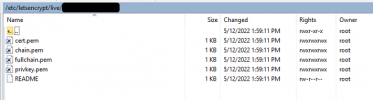
I'm not sure what it doesn't like. I had a random thought but I've never heard of an application being able to make the distinction, but LetsEncrypt uses symlinks for the "live" directory. Could the installer be reading the path and seeing its a symlink?
Where the xml points (and where configs should look)
Where the actual cert lives (on the other side of the symlink)
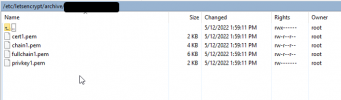
I could of course feed the XML the archive path but in 90 days or whatever the cert will expire and rather than the symlink updating to the new target cert, we'd have to script that too. Any ideas on this one (other than just use the free domains from 3CX sorry but that isn't even a remote option) ?
certs live in /etc/letsencrypt/live/fqdn.com/ (cert.pem and privkey.key are the file names)
here is the xml file excerpt:
<option><!-- vmRequired -->
<code>FullExternalFqdn</code><!--This should be populated if NeedFqdn = "no". -->
<answer>fqdn.com</answer><!--User selected needfqdn = no. This means you have an fqdn so enter your fully qualified domain here example pbx.contoso.com-->
</option>
<option>
<code>CertificatePath</code><!--Use if NeedFqdn = "no". -->
<answer>/etc/letsencrypt/live/fqdn.com/cert.pem</answer><!--This is the certificate file which can be either a path, http link or just copy and paste the whole contents of the certificate - Including the "BEGIN certificate part"-->
</option>
<option>
<code>CertificatePassword</code><!--Use if NeedFqdn = "no". -->
<answer></answer><!--This is the PFX certificate password. Shows only when you select a pfx file"-->
</option>
<option>
<code>CertificateKey</code><!--Use if NeedFqdn = "no". -->
<answer>/etc/letsencrypt/live/fqdn.com/privkey.pem</answer><!--This is the certificate key which can be either a path, http link or it can be the whole contents of the pem file.. Including the "BEGIN certificate part Applies to PEM Certs"-->
</option>
<option>
<code>CertificateKeyPasswordRequest</code><!--Use if NeedFqdn = "no". -->
<answer /><!-- It could be that the pem file is encrypted, so without the key, setupconfig will download the file but will not be able to decrypt it unless we enter the password request key here.-->
</option>
ssh response during install:
An FQDN with a trusted SSL certificate is required. Do you want a free 3CX FQDN with trusted SSL or do you want to use your own FQDN and matching trusted certificate? (Note Self-signed certificates will NOT work)
(1) I need a 3CX FQDN
(2) I have my own FQDN
Enter option: no
Enter your full external FQDN:
External FQDN: fdqn.com
Please enter the path to your Certificate file (.pem, .crt or .pfx only).
Certificate path: /etc/letsencrypt/live/fqdn.com/cert.pem
Invalid certificate format
PostInstall.InvalidAnswerException: Error in XML file. RequestCode = 'CertificatePath': Invalid certificate format
at PostInstall.MenuTree.GetInstallationSettings(MenuNode rootMenuNode, SetupSettings setupSettings)
at PostInstall.Setup.RequestSetupParametersAndExecute(String path, String[] commandLineArguments)
root@3CX-36-Test3CX:/etc/letsencrypt/live/fqdn.com#
I'm not sure what it doesn't like. I had a random thought but I've never heard of an application being able to make the distinction, but LetsEncrypt uses symlinks for the "live" directory. Could the installer be reading the path and seeing its a symlink?
Where the xml points (and where configs should look)
Where the actual cert lives (on the other side of the symlink)
I could of course feed the XML the archive path but in 90 days or whatever the cert will expire and rather than the symlink updating to the new target cert, we'd have to script that too. Any ideas on this one (other than just use the free domains from 3CX sorry but that isn't even a remote option) ?


