3CX SIP ALG Fail Outside Country Network

Status
Not open for further replies.

amanjuman

Trial User
Joined
Oct 3, 2020
Messages
36
Reaction score
1
Hi,

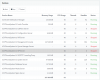
I have two servers running, One is on Cloud another is on the Local network. The firewall is completely opened but when I run Firewall Check it always failed on 3CX SIP Server, SIP ALG, Port 5060.
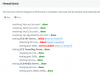
1601929205886.png
I believe due to these four services never start.
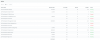
1601929185251.png
3CX PhoneSystem 01 CallFlow Server
3CX PhoneSystem 01 IVR Server
3CX PhoneSystem 01 Queue Manager Server
3CX PhoneSystem 01 SIP Server

I tried to start them manually but it never starts.

Like to mention that, In Bangladesh port 5060 is blocked for any IP address. This means port 5060/5061 and ALG can be accessible only within the country. So how can I bypass that firewall check?
 
Both. Like I said, wherever I deploy 3CX in my Country that 5060 will never work from outside.
  • 3CX Version, Standard Annual 16.0.6.655
  • Server OS, Debian 9
  • Is the 3CX Server Hosted and where, Cloud another On-Premises
  • IP Phone Make/Model/Firmware, Tried on Android
  • Provisioning Method: Local / VPN / STUN / SBC, Local
  • Trunk Provider or Gateway Make/Model
  • Has the Firewall Checker passed: NO
  • Are custom Phone Templates being used: NO
 
Services who are not running is not a good sign.
I suggest to reinstall, from scratch, the 3CX PBX and because port 5060 is blocked by your ISP change the SIP Port to e.g. 6060 during the install.
Ask your VoIP provider if they support an other SIP port, so you can setup you trunks with that port.
 
  • Like
Reactions: JohnS_3CX
Is it possible for you to host cloud pbx out of Bangladesh? if so just use an SBC on remote location.
 
Services who are not running is not a good sign.
I suggest to reinstall, from scratch, the 3CX PBX and because port 5060 is blocked by your ISP change the SIP Port to e.g. 6060 during the install.
Ask your VoIP provider if they support an other SIP port, so you can setup you trunks with that port.
Tried multiple times, each time when I start 3CX 4 services always stoped. By the way, I will change SIP port and will let you guys know here.
 
Is it possible for you to host cloud pbx out of Bangladesh? if so just use an SBC on remote location.
That's possible, but in order to use Bangladeshi PSTN/SIP, connection requests must be originated from a Bangladeshi IP address. Otherwise, I would host 3CX in Singapore and would connect BD SIP Trunk. The government disabled that for illegal VOIP uses.
 
Well o_O , so you are enclosed to Bangladesh ? not free to use phone systems as you want?


 
Services who are not running is not a good sign.
I suggest to reinstall, from scratch, the 3CX PBX and because port 5060 is blocked by your ISP change the SIP Port to e.g. 6060 during the install.
Ask your VoIP provider if they support an other SIP port, so you can setup you trunks with that port.
No luck.
1601975762325.png
and service status.
1601975837259.png
 
Is it possible for you to host cloud pbx out of Bangladesh? if so just use an SBC on remote location.
Yeah kind of. Many people implement illegal VoIP here. Otherwise Government would allow it.
However anyone can use Any phone system within country and thats fine. Only problem is with 3CX, it not let all service running unless it pass Firewall.

i could use other PBX but I like 3CX and trying to get solutions from here.
 
... Only problem is with 3CX, it not let all service running unless it pass Firewall.

A clarification on this point: 3CX will still allow services to run WITHOUT passing the firewall checker.
The reason your services are not running, are not related to the firewall checker at all.

When the SIP service cannot start, you will see a lot of other services stopping, so your problem is most likely the fact that the SIP server cannot start. Here is an example, where I manually stopped my SIP server:
1601978814358.png

One general reason for your SIP server failing to start, is that there is something else running on your server that already bound to port 5060. Another reason could be that you have a corrupted installation.

Follow the advice by @complex1 and reinstall from scratch using our very latest ISO
https://www.3cx.com/phone-system/download-links/

There is a full guide here if you haven't already seen it, and pay attention to all the details: there are small things that if ignored may result in problems down the line
https://www.3cx.com/docs/manual/installing-debian-linux-pbx/

During your new installation, you can also choose to use a different SIP port now (which should help pass the firewall checker too hopefully). But don't worry so much about the firewall checker now, the most important thing of all is to have all the services running when the installation is completed.

Note: During the firewall checker, the services are shut down and restarted automatically, so you can safely ignore this when testing.

Let us know how it goes!
 
  • Like
Reactions: AWS2P
A clarification on this point: 3CX will still allow services to run WITHOUT passing the firewall checker.
The reason your services are not running, are not related to the firewall checker at all.

When the SIP service cannot start, you will see a lot of other services stopping, so your problem is most likely the fact that the SIP server cannot start. Here is an example, where I manually stopped my SIP server:
View attachment 18460

One general reason for your SIP server failing to start, is that there is something else running on your server that already bound to port 5060. Another reason could be that you have a corrupted installation.

Follow the advice by @complex1 and reinstall from scratch using our very latest ISO
https://www.3cx.com/phone-system/download-links/

There is a full guide here if you haven't already seen it, and pay attention to all the details: there are small things that if ignored may result in problems down the line
https://www.3cx.com/docs/manual/installing-debian-linux-pbx/

During your new installation, you can also choose to use a different SIP port now (which should help pass the firewall checker too hopefully). But don't worry so much about the firewall checker now, the most important thing of all is to have all the services running when the installation is completed.

Note: During the firewall checker, the services are shut down and restarted automatically, so you can safely ignore this when testing.

Let us know how it goes!
Thanks for the reply.
I tried 4-10 servers already the same issue. But when I try this on any Cloud Server like AWS, Digital Ocean that works completely fine. Right now three of my 3CX working fine on the Cloud. This only occurs on-premises and I'm out of idea how can I fix SIP Server stopped issue.

If you are talking about running something on port 5060, well I tried a fresh server eventually changed the port still not working. I have Pi 3 this one also had the same issue. Is there any way to check the service log to see what causes SIP Server Stopped?
 
So just to be clear, you create a fresh installation (no backup restore) and when you finish the installation, you log on to the management console and the services are already down?
 
Yes, every time. But that doesn't happen in Cloud VMs.
Local VM Config, 1Core, 2GB RAM, 50GB SSD
Cloud VM Config, 1Core 1GB RAM, 40GB SSD
 
Ok, then you need to see why the services do not start, since this is not the normal behaviour you should expect from a freshly installed system.

Check the Debian syslog and search for 3CX /var/log/syslog you should see the first service that fails to start (most likely SIP Server).

Please tell us how you installed the system though, you did not mention what method and what install media you used, small details may be of importance so tells us as much information as you can. What VM hypervisor are you using?
 
OS: Debian 9
Kernel: Linux dhaka 4.9.0-11-amd64 #1 SMP Debian 4.9.189-3+deb9u2 (2019-11-11) x86_64 GNU/Linux
VM Env: OpenStack
Installation:
sudo apt-get update && sudo apt-get -y upgrade && sudo apt-get autoremove -y
sudo wget -O- http://downloads-global.3cx.com/downloads/3cxpbx/public.key | sudo apt-key add -
echo "deb http://downloads-global.3cx.com/downloads/debian stretch main" | sudo tee /etc/apt/sources.list.d/3cxpbx.list
sudo apt-get install -y net-tools dphys-swapfile
sudo apt-get install -y 3cxpbx


Log:

Oct 7 13:20:01 dhaka CRON[29806]: (CRON) error (grandchild #29809 failed with exit status 127)
Oct 7 13:20:01 dhaka systemd[1]: Starting 3CX PhoneSystem 01 SIP Server...
Oct 7 13:20:02 dhaka kernel: [88308.330046] 3CXPhoneSystem[29816]: segfault at 0 ip 0000560a9927c4e3 sp 00007ffdcd30a3b0 error 4 in 3CXPhoneSystem[560a990ed000+486000]
Oct 7 13:20:02 dhaka systemd[1]: 3CXPhoneSystem01.service: Main process exited, code=dumped, status=11/SEGV
Oct 7 13:20:02 dhaka systemd[1]: Failed to start 3CX PhoneSystem 01 SIP Server.
Oct 7 13:20:02 dhaka systemd[1]: 3CXPhoneSystem01.service: Unit entered failed state.
Oct 7 13:20:02 dhaka systemd[1]: 3CXPhoneSystem01.service: Failed with result 'core-dump'.
Oct 7 13:20:14 dhaka salt-minion[501]: [ERROR ] Error while bringing up minion for multi-master. Is master at syndic-au.3cx.com responding?
 
Last edited:
Ok then based on the above I suggest moving to a supported method of installing 3CX and see it it works for you.

1. Use a supported Hypervisor:
https://www.3cx.com/docs/manual/phone-system-installation-windows/#h.5hoy5wwhhk5c

2. Install using our Debian ISO, not via command line:
https://www.3cx.com/docs/manual/installing-debian-linux-pbx/

It appears that the environment you use is not compatible for some reason, causing a failed startup of the SIP server, and cascading to the remainder of the services.
 
It worked a month ago but now it's not working. It's not possible for me to change the System type because they provide OpenStack on Local Cloud. Also, there is no option to use 3CX ISO.

However, I'm wondering the same issues happen with Pi 3! I'm wondering this issue probably cause by Kernel.
 
It may have worked before, but this is no guarantee that it was compatible in the first place. When using our ISO we have some control over what packages get updated, not so when using your own Debian hence something that worked before, may one day break.

For Pi 3 it's a different platform, you should follow this guide and use the image file that the guide includes. It needs to specifically be a Pi 3B+ (or a Pi 4 if you have one)
https://www.3cx.com/docs/installing-pbx-raspberry-pi/
 
Status
Not open for further replies.

Latest Posts

Forum statistics

Threads
111,964
Messages
590,004
Members
164,869
Latest member
hpgitsupport