Solved 3CX Transcription in V20 for on-prem PBX?

Status
Not open for further replies.

MUpton603

Silver Partner
Basic Certified
Joined
Feb 3, 2023
Messages
5
Reaction score
0
Good morning, everyone!

I'm having some issues getting 3CX transcription to work for one of our clients. They're a unique case among our clients as they're the only ones who are running their PBX on a VM hosted on an on-prem hypervisor. For all of our other clients (including our own phone system), the VMs are hosted on Vultr. For everyone else, I've been able to simply set the transcription engine to 3CX and set the department transcription settings as needed (voicemails only). For this single on-prem instance, doing so does not seem to transcribe anything. We get the voicemail emails, but the transcription section is empty. The client is on an Enterprise Annual subscription, 24 SC. Is there someplace that 3CX transcription reaches out to that might be getting blocked by the firewall?
 
Sure, outgoing should be free for the pbx. Your voicemails are going to the 3cx cloud to transcribed und back to you.
 
Good morning, everyone!

I'm having some issues getting 3CX transcription to work for one of our clients. They're a unique case among our clients as they're the only ones who are running their PBX on a VM hosted on an on-prem hypervisor. For all of our other clients (including our own phone system), the VMs are hosted on Vultr. For everyone else, I've been able to simply set the transcription engine to 3CX and set the department transcription settings as needed (voicemails only). For this single on-prem instance, doing so does not seem to transcribe anything. We get the voicemail emails, but the transcription section is empty. The client is on an Enterprise Annual subscription, 24 SC. Is there someplace that 3CX transcription reaches out to that might be getting blocked by the firewall?
Outgoing HTTPS traffic on port 443 should be allowed to the host wmr.3cx.net to get the transcriptions. This is to allow the traffic to go to the transcription platform, and you should also allow HTTPS traffic on the HTTPS port the PBX is using.
 
I have noticed a similar or related issue. I have used the Google transcription on v18 in the past and was using OpenAI Whisper prior to v20U5. With the extension voicemail set to send an email with the audio attachment, the total process time from hangup to receiving an email with the transcription was less than 30 seconds.

I have upgraded two customers' systems from v18 to v20U5 and enabled 3CX transcription. After hangup leaving a voicemail. there is a delay of about 10 minutes before an email arrives with the voicemail info but the transcription section is blank. Sometime within the next 15 minutes, the voicemail section in the web portal and windows client will now include the transcription. The voicemail appears immediately in the web and Windows client without the transcription and the transcription is added later.

For testing, I changed my internal system from OpenAI to 3CX and experienced the same issue. Changed it back to OpenAI and the process only takes seconds.

I checked my firewall to monitor outbound connections, and I see a connection to the IP for wmr.3cx.net immediately after hangup but virtually no data is exchanged.

Is there a process delay or is something timing out somewhere?
 
Hello everyone,

We are in the same boat here. I have tried V20 Update 5 Final (Build 551) and V20 Update 6 Alpha to no avail.

16SC Pro system with 3CX AI voicemail transcription enabled and configured correctly. Voicemail messages are immediately received by the clients (visible in web and desktop softphones, despite being configured to delete and send via email) and are held for ~10 minutes before finally being delivered via email (and deleted from the extensions) but without the transcription.

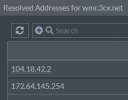
No issues with outgoing traffic to "wmr.3cx.net" but I do note that name resolution seems to fairly rapidly alternate between 172.64.145.254 and 104.18.42.2. As @positron indicated, almost no data is exchanged during the 10-minute delay.

Any ideas?
 
Last edited:
Voicemail is sent out for transcription with a timeout of 10 minutes. If nothing comes back in due time, email is delivered w/o the transcription.
 
  • Like
Reactions: Evolute IT
Voicemail is sent out for transcription with a timeout of 10 minutes. If nothing comes back in due time, email is delivered w/o the transcription.
I think the core question here is what is the expected process time to deliver voicemail transcription using the 3CX service?

I recognize the service is currently available for free and you get what you pay for, but the question would be is the timeout/delay caused by a systemic fault, or is there an issue where the service back-end is overburdened or underprovisioned?

A transcription delay for recordings may be ok, but timely delivery of voicemail notifications (with or without the transcription) is essential. If a 3CX transcription backlog prevents email notifications from being sent, then the 3CX transcription service is not usable in its current state since it is adversely impacting another essential feature.
 
  • Like
Reactions: NZphoneguy
I don't have such information.

But if you want to lower the timeout to 1 minute, you can add VMAIL_TRANSCRIBE_TIMEOUT parameter and set it to 1.
 
  • Like
Reactions: Evolute IT
Thank you @ivank, and I agree with @positron that the root question is whether or not this outcome is expected/tolerated with the 3CX AI transcription service in its current iteration.

Respectfully, if you do not have this information, is there someone else at 3CX who could participate in this discussion? Ultimately, if the 3CX AI transcription service consistently behaves in this manner, we would appreciate feedback on whether or not this is considered abnormal and will be rectified soon, or whether we should opt for transcription via Google/OpenAI in the interim until 3CX AI is in a better state.

From my perspective, this is all framed within the context of the end-user organization, which is simply looking to strike a balance between reliability and cost for this feature. The functionality of 3CX AI has been moved out of beta and into the 'Final' release channel, so there is a reasonable expectation that it will perform consistently.
 
  • Like
Reactions: NZphoneguy
There's a few people in this thread with various issues so i'll go ahead and reply to everyone in this comment starting with OP.

Good morning, everyone!

I'm having some issues getting 3CX transcription to work for one of our clients. They're a unique case among our clients as they're the only ones who are running their PBX on a VM hosted on an on-prem hypervisor. For all of our other clients (including our own phone system), the VMs are hosted on Vultr. For everyone else, I've been able to simply set the transcription engine to 3CX and set the department transcription settings as needed (voicemails only). For this single on-prem instance, doing so does not seem to transcribe anything. We get the voicemail emails, but the transcription section is empty. The client is on an Enterprise Annual subscription, 24 SC. Is there someplace that 3CX transcription reaches out to that might be getting blocked by the firewall?

This sounds like a firewall issue, opening port 443 to wmr.3cx.net should do the trick. Beyond that, for intermittent issues i'd look at Vultr's network routing.


I have noticed a similar or related issue. I have used the Google transcription on v18 in the past and was using OpenAI Whisper prior to v20U5. With the extension voicemail set to send an email with the audio attachment, the total process time from hangup to receiving an email with the transcription was less than 30 seconds.

I have upgraded two customers' systems from v18 to v20U5 and enabled 3CX transcription. After hangup leaving a voicemail. there is a delay of about 10 minutes before an email arrives with the voicemail info but the transcription section is blank. Sometime within the next 15 minutes, the voicemail section in the web portal and windows client will now include the transcription. The voicemail appears immediately in the web and Windows client without the transcription and the transcription is added later.

For testing, I changed my internal system from OpenAI to 3CX and experienced the same issue. Changed it back to OpenAI and the process only takes seconds.

I checked my firewall to monitor outbound connections, and I see a connection to the IP for wmr.3cx.net immediately after hangup but virtually no data is exchanged.

Is there a process delay or is something timing out somewhere?

Using 3CX does not guarantee a 30 second voicemail delivery window. Voicemail has a queue skip priority logic implement when using 3CX. This means that if there's a queue of 100 regular call recordings waiting to be served and 2 voicemails arrive, voicemail 1 is transcribed on the next available transcript slot, then voicemail 2 is served on the same terms.

TLDR: Voicemails are transcribed by skipping any processing queues.

If you're getting a mail after 10 minutes this is in line with a feature on the PBX that waits a while for the recording to be processed before sending the user the mailer. If the mailer is empty at 10 minutes it means your PBX is likely not sending a recording to wmr.3cx.net for processing or some other issue is occuring. TLDR, The 10 minute thing is a PBX feature, not a bug.

For PBXs with closed ports who are generally unreachable, we still transcribe, however reception of said transcript will always be with 1hr delay as the PBX does a poll once an hour to check to retrieve finished transcripts. If you want this to be faster/normal, you must guarantee connectivity between WMR.3cx.net and your PBX on 443. It makes sense in this case that your voicemail mail is always empty as it waits for 10 min, never received anything due to connectivity but does eventually receive the transcript for manual reading in an hour.

Please initially check your connectivity to wmr.3cx.net which is the server that is meant to process your transcripts before moving forwards. If you believe connectivity is fine, then it would help if you could PM me verbose PBX logs after making a call longer than 7 seconds so we can see what's happening. Also please PM me your PBX FQDN so we can take a look on our side.

Hello everyone,

We are in the same boat here. I have tried V20 Update 5 Final (Build 551) and V20 Update 6 Alpha to no avail.

16SC Pro system with 3CX AI voicemail transcription enabled and configured correctly. Voicemail messages are immediately received by the clients (visible in web and desktop softphones, despite being configured to delete and send via email) and are held for ~10 minutes before finally being delivered via email (and deleted from the extensions) but without the transcription.

No issues with outgoing traffic to "wmr.3cx.net" but I do note that name resolution seems to fairly rapidly alternate between 172.64.145.254 and 104.18.42.2. As @positron indicated, almost no data is exchanged during the 10-minute delay.

Any ideas?

Hi, the 10 minute delay for the voicemail mail is a normal PBX feature. The mailer is held back by the PBX for 10 minutes because the PBX is waiting to receive the processed transcript for your voicemail from wmr.3cx.net If it's not received after 10 minutes, the mailer is sent out anyway empty.

So you have an issue where transcription is basically not working in general as it sounds. The alternating IPs for wmr.3cx.net is fine as the service is behind multiple backends for load balancing and is not part of an issue.

Please PM me verbose PBX logs after making a call longer than 7 seconds so we can see what's happening. Also please PM me your PBX FQDN so we can take a look on our side.

I would strongly suggest you verify the connectivity with wmr.3cx.net on 443 as it's usually the first reason for these problems.
 
Last edited:
Thank you @LeonidasG_3CX.

I have just messaged you with the requested information - much appreciated.
 
Hello @NZ_Jayson , just to confirm that your issue was verified and resolved. PBXs behind a NAT can't get direct notifications from WMR when a transcript is completed so they receive pending transcripts about every hour. This usually means that the email contains an empty transcript.

In your specific case, there were pending transcript jobs with an unhandled error which prevented correct notification for your PBX. The error is now handled and you should get all pending transcripts within the next hour.
 
Hello @MarcelloV, thank you for that information and for resolving that unhandled error.

In this case, the PBX is not behind NAT. Its address is Internet-facing, and filter rules restrict inbound traffic to known service ports only. I have not received any pending transcripts for this PBX either, but I suspect this is because my test extension is set to deliver voicemails via email and delete from the extension.

I have just made another two test calls, both of which timed out at 10 minutes and were delivered without transcripts.
 
Hi @NZ_Jayson

It's normal to get a timeout after 10 minutes if your PBX cannot be reached by WMR on port 443. If you transcription features to work, our service has to be reachable both from and to. I see on our side we're processing your transcriptions correctly and are attempting to send you the result however your PBX is not receiving anything which indicates firewall issues.

Please allow communication from and to wmr.3cx.net. Whitelisting the IP will not help as this is a load balanced service with many IP's that change constantly.

With ports closed, your transcript retrieval frequency will be once an hour, far above the 10 minute wait time for voicemail emails. It cannot be shorter.
 
  • Like
Reactions: Evolute IT
@LeonidasG_3CX

Just to confirm, if I have clients with on-prem systems using port 5001 instead of port 443, the 3CX transcription service will not be able to send back the transcription in real time and will be subject to a polling delay of up to one hour for the on-prem system to initiate transcription retrieval?
 
Hi @positron, any port the PBX is configured to use will work, as long as it accepts connections from wmr.3cx.net
 
Ok, I did some additional testing. To limit risk where possible and appropriate, I try to configure geography-based restrictions in firewalls to limit incoming HTTPS connections on client's systems to USA-only sources. I generated a test voicemail message and traced incoming activity on the firewall, and found an incoming connection was being attempted from an IP which has a PTR assigned to "googleusercontent.com" and reportedly originates from Germany. I temporarily added that address to the incoming firewall rule; the transcription was then received and processed, and the user notification email was sent with the transcription. I repeated the process, and the incoming connection was from a different IP, but it also reported as "googleusercontent.com" and classified as Germany.

From my location, wmr.3cx.net currently resolves to two IPv4 and two IPv6 addresses, none of which are the addresses which were used for the incoming connections, so trying to allow wmr.3cx.net does not seem to be a valid option.

If using the 3CX transcription service requires unrestricted worldwide access to inbound HTTPS, I may have to evaluate the risk/benefit tradeoff. If the incoming transcription response could be limited to a specific IP range (or ranges) it would be better from a security perspective.

It may be helpful to update the docs to clarify this requirement to use the feature.
 
I have just completed the same testing as @positron and have arrived at the same result, albeit I needed to allow TCP5001 rather than TCP443 from the observed/global sources. We host our instances behind geographic filters that reject overseas traffic, but we had been sure to include an FQDN object for "wmr.3cx.net" allowing inbound traffic on TCP443 irrespective of geography. This object currently evaluates to 104.18.42.2 and 172.64.145.254 only - we have IPv6 disabled at this time. It is now evident that this should have been TCP5001 rather than TCP443 in our case, but regardless this still would not have worked based on WMR's notification source not aligning with the evaluation addresses of "wmr.3cx.net".

@MarcelloV @LeonidasG_3CX Respectfully, how are we expected to whitelist inbound traffic from "wmr.3cx.net" if the transcription completion notification is being received from an address beyond what "wmr.3cx.net" evaluates to? As per @positron's latest response, is the expectation that we are allowing inbound traffic on TCP443 (or TCP5001) from all sources globally?

I think we have a good understanding of what is causing this behaviour now, and I have a temporary workaround in place. I say temporary because I am not very comfortable having TCP5001 open to global sources. I understand that we can implement console restrictions within the PBX, but without the ability to do this geographically, it adds another layer of administrative overhead, which is unfortunate.

I think it would be very helpful for the entire 3CX community if the firewall configuration documentation (https://www.3cx.com/docs/manual/firewall-router-configuration/) could be updated to reflect our findings on this matter, and it would also be a fantastic addition to the PBX if console restriction could be controlled geographically in addition to the IP-based method available at present.


1744317274857.png
 
Last edited:
We'll look into making this part better. We'll let you know once we have something for you. It won't be immediate and will take a little time.

In the meanwhile if you want to restrict the scope a little bit, you can do the following:
You could whitelist the whole GCP region for Europe West-3 IP ranges which at least limits the scope to something instead of everything. https://www.gstatic.com/ipranges/cloud.json

"ipv4Prefix": "34.0.224.0/24",
"service": "Google Cloud",
"scope": "europe-west3"
}, {
"ipv4Prefix": "34.0.226.0/24",
"service": "Google Cloud",
"scope": "europe-west3"
}, {
"ipv4Prefix": "34.40.0.0/17",
"service": "Google Cloud",
"scope": "europe-west3"
}, {
"ipv4Prefix": "34.89.128.0/17",
"service": "Google Cloud",
"scope": "europe-west3"
}, {
"ipv4Prefix": "34.104.112.0/23",
"service": "Google Cloud",
"scope": "europe-west3"
}, {
"ipv4Prefix": "34.107.0.0/17",
"service": "Google Cloud",
"scope": "europe-west3"
}, {
"ipv4Prefix": "34.118.244.0/22",
"service": "Google Cloud",
"scope": "europe-west3"
}, {
"ipv4Prefix": "34.124.48.0/23",
"service": "Google Cloud",
"scope": "europe-west3"
}, {
"ipv4Prefix": "34.141.0.0/17",
"service": "Google Cloud",
"scope": "europe-west3"
}, {
"ipv4Prefix": "34.157.48.0/20",
"service": "Google Cloud",
"scope": "europe-west3"
}, {
"ipv4Prefix": "34.157.176.0/20",
"service": "Google Cloud",
"scope": "europe-west3"
}, {
"ipv4Prefix": "34.159.0.0/16",
"service": "Google Cloud",
"scope": "europe-west3"
}, {
"ipv4Prefix": "34.179.0.0/16",
"service": "Google Cloud",
"scope": "europe-west3"
}, {
"ipv4Prefix": "34.181.0.0/17",
"service": "Google Cloud",
"scope": "europe-west3"
}, {
"ipv4Prefix": "35.198.64.0/18",
"service": "Google Cloud",
"scope": "europe-west3"
}, {
"ipv4Prefix": "35.198.128.0/18",
"service": "Google Cloud",
"scope": "europe-west3"
}, {
"ipv4Prefix": "35.207.64.0/18",
"service": "Google Cloud",
"scope": "europe-west3"
}, {
"ipv4Prefix": "35.207.128.0/18",
"service": "Google Cloud",
"scope": "europe-west3"
}, {
"ipv4Prefix": "35.220.18.0/23",
"service": "Google Cloud",
"scope": "europe-west3"
}, {
"ipv4Prefix": "35.234.64.0/18",
"service": "Google Cloud",
"scope": "europe-west3"
}, {
"ipv4Prefix": "35.235.32.0/20",
"service": "Google Cloud",
"scope": "europe-west3"
}, {
"ipv4Prefix": "35.242.18.0/23",
"service": "Google Cloud",
"scope": "europe-west3"
}, {
"ipv4Prefix": "35.242.192.0/18",
"service": "Google Cloud",
"scope": "europe-west3"
}, {
"ipv4Prefix": "35.246.128.0/17",
"service": "Google Cloud",
"scope": "europe-west3"
}, {
"ipv6Prefix": "2600:1900:40d0::/44",
"service": "Google Cloud",
"scope": "europe-west3"
 
Last edited:
Thanks for the info. If someone wants to easily extract the IP ranges to script for their firewall, here's a head start I put together in PowerShell:

Code:
$googleService = "Google Cloud"
$googleScope = "europe-west3"
$googleRanges = (Invoke-WebRequest -Uri "https://www.gstatic.com/ipranges/cloud.json" -UseBasicParsing).Content | ConvertFrom-Json

$3CXTranscriptionIPv4 = $googleRanges.prefixes | `
  Where-Object {$_.scope -eq $googleScope -and $_.service -eq $googleService -and $_.ipv4Prefix -ne $Null} | `
  ForEach-Object {"$($_.ipv4Prefix)"}
$3CXTranscriptionIPv6 = $googleRanges.prefixes | `
  Where-Object {$_.scope -eq $googleScope -and $_.service -eq $googleService -and $_.ipv6Prefix -ne $Null} | `
  ForEach-Object {"$($_.ipv6Prefix)"}

# $3CXTranscriptionIPv4 | Out-File -FilePath "_add_path_and_filename_here_"
 
Status
Not open for further replies.

Forum statistics

Threads
111,974
Messages
590,081
Members
164,899
Latest member
mazet