3cx V14 Recording Management access

Status
Not open for further replies.

bbaker73

Platinum Partner
Joined
Nov 27, 2015
Messages
276
Reaction score
93
Trying to figure out how to give a user access to the Recording Management feature. He is not a system admin. He was previously able to access recordings off the online reporting which has changed.

I don't seem to find a way to give him access to the recording management in his console login.
 
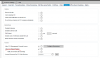
Enable "Allow 3CX Report Feature" in their extension under the Options tab. Have them log in and on the left is an option for Call Reports. Click that and then "New report" on the top.


Attachments

  • Capture.PNG
    Capture.PNG
    34.2 KB · Views: 370
Thank you. I understand now they generate the report, then as long as the report is being displayed on the same computer where they are logged into management console, they can play the recordings from the report.

My reason for this not working is users are using a virtual desktop. They get email in the virtual desktop, but log in to the management console from the local pc browser. So they will either have to be allowed to log in the management console within the vdi where the report is displayed, or copy and paste the report url to the local pc where they are logged into the management console.
 
Status
Not open for further replies.