3cx v16 making a call on sip trunks

Status
Not open for further replies.

Chichi

Bronze Partner
Basic Certified
Joined
Mar 13, 2019
Messages
18
Reaction score
2
Hi all,
Could someone possibly help with an issue I have on a sip trunk?

The setup I have is as follows:
Sip trunk has been setup and I get a green light. Host ip entered, type: Provider sim calls: 10 main number trunk input.
Phone is a yaelink 22t and has been setup and registered.
Outbound rule has been setup with route one set to gamma and the rest set to block calls
I can receive calls in on with no issues however when I try and make an outgoing call I get the word Forbidden across the screen.
Any help would be greatly appreciated.
Thanks,
 
On your outbound rule, what is the setting for 'Apply this rule to these calls' - you need to specify one

Have you also check your 'Allowed Country Codes' - Settings - Security Settings

Are you using the 3CX Gamma sip template ?

What does the activity log show you ?
 
hi,
these are all in default. so nothing has been entered. this has never been set on any other client we have 3CX's at.
i am indeed using the gamma template within the 3cx V16

activity shows the following:

Cause: 403 Forbidden-Source Endpoint Lookup Failed/INVITE from xxx.xxx.xxx.xxx:5060

i have x'd out the ip details but this is showing the same ip as in the sip trunk section.
 
Check the Activity Log for one of these calls. Does it make it to the provider? Are they blocking (forbidding) it? Does it show why 3CX may be blocking it?
 
So, the IP is that of your provider?
 
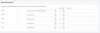
Can you provide us a screen capture from outbound rule?
 
I would contact them. They should be able to tell you what you are sending, that they do not like, and what may need changing in your trunk settings.
 
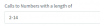
you need to add something in your rule almost number lenght for example for number from 2 digits to 14
11782
 
On your outbound rule, what is the setting for 'Apply this rule to these calls' - you need to specify one

As per my previous post - change the outbound rules. Enter 0 in Calls to numbers starting with prefix

You will also need to add another rule to add your local std code, if the person dials local numbers. - Use Calls to Numbers with a length of x and prepend your std code

Rules are processed from the top down, so make sure there are in the right order
 
i will give this a try however i have 3cx's installed at 4 other sites and havent had to do any of this.

i will let you know the result.

thanks
Scott
 
Outbound rule need always one argument set to apply otherwise no outgoing calls can be done.

Did you compare on your others sites how outbound rule is set?
 
i did indeed, there is an entry however there were no arguments set. it was all as in the previous screenshots.
i will play around with it again and see what i can do. Thanks for all the help in any case and i will be in touch
 
For test , i removed lenght which was the only argument in outbound rule, tried to make a outgoing call, i've got a voice message from 3CX saying " number you've dialed doesn't exist"

Reset the lenght and works again
 
The Activity Log will always show whether or not, a dialled number matches an outbound rule, and if it does, exactly what digits are sent to the provider. It will then show the responce from the provider, good or bad.
 
I can receive calls in on with no issues however when I try and make an outgoing call I get the word Forbidden across the screen.

Is this phone in the DEFAULT extension group? We discovered conference calls out to external numbers were Forbidden because we had not manually added extension 700 to the "calls from extensions" field on the outbound rule.
 
this is normal behavior all the systems extension belongs to any groups so you need to do specific outbound rules for that, this is part of 3cx training perhaps start to learn in intermediate level.
this explain start to see since 7:45
 
As long as the extension you are calling belongs to the Default extension group your outbound rule should work. The error seems to be coming from the provider so i am guessing the call leaves the PBX.
I would recommend contacting Gamma and asking them why they are replying with that error message.
 
Status
Not open for further replies.

Forum statistics

Threads
111,933
Messages
589,809
Members
164,808
Latest member
jsbjsb