3CX V20 - O365 sync: Mobile spaces in number format

Kristoffel_Loos

Customer
Joined
Dec 16, 2024
Messages
17
Reaction score
3
Hi,

Our users on our 3CX V20 are synchronised from our O365, where in our domain controller the mobile numbers of all user were filled in like +32 xxx xx xx xx.

So there where spaces type in the number, because this is also synchronised to a 3rd party tool that creates our signatures for Outlook and is better to read, and we can't change this now!

I've read in an old post that the 3CX system can't handle a number with spaces in it, it will not be routed to the outbound rules or trunk if you want to use this in forwarding.

Now since we have V20, which is a whole new system under the hood, I was wondering this has been changed or there is now some kind of way to make it possible to route these mobile numbers?

Br,
Kristof
 
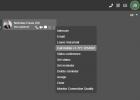
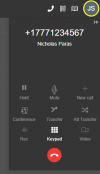
You should be OK

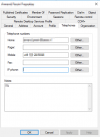
1739457449392.png

1739457480293.png

Have you tested this and is it giving you a problem? Ive tested with dashes and spaces. Same result.
 
You should be OK

View attachment 46458

View attachment 46459

Have you tested this and is it giving you a problem? Ive tested with dashes and spaces. Same result.
@NicholasP_3CX you're using the 3CX dialer here, yes that does work, but that isn't my question!

1739459955648.png

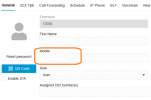
It's the mobile number in the user's settings, and when the user is setting call forwarding in a status to my mobile or ring also my mobile the system itself can't use this I get error in the system because of the spaces!

My question here is there a workaround of a solutioon for this without change the mobile numbers, we are talking here about more then hundreds of users.

Kristof
 
Ultimately the telephone nubers should be in one string, with just the + as a special character.

The PBX can store it, and the dialler of 3CX can parse it. but in forwarding, yes it needs to be in the proper format.
 
Ultimately the telephone nubers should be in one string, with just the + as a special character.

The PBX can store it, and the dialler of 3CX can parse it. but in forwarding, yes it needs to be in the proper format.

Ok, so it's still the case that the 3CX system can't parse it. I was afraid this would be the answer. I'll think of another solution then for our signature and change the numbers to one string like you said ;-)
 
This is a crazy situation - it would be so easy for 3CX to strip the unwanted characters from the numbers before updating the local user record and should be done as part of the integration.

I can't have 3CX dictating the format of the phone numbers in a system that has been around way longer and integrates with so many other systems.

How do we get this in front of the developers for an urgent fix?
 
This is a crazy situation - it would be so easy for 3CX to strip the unwanted characters from the numbers before updating the local user record and should be done as part of the integration.

I can't have 3CX dictating the format of the phone numbers in a system that has been around way longer and integrates with so many other systems.

How do we get this in front of the developers for an urgent fix?
Our 365 feeds into the email signature and I need to have it formated as (xxx) xxx-xxxx for the desired email signature formatting. If 3CX could parse and store it as +1xxxxxxxxxx then caller ID would work when those users called into the 3CX from their mobile number
 
This is a crazy situation - it would be so easy for 3CX to strip the unwanted characters from the numbers before updating the local user record and should be done as part of the integration.

I can't have 3CX dictating the format of the phone numbers in a system that has been around way longer and integrates with so many other systems.

How do we get this in front of the developers for an urgent fix?

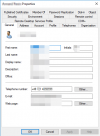
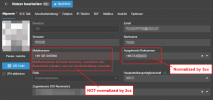
we do also sync with m365 and the outbound caller ID field gets normalized (removes blanks) only the mobile number field does not
so it is an easy fix but they just dont want to it seems to me
It should be a easy fix really
1754995707267.png1754995804865.png1754996067079.png
 
Last edited:
Hey 3cx,
please move and fix it. The whole google and Entra ID integration is trash actually
 
You'll have to populate your mobile numbers in another field in AD and have your 3rd party tool pull this instead.
 

Latest Posts

Forum statistics

Threads
111,953
Messages
589,916
Members
164,851
Latest member
DrunkeMeister