3CX v20 Where to switch phone to use SBC

Status
Not open for further replies.

VUSALDADASHOV

Gold Partner
Basic Certified
Joined
Dec 30, 2021
Messages
68
Reaction score
15
When I had v18 i was able easily select SBC for IP phone....
But in v20 I cannot find such an option

look. At network interface I do not have such an option
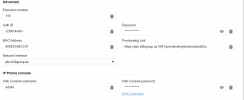

1701873803526.png

But on phones I previosly configured I do not have an option "network Interface". Instead of it I have "Routing device"
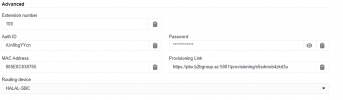
1701873934677.png

The only question: HOW to switch?
 
You could likely delete/readd the device to switch it's provisioning/use type.
 
Previously the phone was provisioned as STUN?
 
I misread your original post. The routing device dropdown is the SBC selection.

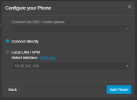
From no phones added, you click add phone and choose local lan, router phone, or SBC:

1702325048787.png
 
Thanks
I have readded it
but on v18 I could easily switch between SBC and Local LAN
So many chnages....
 
Thanks
I have readded it
but on v18 I could easily switch between SBC and Local LAN
So many chnages....
I don't think you can switch the type anymore without a delete/re-add, but I have not tested extensively.
 
  • Like
Reactions: VUSALDADASHOV
Correct, you need to remove the device from the extension, factory reset and provision again.
 
Status
Not open for further replies.

Forum statistics

Threads
111,974
Messages
590,081
Members
164,899
Latest member
mazet