3CX V20

Status
Not open for further replies.

Soli

Platinum Distributor
Joined
Feb 14, 2016
Messages
168
Reaction score
42
Hi

Do you know where is the inbound rules so I can edit them and set the office hours like vr 18?

where is the Vlan on provision phones?

Where is the option to trace with wireshark?
 
Last edited:
Hi @soli

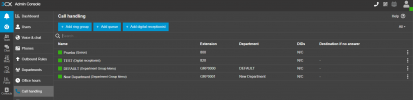
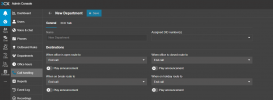
If you have different departments and you have configured them with the office hours, then go to call handling and you will be able to see the groups, edit them and set your routing.

1701006781252.png


1701006797700.png


Regarding the other features, please note that it is still a beta. In the incoming releases there will be more features added, stay tuned in the blogs.
 
thank you

So all the configurations that I had before for OOO hours deleted?

we have a lot of PBX to manage, and this is a huge problem for us
 
thank you

So all the configurations that I had before for OOO hours deleted?

we have a lot of PBX to manage, and this is a huge problem for us
They are not build in yet... why you are using v20 on a productive system? Its still beta.
 
The call will be routed based on where you assign the DID.

The office hours are now configured based on the departments (previously known as Groups). You will need to configure the office hours to the relevant departments. The DIDs that are assigned to these groups, or the Ring Groups, Queues etc which are assigned to these departments will inherit these timings.

The Wireshark feature will be reintroduced in a subsequent release, as well as more phone provisioning options.

Version 20 is still in BETA and should not be rolled out to production systems just yet.
 
Will the system-level office hours and holidays be copied to the DEFAULT group when upgrading?
 
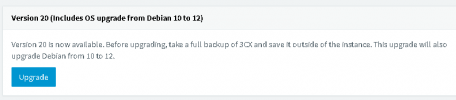
I'm a bit confused and annoyed about the status of the V20 release. 3CX seem to be pushing the v.20 upgrade as "complete" in the Upgrades page of the Admin console, with nothing indicating it is Beta in that notification.

1701099450453.png

I think it is rather poor notice phrasing by 3CX in that message. We could so easily have ended up on a Beta system (in Production environment) if we had not also spotted the forum posts indicating it is still only in Beta status.

In order to see that message, we had to apply the v18 update 9 patch first - which *did* indicate Beta, but I felt we were really being pushed to install it anyway. We would certainly like to get the Debian update, and having to wait for the 3CX upgrade to achieve this is a bit frustrating.
 
@AlecM Consider (temporarily) enabling automatic updates when you want to install an update. This will 1) not install beta software, and 2) will install OS/package security updates, which are not installed when manually updating 3CX.

But yes I agree it should be labeled as an alpha or beta there, normally those are.
 
But yes I agree it should be labeled as an alpha or beta there, normally those are.
You need to install a v18 beta to get there, so you are allready on a beta version... Why should it mentioned again?
 
You need to install a v18 beta to get there, so you are allready on a beta version... Why should it mentioned again?

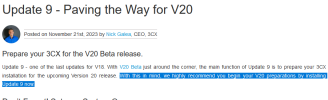
Because 3CX are clearly pushing users to upgrade to 20, regardless of the Beta status of the v.18 Update 9:-

1701165718932.png

All I'm saying is that there is (in my view) a very mixed message about installations being portrayed between the various Blog posts and Upgrade statuses.

It feels like the general community is being used for a test bed on the main production channel, instead of just "Beta opt-in" users.

3CX do seem to have a Beta testing program you can join (at least for the Android app) - begs the question of why not keep all the Beta updates hidden unless your customer account is a member of/opted-in to this program?

1701166082174.png
 

Attachments

  • 1701165683301.png
    1701165683301.png
    9.2 KB · Views: 4
  • 1701165701563.png
    1701165701563.png
    36.4 KB · Views: 5
Why should it mentioned again?
Why should it be obfuscated?

I'm just a fan of making things as obvious as possible so no one misunderstands.
 
  • Like
Reactions: AlecM
Why should it be obfuscated?

I'm just a fan of making things as obvious as possible so no one misunderstands.
It would be nice to mark it as Beta, thats right. But if you are allready on beta software, you should know what you are doing.
 
  • Like
Reactions: campos17
3CX do seem to have a Beta testing program you can join (at least for the Android app) - begs the question of why not keep all the Beta updates hidden unless your customer account is a member of/opted-in to this program?
That's an android specific thing that Google offers/manages. iOS has a similar one (test flight). But for the PBX itself they would have to build their own system.
 
  • Like
Reactions: AlecM and bitn2
But if you are allready on beta software, you should know what you are doing
Not that we need to drag this out, but for sake of open discussion, were 3CX hosted instances updated to 18u9 beta automatically or is that optional? In the past 3CX has tended to upgrade those to beta versions. I was just reading a similar comment in that forum section...
 
Not that we need to drag this out, but for sake of open discussion, were 3CX hosted instances updated to 18u9 beta automatically or is that optional? In the past 3CX has tended to upgrade those to beta versions. I was just reading a similar comment in that forum section...
To answer your question, the 3cx hosted instances have not automatically updated to update 9 beta.

If updates are applied automatically, they will only be done for NFR and trial keys, and a mailer will inform the subscription owners before this is done.
 
Status
Not open for further replies.

Forum statistics

Threads
111,974
Messages
590,081
Members
164,899
Latest member
mazet