3CX version 16 AWS windows server Firewall check

Status
Not open for further replies.

iversion-Support

Customer
Advanced Certified
Joined
Apr 24, 2019
Messages
51
Reaction score
6
Has anyone face the same issue, after upgrading to version 16 and deploying new server using v16 on windows server 2019 3CX firewall check keep trying for Media server ports. I have disabled windows firewall and also open all inbound and outbound ports on security group for troubleshooting still same result. The system work fine without completing the firewall check.

This does not happen on deployment implemented on Vmware esxi in private network. Firewall check complete in less than one minute.
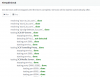
 
The same issue surface with instance running Windows server 2016. The only update that pass the firewall test is running in vmware environment on server 2012 R2. So not sure if this server 2016 & 2019 compatibility issue or AWS.
 
Ok 3CX team, I have backed up one of my deployment, deployed a server 2012R2 in AWS. Use the same security group left the windows firewall enabled and restore the config on 2012R2.

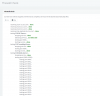
Run a firewall test took one minute and completed same as running on server 2012 R2 in Vmware environment.

Conclusion

Nothing to do with AWS there is a bug in 3CX version 16 update 2 when running on Windows server 2016 or Server 2019. The firewall check never finish for media ports and 5090 port.

I have also ran a test on one of the deployment running Server 2016 with Version 16 update 1 no problem with firewall check. Please check and let us know the issue is resolved with firewall check.

See attached successful firewall test ran on server 2012R2 in AWS
 

Attachments

  • firewall check.PNG
    firewall check.PNG
    24.5 KB · Views: 9
Hi @iversion-Support

Can you please clarify a bit more? What happens exactly? A screenshot would be very useful
 
It just keep trying when you run a firewall check. I am happy to share login info for one of the deployment for you to run a test.

Send me a message in a private chat I will create an extension with admin privilege for you to run firewall check.
 
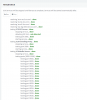
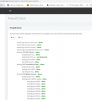
Ran firewall check on both 2019 and 2012 R2 server, this time interestingly 2019 server complete its test in one minute. on 2012 server its still running. The behavior swapped, may its just random. See screen shot of both servers.

Both test launched at the same time.
 

Attachments

  • 2012 r2.PNG
    2012 r2.PNG
    36.9 KB · Views: 8
  • 2019.PNG
    2019.PNG
    36.5 KB · Views: 7
I ran firewall check again on server 2019 instance after it completed successfully it is running from last 9 minutes and on the server 2012 R2 which it is still running for more than 13 minutes and stuck at the same stage as in the screen shot I gave you. Both server have the exact same behavior stuck.

Once its stuck it stays like that I even waited for more than 25 minutes before I cancelled it initially.

It has no bearing on the functionality just annoying firewall failure message if its new deployment and you don't get lucky get it passed.

Once the firewall check is passed like in my case if I cancel the firewall check it does not change the firewall status I still get green tick no errors. Its only an issue if its brand new deployment then you have the annoying red firewall failure thing on the dashboard.
 
We cannot reproduce the problem the way you described it. I think you will need to run some captures on your end while running the firewall checker and analyze to see why you are getting this issue
 
I am just going to leave it there, I got green lights. It's so random, it can no be my network or server because my test group contain:

server 2012 R2
Server 2016
Server 2019

Three server in AWS in two different VPC with two separate security groups
One server running in private VMware network behind checkpoint firewall

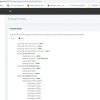
All of them giving same random behavior with firewall test. See attached images this time I included a partial domain name for you. and the failed server is server 2012 R2 running in vmaware environment. This server is in production for 2 years using custom domain. Same server passed the test in less than a minute couple of hours before no change made.

Have a good night time to hit the bed.
 

Attachments

  • aws.PNG
    aws.PNG
    39.9 KB · Views: 2
  • vmware server.PNG
    vmware server.PNG
    37.6 KB · Views: 2
No problem, if you still want to analyze further the captures should reveal whether the traffic leaves or reaches the NIC at least
 
Status
Not open for further replies.

Forum statistics

Threads
111,933
Messages
589,812
Members
164,808
Latest member
jsbjsb