3CX Web Client, SSO and MFA

Status
Not open for further replies.

kelsallp

Basic Certified
Joined
Sep 8, 2020
Messages
6
Reaction score
0
Is it possible to turn off password logins for the web client?

I have turned on SSO (and with it MFA), Google in this case, and it works just fine. The problem is that the password still works as a way to gain access. So, if the password becomes compromised, the MFA does not help.
 
No.

I would recommend you ensure users are using generated passwords from 3CX.
 
We are doing, but it did not stop the password being compromised. That's the point of MFA.
 
I know it's not ideal, but there you could configure the WebClients for the users, then once you send them the Welcome Email, you can randomize the WebClient password from the Management Console and not send it to them.

Yes, there is a password, but you can make it a 16 digit password and the user won't know it.
They also won't be able to change it from the WebClient as it requires them to know the old password.
 
I know it's not ideal, but there you could configure the WebClients for the users, then once you send them the Welcome Email, you can randomize the WebClient password from the Management Console and not send it to them.

Yes, there is a password, but you can make it a 16 digit password and the user won't know it.
They also won't be able to change it from the WebClient as it requires them to know the old password.
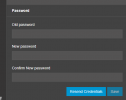
Yes, but they can re-trigger a welcome email if they are signed in, no?
1646755876819.png
 
  • Like
Reactions: Evolute IT
Yes, but they can re-trigger a welcome email if they are signed in, no?
View attachment 28502
You have a point, but the Welcome Email can be edited to remove the username and password I believe.
This part of the Welcome Email would actually be good to be replaced anyway so as to instruct Users to log in using SSO.
 
  • Like
Reactions: SweetAction
Status
Not open for further replies.

Forum statistics

Threads
112,349
Messages
592,027
Members
165,514
Latest member
megalmazan