403 Forbidden Error

aungmin

Joined
Sep 5, 2024
Messages
15
Reaction score
2
Our 3CX version 20.0.5.551 can't access the login to the management console after a reboot and shows as " 403 Forbidden : nginx " error as attached.
We restarted all services and still get these issues, but all inbound and outbound calls can be used.
How can we solve these issues?

 

Attachments

  • 403 Forbidden.jpg
    403 Forbidden.jpg
    16 KB · Views: 8
Hello,

What URL are you trying to access? V20 do not have a separate management console, rather you login on the normal user portal and have the Admin link visible if the user has the relevant rights.

Were any changes done to the system, is the server running any other software?

Best,
KS.
 
No infos at all......

Where is your pbx installed?
Did you restarted the pbx?
What URL are you using?
 
We are using on-premises in our internal server.
The URL is https://xxxxxxx.3cx.asia and only 3CX is being used on the server, no other software is being used.
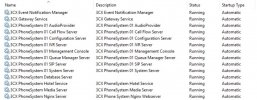
All services was still OK yesterday, and these issues happened this afternoon.
 

Attachments

  • services .jpg
    services .jpg
    109.5 KB · Views: 6
Do you have any antivirus software? Can you check if they quarantined anything?
 
There is no antivirus software being used.
All services are running properly, and still can't login with Local IP or FQDN.
 
May I ask, Win OS version, and what was the reason of the reboot? And if you have tried restarting the machine again, to see if it clears.
 
Windows Server 2016 Standard
Version 1607 (OS Build 14393.1884)
A reboot occurs when the power goes out.
 
Hmm.. So there is a chance of something having gotten corrupted if it was not a clean shutdown. Clean shutdown via UPS, or hard shut?

For any further investigation you will need to open a ticket, so the team can follow up on that.
 
Thank you for your suggestion.
 

Latest Posts

Forum statistics

Threads
111,961
Messages
589,953
Members
164,862
Latest member
ARTipsadmin