911 What’s Your Emergency? V16 Update 5 Alpha Responds with Emergency Number Options

  • Thread starter Thread starter KyriakosP
  • Start date Start date
Status
Not open for further replies.
Got alpha 2, and I like what I see for the DID re-writing! Great work! Just need to put it through some testing.

None of my clients currently use hot desk phones, but I'd be curious to know how that will be handled. As you need to be able dial 911, even if the phone is not logged in.
 
  • Like
Reactions: accentlogic
Got alpha 2, and I like what I see for the DID re-writing! Great work! Just need to put it through some testing.

None of my clients currently use hot desk phones, but I'd be curious to know how that will be handled. As you need to be able dial 911, even if the phone is not logged in.
Hot desking phones that are logged out can still dial emergency numbers. As the phone in this state does not have an Extension Number (it is HDxxxxx) or Extension Group, it will not be able to use an Emergency Rule that includes a range of extension of an extension group.
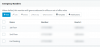
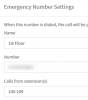
This means though that could add multiple Emergency Rules for the same number, all with Extension/Extension Groups configured, so this would cover the cases where users are logged in.
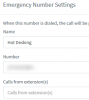
Then at the end, you could create a new Emergency Rule without Extension/Extension Groups that would 'catch' the calls from Hot Desking Extensions.

Something like this:
1582788162592.png
1582788168549.png
1582788172272.png

Hot Desking Extensions would not be able to use Rules "1st Floor" and "2nd Floor", but would fall under "Hot Desking".
 
@NickD_3CX would that still satisfy the "dispatchable" location requirement? Clearly you would pass along the DID, but it would be for an entire building, no? I'm just trying to be helpful with suggestions - I would work on having hot desk extensions be able to have a location attached to them directly based on their MAC, but I can see how that would be difficult if a certain user logs into various phones in various areas. If I had my way, a user should be able to select their location from a drop down in the webclient perhaps (would be really cool if done on the phone via a web browser there).
 
@NickD_3CX would that still satisfy the "dispatchable" location requirement? Clearly you would pass along the DID, but it would be for an entire building, no? I'm just trying to be helpful with suggestions - I would work on having hot desk extensions be able to have a location attached to them directly based on their MAC, but I can see how that would be difficult if a certain user logs into various phones in various areas. If I had my way, a user should be able to select their location from a drop down in the webclient perhaps (would be really cool if done on the phone via a web browser there).
You are right on this one, effectively all HD extensions would send the same ELIN, so as far as the Emergency Services operator would be concerned, they would see a single dispatchable location.
Although as you said there could be ways to make this work, HD extensions sort of fall under the same "problematic" category of DECT/Mobile/Remote devices, where the caller could be anywhere, even outside the set location.
The caller in these cases would have to specifically tell the 9-1-1 Operator where exactly they are.
 
@NickD_3CX thanks for acknowledging that edge case. I would hate for anyone's clients to get hit with a non-compliance fine due to the tricky nature of this. My suggestion of the web interface changing their location (or even selectable from the phone itself) comes from a competing vendor's demo I saw online. Again, just trying to provide ideas and make 3CX even better.
 
  • Like
Reactions: NickD_3CX
For hotdesking, would it be possible to set up routes based on phones rather than extensions? This way the phone with MAC XX:XX:XX:XX:XX:XX is routed to this emergency number/route. (Really, most all phones could be done this way if tied to a MAC since they won't typically move often) Mobile and softphones would be a different story and there's probably no easy way to handle them since they could be anywhere.
 
  • Like
Reactions: accentlogic
how do we provision USER EXT 231 who is at
physical address1 MWF
and
physical address2 TTH

or random days?
 
@NickD_3CX thanks for acknowledging that edge case. I would hate for anyone's clients to get hit with a non-compliance fine due to the tricky nature of this. My suggestion of the web interface changing their location (or even selectable from the phone itself) comes from a competing vendor's demo I saw online. Again, just trying to provide ideas and make 3CX even better.

I can confirm this is what we did when I worked at a major bank. There was a drop down menu and employees were required to set to their location for emergency calls.

Definitely a tricky thing to implement but this is likely the best method for a mobile workforce.
 
I have put some thought to this question...

We recently added to our 3CX Emergency Notifier tool the ability to automatically change an extension's location (emergency group) based on the phone's IP address We monitor phone registration events and based on the IP address in the event, we update the extension's location. This process is straightforward for staff working at one of several known offices, but gets a little more complex when staff occasionally work from home.

There are 3 ways we can control the caller ID: (1) assign a DID to a trunk, (2) assign a DID to an extension, or (3) add a rule in the emergency numbers screen.

3CX evaluates what DID to present as follows:

1. Emergency numbers (groups or extensions)
2. Extension DID
3. Trunk DID

To handle employees working from home, they need their own unique DID, and have E911 configured with their home address. When working out of the office, we need to automatically remove them from their emergency group (location). When working at the office, we need to add them back to the appropriate emergency group (location). By adding and removing extensions from emergency groups we can ensure the correct DID is presented.

All this complexity could easily be hidden from the user by allowing them to choose their location (a web page or perhaps in the future by a new field in the web client). We could look at the IP address of their phone and if it is not a known subnet, we could pop up a message saying "You appear to be working out of the office. Please update your emergency address" and pop a screen similar to the following:.

Extension: 101 Matthew Orr
IP Address: 192.168.1.23

Locations:

_X_ Out of Office
___ Central Office
___ North Branch
___ West Branch

Current home address: [Update]

DID: 8016424655

1234 Elm Street
Cedar City, Utah 80462

Maybe a simple interface like the above, where the "Update" button allows them to enter their current address and have it automatically update their personal DID at the carrier

We could also mandate, as part of the trunk certification process, the carrier provide an API for changing a DID's address.
 
  • Like
Reactions: FridayIT
Status
Not open for further replies.

Latest Posts

Forum statistics

Threads
111,991
Messages
590,167
Members
164,929
Latest member
Cloudstar