Solved Aastra phone disappeared after disconnected

Status
Not open for further replies.

Fred2k

Free User
Joined
Oct 30, 2018
Messages
39
Reaction score
4
I am running version 15.5.15502

I had an Aastra 51i phone setup, but after I disconnected it, it disappeared from the Phones menu. Is this the expected behaviour for a disconnected phone? I would have though it just shows as offline or something.

It's making my life difficult because I had to reset it to factory defaults, and now I want to provision it back on 3CX I can't find the User ID and Password which it had setup. Is there some hidden view to see all phones including disconnected ones?

 
This is the behaviour under 'Phones', this will only show connected devices.

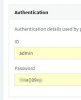
If you goto 'Extensions' - you can get the info. Select the extension - General - Authentication will show you the ID and password (click on the eye icon to see the password)

Under extensions, you can see if the device is connected - the circle icon will be green
 
Thanks for the reply - yeah that's what I thought too, but when I click on the extension and scroll down to Authentication, I know for a fact the ID and password it's showing there are different to what I had setup, and what is shown from the main phones screen.

Also, if I compare another working phone (a Snom 300) the User ID and password are completely different in the Extension Authentication and what's shown on the Phone screen, please see attached images - (this is the same extension/phone)

11720
11719

I am completely misunderstanding things?!
 

Attachments

  • phones.jpg
    phones.jpg
    29.5 KB · Views: 2
Ok - well I just manually setup the phone again, using the User ID and Password listed in the Extensions and it's registered.

No idea why the behaviour is different from before, and no idea why the Snom 300s are showing different things still... I guess because I'm using legacy phones.

Anyway, problem solved.
 
Status
Not open for further replies.

Forum statistics

Threads
111,933
Messages
589,809
Members
164,807
Latest member
Smax