- Joined
- Jun 6, 2006
- Messages
- 4,869
- Reaction score
- 9,372
This thread is to clarify how meeting invites work and what changes we will make going forward.
First off - meeting invites must be sent by the organizer. This is the correct way to do it. here are the scenarios:
a. Google Mail, Microsoft 365 online, Outlook online - works perfect. The invite will be added to the calendar and you can add participants and everything will work perfect.
b. Microsoft 365 online & Outlook locally installed - works perfect - select Microsoft 365 and it will ask you to login in to your Microsoft 365 account and the meeting will be created there. Information will be synced with the locally installed Outlook.
c. Microsoft Outlook locally installed WITHOUT Microsoft 365 (i.e. onsite exchange server) - you will need to download the iCal/ics and open it up on the desktop. The default mail client (outlook if so configured) will be opened and the invite created. Its an extra step and a little clunky (just like full fat outlook), but there is little we can do about this.
The above are the recommended options. Now if you want to have 3CX mail out the invites, this is possible but there will be big limitations. The mail will be sent out from your mail server or the 3CX smtp service. The RSVP will not work and the email looks terrible. It will possibly end up in spam folders at your invitees.
Now the good news for the users that insist on having 3CX send out the invites that we are going to revert the ics invite back to the way it was. Furthermore we are going to update the schedule meeting interface and document the options better. This change should be available as update 7a in the coming week.
V18
For V18 we are studying the Microsoft 365 and Google Calendar API to be able to create the meeting directly in Microsoft 365 or Google. The nice thing about this is that if the meeting time changes, then we can update the meeting on 3CX automatically. This is something we are researching and is likely to be part of the new version unless we hit some road block.
Furthermore we will include the ability for admins to set a default behaviour for scheduled meetings.
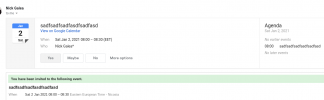
The screenshot shows how it looks if you use Gsuite and you select it from the drop down for the meeting
I am closing the other threads. If you comment please include what exactly mail and server you are using.
First off - meeting invites must be sent by the organizer. This is the correct way to do it. here are the scenarios:
a. Google Mail, Microsoft 365 online, Outlook online - works perfect. The invite will be added to the calendar and you can add participants and everything will work perfect.
b. Microsoft 365 online & Outlook locally installed - works perfect - select Microsoft 365 and it will ask you to login in to your Microsoft 365 account and the meeting will be created there. Information will be synced with the locally installed Outlook.
c. Microsoft Outlook locally installed WITHOUT Microsoft 365 (i.e. onsite exchange server) - you will need to download the iCal/ics and open it up on the desktop. The default mail client (outlook if so configured) will be opened and the invite created. Its an extra step and a little clunky (just like full fat outlook), but there is little we can do about this.
The above are the recommended options. Now if you want to have 3CX mail out the invites, this is possible but there will be big limitations. The mail will be sent out from your mail server or the 3CX smtp service. The RSVP will not work and the email looks terrible. It will possibly end up in spam folders at your invitees.
Now the good news for the users that insist on having 3CX send out the invites that we are going to revert the ics invite back to the way it was. Furthermore we are going to update the schedule meeting interface and document the options better. This change should be available as update 7a in the coming week.
V18
For V18 we are studying the Microsoft 365 and Google Calendar API to be able to create the meeting directly in Microsoft 365 or Google. The nice thing about this is that if the meeting time changes, then we can update the meeting on 3CX automatically. This is something we are researching and is likely to be part of the new version unless we hit some road block.
Furthermore we will include the ability for admins to set a default behaviour for scheduled meetings.
The screenshot shows how it looks if you use Gsuite and you select it from the drop down for the meeting
I am closing the other threads. If you comment please include what exactly mail and server you are using.
Last edited: