Acumatica Integration Losses Authentication

LeifZ

Customer
Joined
Feb 14, 2025
Messages
17
Reaction score
2
I have tried and tried to get reauthentication to work but I have stuck.
I can authenticate, and if I only run the "Test" function once things work well for several days. but If i hit the "Test" button twice I get the following error.

Server returned a non successful status code - HTTPStatusCode=BadRequest - Reason=Bad Request - Content={"error":"invalid_grant"}

Additionally after several days (not sure how many) the CRM function stops working until I click "Authorize" again.

Version 20.0 Update 8 (Build 1089 Beta) ( same error prior to moving to the Beta build)

See log file @ 2026/01/24 16:09:59.446|
 

Attachments

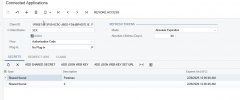
The refresh token should renew the least often as possible, or even never if possible. What other options are there in your "Absolute Expiration" dropdown?
 
max 60 days.

Why does the first "Test" work, while the second does not. My assumption is that 3CX expects the refresh to function, so they request a new token every "Test".
 
I remember a similar issue with the Microsoft Dynamics 365 template. In that case, the problem was that every time the CRM returned an access token, it also provided a new refresh token, and the old refresh token was revoked a couple weeks later. When this happens, 3CX can't get another access token, because the refresh token is invalid.

The solution was to update the stored refresh token every time you get an access token. I can see that you're doing this in your template, so it should work as it is.

Are you restoring an old 3CX backup by any chance? If that's the case, you could be overriding the refresh token with an old value, causing the issue.
 
I remember a similar issue with the Microsoft Dynamics 365 template. In that case, the problem was that every time the CRM returned an access token, it also provided a new refresh token, and the old refresh token was revoked a couple weeks later. When this happens, 3CX can't get another access token, because the refresh token is invalid.

The solution was to update the stored refresh token every time you get an access token. I can see that you're doing this in your template, so it should work as it is.

Are you restoring an old 3CX backup by any chance? If that's the case, you could be overriding the refresh token with an old value, causing the issue.
Yeah, this still doesn't work well in some CRMs. We had to built a proxy for our Bullhorn integration because 3CX couldn't update the refresh token properly. Seems to be limited to the Test feature since it uses a different optionsstorahe than the regular CRM service.
 
If this is still the case, maybe this should be reported for internal review by 3CX. There is a global parameter named CRMINT_DEFAULT, which stores the CRM configuration, including the refresh token. Something you can do to check this is:
1) Configure the CRM integration, and run the Authorization flow.
2) Check the global parameter and see the value set for the refresh token.
3) Run a test call, so a new access token is obtained, and the refresh token is updated.
4) Check the global parameter again, and check if the refresh token was updated accordingly.

If it's not updated, then it seems to be a bug....
 
  • Like
Reactions: Evolute IT
I remember a similar issue with the Microsoft Dynamics 365 template. In that case, the problem was that every time the CRM returned an access token, it also provided a new refresh token, and the old refresh token was revoked a couple weeks later. When this happens, 3CX can't get another access token, because the refresh token is invalid.

The solution was to update the stored refresh token every time you get an access token. I can see that you're doing this in your template, so it should work as it is.

Are you restoring an old 3CX backup by any chance? If that's the case, you could be overriding the refresh token with an old value, causing the issue.
No Backups being restored.
 
No Backups being restored.
Can you run the test I suggested above? That would confirm if there is something that needs to be fixed on the 3CX side.
 
Yes the steps adviced to reproduce as per @edossantos_sipcaller will show if this does change the refresh token and can track this issue.
 
I'm having the same issue, just checked global parameter and the refresh token isn't getting updated after a test.
 
@TheodorosG_3CX, this could be a hint of a bug in this logic. Can you report this internally? I think you will be able to reproduce the same with the standard Dynamics template, which also updates the refresh token with every access token.
 
Hello All,

Let me briefly explain how the logic works in this area:

During CRM authorization, both a Refresh Token and an Access Token are created successfully.

The system then uses the Access Token for subsequent CRM actions (Incoming/Outgoing Calls, Chats, Contact Search) without requesting a new one for each action.

The Access Token is valid for a specific duration, as defined by the CRM provider.

When the Access Token expires, it is automatically renewed upon the next CRM action.

As long as the Refresh Token remains valid, it is not renewed during any CRM action.

The renewed Access Token, along with its expiration date and time, is stored in the CRMINT_DEFAULT parameter and used by the system.

In the case of Microsoft Dynamics 365 CRM, the same logic applies with the only difference being that the Refresh Token is renewed after CRM authorization.

Each time an Access Token is requested (for example, when it expires), the Refresh Token is updated as well.

Behavior of the "TEST" button:
When pressing the "TEST" button, the Access Token is not saved in the CRMINT_DEFAULT parameter.

For example, if the Access Token is expired or does not exist and you perform a "TEST", a new Access Token is created. This happens each time you perform a "TEST".

However it is not stored in the CRMINT_DEFAULT parameter.

The Access Token is saved to and read from the CRMINT_DEFAULT parameter during any other CRM action (Incoming/Outgoing Calls, Chats, Contact Search)
 
Last edited:
Hello All,

Let me briefly explain how the logic works in this area:

During CRM authorization, both a Refresh Token and an Access Token are created successfully.

The system then uses the Access Token for subsequent CRM actions (Incoming/Outgoing Calls, Chats, Contact Search) without requesting a new one for each action.

The Access Token is valid for a specific duration, as defined by the CRM provider.

When the Access Token expires, it is automatically renewed upon the next CRM action.

As long as the Refresh Token remains valid, it is not renewed during any CRM action.

The renewed Access Token, along with its expiration date and time, is stored in the CRMINT_DEFAULT parameter and used by the system.

In the case of Microsoft Dynamics 365 CRM, the same logic applies with the only difference being that the Refresh Token is renewed after CRM authorization.

Each time an Access Token is requested (for example, when it expires), the Refresh Token is updated as well.

Behavior of the "Test" button:
When pressing the "TEST" button, the Access Token is not saved in the CRMINT_DEFAULT parameter.

For example, if the Access Token is expired or does not exist and you perform a "TEST", a new Access Token is created. This happens each time you perform a "TEST".

However it is not stored in the CRMINT_DEFAULT parameter.

The Access Token is saved to and read from the CRMINT_DEFAULT parameter during any other CRM action (Incoming/Outgoing Calls, Chats, Contact Search)
The TEST should honestly use the same option storage as the real-life functions. Otherwise it causes problems like this.

We had a ticket about this about a year ago. It was never fixed. Even during real-life tests, the auth would break because of the refresh token needing to be updated.
 
  • Like
Reactions: Niels-ITP
Hello All,

Let me briefly explain how the logic works in this area:

During CRM authorization, both a Refresh Token and an Access Token are created successfully.

The system then uses the Access Token for subsequent CRM actions (Incoming/Outgoing Calls, Chats, Contact Search) without requesting a new one for each action.

The Access Token is valid for a specific duration, as defined by the CRM provider.

When the Access Token expires, it is automatically renewed upon the next CRM action.

As long as the Refresh Token remains valid, it is not renewed during any CRM action.

The renewed Access Token, along with its expiration date and time, is stored in the CRMINT_DEFAULT parameter and used by the system.

In the case of Microsoft Dynamics 365 CRM, the same logic applies with the only difference being that the Refresh Token is renewed after CRM authorization.

Each time an Access Token is requested (for example, when it expires), the Refresh Token is updated as well.

Behavior of the "TEST" button:
When pressing the "TEST" button, the Access Token is not saved in the CRMINT_DEFAULT parameter.

For example, if the Access Token is expired or does not exist and you perform a "TEST", a new Access Token is created. This happens each time you perform a "TEST".

However it is not stored in the CRMINT_DEFAULT parameter.

The Access Token is saved to and read from the CRMINT_DEFAULT parameter during any other CRM action (Incoming/Outgoing Calls, Chats, Contact Search)
Hi @SoterisH_3CX,

Thanks for your detailed explanation!

In the past, when you did a test from the console, the updated refresh token was also saved into the CRMINT_DEFAULT parameter. This causes that the new refresh token is updated. Some CRMs revoke old refresh tokens immediately as they issue a new one, so running a test from the console breaks the integration, and you need to run the authorization flow again.

I think this is not the case for Dynamics, as they keep the previous refresh token as valid for some time when they issue a new refresh token, so the integration continues working. But some CRMs are more aggressive with this, and revoke it immediately, so not updating the refresh token causes that it can't be used anymore once the access token expires.