Android 3CX App not able to receive or make calls anymore

Status
Not open for further replies.

am12

Customer
Joined
Mar 12, 2020
Messages
17
Reaction score
2
I have a smartphone here running 3cx version 16.7.6.105 on Android 9 (Ulefone Armor 7E, just another mediatek powered device if you're wondering)
I am not sure if there was an update or something, but the app is completely broken and unable to receive or make external calls.
It worked perfectly till yesterday.

Behavior:
a) When I dial the Android stock Dialer App comes up with no number on screen and i hear four beeps.
b) When I receive a call i get the notification but if I answer nothing happens (except that the app says that I am in a call when I am not).
c) If I wait without answering the notification just disappears after two or three seconds.

I already tried reprovision, reinstall, rescan code, update permission, reboot and all sort of things.
I also rebooted the 3cx server just to be sure.
Extension is also configured correctly (nothing changed there actually).

There seems to be some major flaw here.
 
Do you know what version of the 3CX App you had up until yesterday? v16.7.6.105 was released about a week ago, so it would be useful to know if that was working until yesterday.

Also, could you please go to Settings --> Advanced and try switching off the "Telecom API" checkbox? It should be the first option in the list.
 
I reinstalled the app so I no longer can see it in the recent updates but I am assuming it was auto updated the first time I plugged the charger when connected to Wifi.
This must have been just before the issue started.

I have the Italian version of the app so there is no "telecom API" under advanced settings but I unchecked everything in there and I was able to receive a call.
Receiving works and now when I make a call it no longer opens the Android Stock Dialer but I still hear the 4 beeps.
Outgoing seems to be broken.
 
Ok, so incoming calls work now.

For outgoing calls, could you try configuring another Android device to the same extension (maybe a more 'mainstream' one if you have) and check if that works or not?
This way we should at least be able to understand if it is something with the specific Mobile Device or something on the PBX.
 
I think neither of the two since it was working till you released this new version.

These chinese devices are vanilla Android for the most part and hardly get updates outside Google services app in the playstore so it is very unlikely that something changed on the device.
No app was installed on the device to the user knowledge and I verified it.

We have other devices that work with other extensions with the very same config but they are currently in use.

Anyway if I get the chance to get another phone to test with, I'll try.

Can I ask you to point me to a download of the older apk for the 3CX app so that I can check and reinstate normal operation on this phone?
I am pretty confident that this will work since all the evidence points to this.
 
These chinese devices are vanilla Android for the most part and hardly get updates outside Google services app in the playstore so it is very unlikely that something changed on the device.
If the option for "Telecom API" does not exist as you said, it is actually quite the exact opposite, meaning that this variation of Android is further from the default than you think, because "Telecom API" was an integral part of the Android OS for many versions now.
If the option isn't there, it means that they have ripped it out and seeing that this is a core part of the default Android calling functions, it means that they have done customization to make the default dialer work.

Unfortunately there is no APK for the older version, only what is available on Play Store.
 
So you are suggesting that your app update is perfectly fine and that it's the phone maker that broke your app without doing any update to the phone (if it worked previously, it was by accident).
Also you say that you will not provide any previous version of your application. Maybe we should get a new phone to get it working?

It's unfortunate but I see that this thread is going exactly where all my other support requests on this forum went (e.g. "Your fault. Fix it yourself. Call your partner.").
You can close this, I'll try to find an older version myself (just like I did with Windows 3CX on the laptops) but at this point I am starting to doubt the choice of this PBX since on every platform it seems to have bugs that you're not willing to fix.
 
@am12
On the desk next to me there are two iPhones and about 40 Androids - and no Ulefone among them - ranging from Android 7 to Android 12 Beta. Why Android 9 on your Ulefone model is different than Android 9 on another Ulefone model and different than the one on Samsung A20e which is different than the one on a Samsung A20y, I don'y know.

Send me or NickD the client logs by PM and we'll check.
 
These phone makers are a mess sometimes and I don't understand much why they change on the stock Android to add pointless things that most of the time break everything and make their phones hard to update.
Kinda reminds me of laptop makers that tend to stuff all sort of garbageware in their products but at least Windows can always receive the latest patches (including security ecc.).

Thanks for your helping hand.
I'll make new tests and send you the files next week when I'll be again in the same situation.

Btw I found one additional thing. The stock Android Dialer on outgoing calls appears if the "Supporto per Auto/Bluetooth" is checked in the Advanced Settings. Maybe that helps.
 
Btw I found one additional thing. The stock Android Dialer on outgoing calls appears if the "Supporto per Auto/Bluetooth" is checked in the Advanced Settings. Maybe that helps.
This is the "Telecom API" option I was referring to, so yes please, keep this option disabled.
In English it actually says "Telecom API", in Italian translation I just checked and it doesn't, so maybe that caused a bit of confusion.

Regardless, send us the logs next week when you have them for us to check.
 
Yes that's the same problem that I have too I cant make any call through 3CX app and is saying all time Not Found so is there any solution about this issue?
 
@ALEX7

Is the issue you are facing only affecting making calls from the 3CX Android Client or receiving calls too? Have you tried disabling "Telecom API" in "Menu >> Settings >> Advanced" and then exited and re-launched the app?

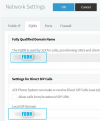
Also, in the 3CX Management Console, navigate to "Settings >> Network >> FQDN" and make sure that both fields seen below contain the FQDN and then hit OK:
1623658597602.png

Try again and let us know how it goes.
 
The problem is that when i tried to make calls it doenst work and i am hearing all the time the occupied ringotne that of course its not plus i disabled the telecom API but nothing at all and in the end i searched for the network settings in management console but i didnt find any (i mean that i didnt saw this option plus in the settings in my console doesnt appearing this option) and i think that probably something is not adjusted properly on my phone app or in the console because it doesnt work at all.One detail is that i am using the 1 year trial if this affect in my problem.
 
@ALEX7

One detail is that i am using the 1 year trial if this affect in my problem.
In that case, your 3CX PBX must be hosted with 3CX, which would explain why you do not see a "Network" option under "Settings".

In any case, could you please provide the following info?

1. Phone Model: [HTC Desire | Samsung Nexus S...]

2. Android Version: [Android 10]

3. App Version: [16.0.1.X]

4. 3CX PBX Version: [V16 Update 7 (16.0.7.1078)]. Check under "Dashboard >> Information >> License". If indeed this is a 3CX Hosted instance it should be running v18.0.0.1379 but please confirm.

5. Create a new test extension, do not change any of its settings, and provision it to the android device using the QR code or the welcome email. If the issue persists after doing so proceed with steps 6-8.

6. Try calling *777 to perform an echo test from the android device. Does this fail as well?

7. Does the issue occur when the android device is connected to other wifi networks as well or only on a specific one? While on a different wifi network, make a call from the Android device to *777 and also make a call to the Android device from another 3CX extension to test both incoming and outgoing calls.

8. Do you get the same issue when connected with an LTE connection? While connected via LTE, make a call from the Android device to *777 and also make a call to the Android device from another 3CX extension.
 
Regarding my issue I have to report that calls now started working in the same location (with no changes made to phone, PBX or whatsoever since I last posted).
There is still the telecom api issue that wasn't present in the previous version but I can live with it.
If the issue comes again I'll send the logs.
 
  • Like
Reactions: ChrisC_3CX
@am12

I must say, that is strange. In any case, yes, please do let us know if the issue reoccurs so that we can look into it further.
 
I did the echo test which was worked but after this no able to place calls.
Version 18.0 (Build 1379)
 
Last edited by a moderator:
@ALEX7

Since the echo test works internal calls should work as well. Are you not able to call other internal extensions? Try logging into the 3CX Webclient from with a second extension and then call it from the android app, does it work?

Also, do you get this same issue on other android devices as well?

Do bear in mind that v18.0.0.1379 is Alpha 4 which is not the latest v18 Alpha release. I'd recommend upgrading to the latest one which is v18 Alpha 5 (1608) once you get the chance.
 
Status
Not open for further replies.

Forum statistics

Threads
111,832
Messages
589,284
Members
164,662
Latest member
DejanMDS