Android Beta Release: Dialer Redesign, Multi-call View and More

Status
Not open for further replies.

ThomB_3CX

Staff member
Joined
Apr 28, 2022
Messages
829
Reaction score
1,256
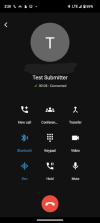
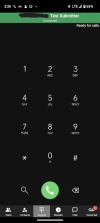
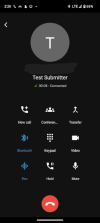
The Beta release of the 3CX App for Android is now available to download from the Google Play store. It introduces some great new elements in the dialer redesign along with a number of modern and very useful features to help you manage multiple calls - either on hold or incoming - easily. You can continue navigating back and keep chatting without a...
Continue reading the Original Blog Post.
 
I am missing an Android Auto integration. It should be possible to dial someone over Android Auto, because it's not allowed in most countries to dial on the Smartphone.
 
I'm not sure if removing the bottom navigation bar on Android is a good idea. Now you need to push the back button twice to get to the "team" icon to find who you need to transfer to. Also going back to the team list does not seem to let me use it to transfer to another extension now.
I have a feeling this is going to bug a lot of customers as not many people remember extension numbers to transfer to and currently use the team list.

Before it was just a matter if hitting the transfer option and then pressing the team button.

If you are going to stay with the navigation bar removed then it might be a good idea to change the transfer option to how it is on iPhone where after selecting the transfer option it takes you to the team list.

Thanks.
 
  • Like
Reactions: jed and ts best
@Phone systems NZ
Thanks for your feedback.
To do this, one can simply:
- Tap on the Transfer button
- Tap on the lens icon button [search] that is on the bottom left corner
- This will show you a list of contacts which is more intuitive than tapping on the Team nav bar


In the meantime, we will check on your particular scenario and do the necessary changes from our end
 
Last edited:
  • Like
Reactions: cimtech and jed
@Phone systems NZ
Thanks for your feedback.
To do this, one can simply:
- Tap on the Transfer button
- Tap on the lens icon button [search] that is on the bottom left corner
- This will show you a list of contacts which is more intuitive than tapping on the Team nav bar


In the meantime, we will check on your particular scenario and do the necessary changes from our end
Thanks for your reply, i had not used the search button before, I will definetly have to start showing my customers in training sessions from now on.
 
  • Like
Reactions: jed
Hi I have a Xiaomi Redmi Note 11 on Android V11 and my phone updated to the Beta app 18.1.4 yesterday yet every time you try dial out it just shows error (internal or external calls), have uninstalled and reprovisioned a few times yet no joy, install previous version and works. PBX version 18.0 Update 7 (Build 312), added note I also have a Samsung A31 and updated to the beta and that works fine.
 
Last edited:
Hi I have a Xiaomi Redmi Note 11 on Android V11 and my phone updated to the Beta app 18.1.4 yesterday yet every time you try dial out it just shows error (internal or external calls), have uninstalled and reprovisioned a few times yet no joy, install previous version and works. PBX version 18.0 Update 7 (Build 312), added note I also have a Samsung A31 and updated to the beta and that works fine.
Hi, Thanks for your reply

Do you have Telecom API enabled? This setting can be found here:
Android App Settings (top left hamburger menu) > Settings > Advanced > Under Audio Options section. If not, kindly enable this setting and try again.

Could you also provide me in Private Message the app's verbose logs for this device in order to understand what's going on and help and resolve this issue?

Enable Verbose Logs: “Android App Settings (top left hamburger menu) > Settings > Advanced > Troubleshooting > Enable verbose logging”.
Reproduce the issue and “Send log report”: Android App Settings (top left hamburger menu) > Settings > Advanced > Troubleshooting > Send Log Report
Thanks
 
Darn, was hoping to see BLF buttons. Those should be added to all possible clients.
 
  • Like
Reactions: Evolute IT
Hi I did try the Telekom API setting both on and off, I will send you the logs now.
 
We have uploaded a new version to our beta client - 18.1.4.181 for you to take a look

@brienf This includes a fix to your particular scenario where 'On screen lock' permission is no longer mandatory.
When installing a fresh app, MIUI devices will be asked to enable this permission correctly
 
Last edited:
Really liking the new UI but I've noticed that I cannot access the block to change my status during an active call which is something I utilize. If I press the back button during the call, the indicator across the top that is used to return to the active call screen covers the block.
Screenshot_20230505-142808.pngScreenshot_20230505-142813.png
 

Attachments

  • Screenshot_20230505-142808.png
    Screenshot_20230505-142808.png
    28.8 KB · Views: 2
  • Like
Reactions: SweetAction
change my status during an active call which is something I utilize.
Your status while in a call is... "In a call", regardless of FW profile you chose.
 
  • Like
Reactions: jed and N_G
The green call bar is shown from the moment a call comes in. Unfortunately this green bar is on top covering the Call Forwarding options and I can't access the Status options any longer. This is before answering the call. I want to still be able to change status when a call is incoming. Which was possible before.

Anything I'm missing here of maye someone has a solution? I have already tried everything within the app. There is no way to change status when call is incoming.
 
If the case above is the most frequent one, then solution is to turn OFF the "Accept multiple Calls" in Available profile. Or, alternatively, keep it ON on Available and OFF on Available 2, so you can chose the convenient configuration when you're idle.
 
  • Like
Reactions: Daffie
Thank you! Have edited the setting...awaiting for the next incoming call. :)
 
  • Like
Reactions: Vali_3CX
Unfortunately this hasn't helped.

Just to make sure we're on the same page...the issue I'm experiencing is not when in a call. It's with a call coming in, when I'm not on a call already, nor do I accept the incoming call. At this moment I would like to access Call Forwarding options to change status from Available to to Away. I'm not able to do so with the green call banner in the way on top of the screen..
 
Last edited:
  • Like
Reactions: Wesley | Ruijs IT
Does the final release include H264 for decode of the intercom video streams?
Or do we have to wait some more for that?
 
  • Like
Reactions: Gasha
It will be in Update 8
 
Unfortunately this hasn't helped.

Just to make sure we're on the same page...the issue I'm experiencing is not when in a call. It's with a call coming in, when I'm not on a call already, nor do I accept the incoming call. At this moment I would like to access Call Forwarding options to change status from Available to to Away. I'm not able to do so with the green call banner in the way on top of the screen..
Anyone able to shed some light on this please? I would really appreciate it.
 
  • Like
Reactions: Wesley | Ruijs IT
Unfortunately this hasn't helped.

Just to make sure we're on the same page...the issue I'm experiencing is not when in a call. It's with a call coming in, when I'm not on a call already, nor do I accept the incoming call. At this moment I would like to access Call Forwarding options to change status from Available to to Away. I'm not able to do so with the green call banner in the way on top of the screen..
Still looking for any solution to our problem. It is very annoying to deal with. Maybe it will be fixed in upcoming upgrade? Anyone can shed some light?
 
Status
Not open for further replies.

Members Online Now

Forum statistics

Threads
111,831
Messages
589,277
Members
164,660
Latest member
RJenkinsROCK