





The Beta release of the 3CX App for Android is now available to download from the Google Play store. It introduces some great new elements in the dialer redesign along with a number of modern and very useful features to help you manage multiple calls - either on hold or incoming - easily. You can continue navigating back and keep chatting without any loss of functionality, know who’s calling, and whether they’re free to talk. And most important of all - choose which call you need to prioritize with just a simple tap! Read on to discover more.
Dialer Redesign
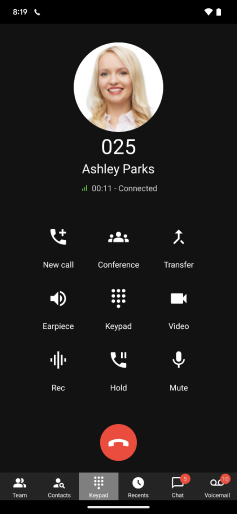
A fresh new look has been given to the dialer, including these key elements:
- Reduced in size to minimize your accidental taps.
- Modern icons have been introduced and placed in a different order.
- You’ll see the avatar or initials of the person calling you.
- We’ve enhanced the navigation bar functionality.
- The navigation bar will disappear from the bottom of your screen whilst on a call.
- Use the back button in the top left or the physical phone button to navigate back to your previous screen.
Multi-Call View

When you have multiple calls - either on hold or incoming - we now have a number of new and very useful features to help you manage this easily:
- A scrollable list of your callers.
- You can identify who’s calling you, by their avatar or initials.
- The status of the call is displayed with customized icons ‘On hold’ or ‘Incoming call’.
- Each row is clickable allowing you to move the ‘On hold’ button to the Active call window.
Call Badge

If you’re on a call and tapping back to a previous screen, here’s what you can expect. You can continue to navigate and chat whilst still on the call, but at the same time you’ll see a green bar at the top of your screen. All you have to do is simply tap on the green bar and you’ll be returned to the dialer. You'll recall the hamburger menu / Queue and Status icons were already disabled whilst on a call so no functionality is lost by placing this green bar on top of them.
Status in Dialer

When you’re dialing a number, you can instantly see the status of the person you’re calling, or whether they are currently on a call.
Other Features / Fixes
Here’s a recap of what else we’ve been improving behind the scenes. As well as UI improvements for smaller screens, we’ve also addressed a vulnerability fix where the profile xml remains in the app folder even if we delete the profile.
Try the Android Beta
Join our Beta testing program and try out the latest Android Beta update! Download the app from the Google Play Store and head over to the Forum to tell us what you think. View the complete changelog history.









 Copyright © 2026