App works fine, but there is no sound while calling

Status
Not open for further replies.

avolkov

Joined
Feb 26, 2021
Messages
7
Reaction score
0
we've got on-premise PBX system, all updates are installed (18.0 build 908).
Everything works fine (provisioning, phone book and calling) through wifi (external and internal), but sometimes there is no voice while using mobile network. call notification and establishing connection are working, call timer is active.
can you advise, where I can find clues to solve this problem.
 
No voice usually means that RTP ports are not forwarded correctly.

Does the Firewall Checker pass?
 
Hi @avolkov

Thanks for your feedback

Could you please provide me in Personal Message, the app's verbose logs in order to understand what's going on and help you out with your issue?
  1. Enable Verbose Logs: “Android App Settings (top left hamburger menu) > Settings > Advanced > Troubleshooting > Enable verbose logging”.
  2. Reproduce the issue and “Send log report”: Android App Settings (top left hamburger menu) > Settings > Advanced > Troubleshooting > Send Log Report
Thanks
 
Hello!
I sent log to you in personal messages.
 
@avolkov Thanks for the logs. We will review
 
@avolkov
From reviewing your logs, we can see that you might have problems in your environment/network.

Logs show the following:
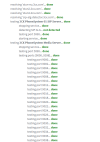
22:01:39.405 TNL|SLV Ping All attempts failed, no media - keep on retrying xx:xx:xx:xxx
TNL|SLV Ping All attempts failed, no media - keep on retrying xx:xx:xx:xxx

strm0x104085a58 JB summary:
size=0/eff=0 prefetch=10 level=0
delay (min/max/avg/dev)=0/0/0/0 ms
burst (min/max/avg/dev)=0/0/0/0 frames
lost=0 discard=0 empty=636

This signifies a UDP issue. UDP seems to be blocked somewhere.
From your firewall checker, we could presume that the issue is where the apps are located.

We advise you to first check your environment / network.
Following this, you should contact your Partner or 3CX Support directly by purchasing a ticket.
 
Last edited:
Hello again!
we checked every step in network and didn't find any blocking rules.
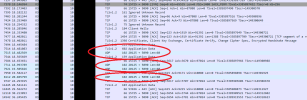
I captured traffic on 3CX server today with wireshark and found that UDP traffic reached server.
Application use 5090 port to voice, right?3.png
 
Ensure that the app you're using for calls has permission to access your microphone and speaker. If those permissions are turned off, that could be causing the issue.
Hello!
App works great through wi-fi, problems only with cellular.
 
Something somewhere on your firewall or network is "mangling" 3CX packets and they are not arriving untouched to the 3CX server. A firewall rule, some sort of IPS/IDS, etc.

You need to look at your network to resolve this.
 
Status
Not open for further replies.

Members Online Now

Forum statistics

Threads
111,831
Messages
589,277
Members
164,660
Latest member
RJenkinsROCK