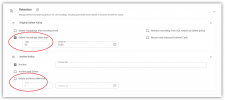
Archived Recordings Deletion

k.hamza

Premier Customer
Joined
Nov 24, 2021
Messages
34
Reaction score
10
Hello,

We have enabled a remote storage and configured Auto-archive recording older than 7 days.
Question is now we want to keep archived recording for only 30 days and then delete them, is there an option to auto delete archived recording ?
and if not, how can we do this please?.

Thank you.
 
You'll have to script something to delete your files older then 30 days. 3CX isnt capable of doing this.
 
  • Like
Reactions: Evolute IT
You may want to consider looking at our 3CX Recording Manager tool. We have separate retention policies for both the original recordings, and archives so you can manage them separately.

1763997044897.png

This is just one small example of the additional features we provide. You may also find our expanded AI features ("Ask AI Anything" and Agent Scoring) useful.
 
I delete recordings from the external storage(FTP) directly from FTP server but those entries still shows up in 3CX Recordings. Apparently, it does not download or play, but old entries remain in list forever on 3CX.

Is there a way to make 3CX to scan remote storage to sync available recording entries and delete entries that are not available. The issue is deleting recordings from 3CX is extremely slow, even empty entries of recordings on 3CX takes long to delete, because it tried to delete from remote storage and waits for it to fail before removing them from 3CX server. and over time 3CX server will have 1000s empty entries but the archive storage will only have what's needed.

Alternatively, 3CX server should have an option to Delete entry without validation from Remote Storage. this would be way faster to avoid build up over time.

I give access of Recordings to client and they will see false entries as old as years, may create issues later for me to explain them.
Thanks
 

Latest Posts

Forum statistics

Threads
111,953
Messages
589,916
Members
164,851
Latest member
DrunkeMeister