Audio conference contatcs import

Status
Not open for further replies.

p_vah

Free User
Joined
Feb 7, 2022
Messages
3
Reaction score
0
how can I implement the import of contacts in the *,csv form "name, phone number" when creating an audio conference?
at the moment it is only possible to import contacts for a video conference in the *,csv "name, email" format, which is not suitable for audio.
 
Hi @p_vah,

Currently, adding the email addresses of the participants will send them an email with instructions on how to connect. Is there a reason why you're wanting to add the phone number to the field specifically?
 
sending email with connection instructions is needed when users themselves connect to an audio conference.
In my case, I want to organizer the audioconferences and dial all the participants myself (by 3CX) to mobile or landline numbers.
Since not all participants have the opportunity to check mail or call themselves to conference. But everyone has to accept an incoming call.
 
Hey @p_vah,

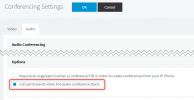
What you could use is the option to Call participants when the audio conference starts. This way you'll need to add the numbers manually, but it will call them out as soon as it starts.

1644235915063.png
 
The problem is not that the system does not call to participants, the problem is that there is no way to add participants using a file *.csv with lines like:
Name1, +997 87 111 11 11
Name2, +997 87 222 22 22
Name3, +95 05 00 00 00
Name4, +8 800 12 12 12

If you want to start audioconference with more than 15 participants, it is to time consuming to enter all numbers manually
 
Status
Not open for further replies.

Forum statistics

Threads
112,349
Messages
592,027
Members
165,514
Latest member
megalmazan