- Joined
- May 11, 2017
- Messages
- 31
- Reaction score
- 1
Hi all,
I updated our 3CX to SP6 over the weekend, and am now testing it with my Grandstream GXP2170.
I did a Regenerate on my extension and logged in to the phone's GUI to update the Authenticate-ID and password. This would not work, no matter what I tried.
I restarted the phone, but it still wouldn't register.
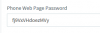
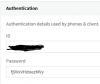
I was also testing the new WebClient phone, and when I looked in the Phones section of the 3CX Management Portal, I noticed that the Webclient phone had a totally different password from the one listed under my extension. (It only had the WebRTC phone originally)
Under phones, my extension has this password:

But, when I look in my extension, I get this:
I entered the Webclient password in my phone's GUI, and it registered ok.
How did this happen? And, how do I stop this from happening when I start rolling out SP6 to our customers?
Thanks,
Marc
I updated our 3CX to SP6 over the weekend, and am now testing it with my Grandstream GXP2170.
I did a Regenerate on my extension and logged in to the phone's GUI to update the Authenticate-ID and password. This would not work, no matter what I tried.
I restarted the phone, but it still wouldn't register.
I was also testing the new WebClient phone, and when I looked in the Phones section of the 3CX Management Portal, I noticed that the Webclient phone had a totally different password from the one listed under my extension. (It only had the WebRTC phone originally)
Under phones, my extension has this password:
But, when I look in my extension, I get this:
I entered the Webclient password in my phone's GUI, and it registered ok.
How did this happen? And, how do I stop this from happening when I start rolling out SP6 to our customers?
Thanks,
Marc