Auto Answer for Paging

jlocke235

Silver Partner
Joined
Jan 10, 2023
Messages
8
Reaction score
0
We removed a custom template from the Yealink T46S for a customer. It seems everything is working, except the auto answer when paging. When paging another phone, it rings and does not do the auto answer like it previously did with the custom template. We have enabled the intercom barge in the back end of the phone. Even with the intercom barge enabled, the paging is still ringing. The phones are running FW Version 66.86.0.5. Any recommendations would be great!
 
I can confirm this works on 66.86.0.15 (check and upgrade from your PBX)

The paging only works if the caller has the right for paging though, and you have a paging dial code defined on your PBX.
Choose a role that allows Operations, or tick it manually.
1737559337338.png

Important: If you removed a custom template, make sure you factory reset and reprovision the device clean to ensure everything is default.
 
  • Like
Reactions: Alejandro_3CX
I can confirm this works on 66.86.0.15 (check and upgrade from your PBX)

The paging only works if the caller has the right for paging though, and you have a paging dial code defined on your PBX.
Choose a role that allows Operations, or tick it manually.
View attachment 46101

Important: If you removed a custom template, make sure you factory reset and reprovision the device clean to ensure everything is default.
All of the users have the receptionist role and have the operations checked. We did completely wipe the phones and set them up on the 3CX provided template for the phones. Their paging code is *8 and has been updated in the dial codes as well.
1737559884207.png
 
Is the user you want to page also in DEFAULT? If not you cannot page them with auto-answer.
 
Is the user you want to page also in DEFAULT? If not you cannot page them with auto-answer.
Yes, all of the users are in DEFAULT.
 
- Have you upgraded the phone to the firmware version I mentioned?

- Do you dial *8100 for example to page user 100?

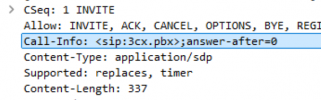
- Can you run a capture and then page it? The INVITE should contain this if you check the capture in wireshark
1737622549721.png
 
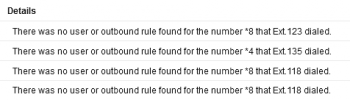
The dial codes themselves are functional. We try to use the dial code as a speed dial key. The image is from the event log. It seems the speed dial keys are not recognizing the dial code.

1738686597378.png
 
The dial codes themselves are functional. We try to use the dial code as a speed dial key. The image is from the event log. It seems the speed dial keys are not recognizing the dial code.

View attachment 46274
 
Is it possible to create a BLF key that when pressed will intercom the respective extension and auto answer without losing the BLF (busy light) functionality?
 

Members Online Now

Forum statistics

Threads
111,831
Messages
589,277
Members
164,660
Latest member
RJenkinsROCK