Auto Update Won't Update Phone Template

Status
Not open for further replies.

myrich22

Forum User
Joined
Feb 24, 2020
Messages
30
Reaction score
1
I have the auto update set to daily. For some reason, there is a phone template update that won't auto apply. I've tried to manually apply and it won't let me select. Update has been out there for about a week. I have many phones that would get this update. The home page and extensions gives an error message that my phones are not supported. But, the compatibility page says they are ok (Yealink T46S). I tried rebooting the 3cx server without any luck. Ideas?
>>>>>>>>>>
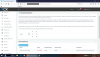
3cxUpdate.png
 
Did you firstly select the row "Yealink T23,T27,..." and then click "Download Selected" button?
 
Ahh... that was it... Going to hide under rock in shame... I guess I was looking for a checkbox rather than a row select. Anyway, all ok. Thanks!
 
Auto update is mostly just for the pbx itself, not the Templates, SIP trunks, Gateways.
 
Status
Not open for further replies.

Latest Posts

Forum statistics

Threads
111,948
Messages
589,880
Members
164,841
Latest member
erre