Solved Backup using SFTP with SSH Key

Status
Not open for further replies.

fgc92210

Customer
Advanced Certified
Joined
Oct 28, 2020
Messages
185
Reaction score
29
So I had it working a while back and for the heck of me can't get it to work anymore.
My goal is to use SFTP Backup using a SSH key in order to test 3CX Redundancy (so backup location needs to be shared by the 2 systems).

I have a linux server, with a user "3cx" setup with its ssh key.
This user can ssh to the public IP of its own server without password correctly.

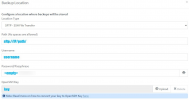
In 3CX for the backup, I have
SFTP as file transfer,
Path is sftp://ip_of_server/home/3cx/backup/ (also tried sftp://3cx@ip_of_server/home/3cx/backup/ )
Username: 3cx (tried without username)
password: nothing
SSH Key: private key from the 3cx user

The checksum of the id.rsa file I am trying to upload under SSH Key is the same checksum as the id.rsa key for the 3cx on the local backup server

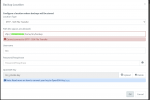
Still getting "cannot connect to sftp - SSH File Transfer"
Any hint?
 
I generated the key from linux directly, using ssh-keygen, which by default writes keys in an open-SSH specific format..

The link you sent specifically talked about converting pem keys to open-ssh.
ssh-keygen can generate a pem key using the -m flag, which I did not use.
 
I generated a ssh (openssh) key for root@3cx , and sftp to my remote server.
It worked. So I know my setup is working correctly. It's just from the web page, something is not working correctly or there is a trick between user field and URL maybe?

root@3cx:~/.ssh> sftp [email protected]
Connected to [email protected].
sftp>
 
And the key I generated for the 3CX backup works too (from the command line):

3cx@zeus:~/.ssh$ sftp 3cx@localhost
The authenticity of host 'localhost (127.0.0.1)' can't be established.
ECDSA key fingerprint is SHA256:Loos4L/uK4pu0l7Jo5qztVwqbWfC+TlnbKDWtX17Fc0.
Are you sure you want to continue connecting (yes/no)? yes
Warning: Permanently added 'localhost' (ECDSA) to the list of known hosts.
Connected to 3cx@localhost.
sftp>

So definitely something through the web page..
 
When a key is used, should the path be sftp://username@IP , or sftp://IP + username field filled out ?
 
  • Like
Reactions: NickD_3CX
I still get the error "Cannot connect to SFTP - SSH File Transfer" which shows up pretty fast.
Any log files I could check? Where is 3CX trying to save the key?
 
So after further tests... I think the upload of the file or something else from the WWW GUI is screwing up things.
last test:

- Generated a new separate ID key on my own linux (id_rda, id_rsa.pub)
- Copied through ssh-copy this id_rsa.pub remotely to the 3cx account on machine XXX
- from my machine, I can ssh -i new.id.rsa.private 3cx@xxx and login successfully
- from the WWW interface, I have sftp://IP_Address_remote_machine/path/to/account/
- username: 3cx
- No password
- OpenSSH Key: I uploaded the new private ID key I just generated and tested

Still not working.
I can reproduce on my end. If you need any type of traces let me know.
Probably reproducible on your end too.
 
Probably reproducible on your end too.
I've actually just tested this on both 3CX v16 and 3CX v18 with keys generated both using PuTTYGen via Windows and ssh-keygen via Linux and all scenarios worked just fine.

What version 3CX are you running?
 
V18, built 1880

How did you check your linux scenario?
The last one I did should work:

- Machine A, user X, generated new ssh id (2 files, id_rsa, and id_rsa.pub)
- With ssh-copy , copied id_rsa.pub to account X on machine A
- From my command line, I can now ssh x@a successfully
- I copied my id_rsa onto my Desktop
- From the browser, uploaded key ~/Desktop/id_rsa into the WWW browser
- 3CX says it can't connect still.

Am I doing anything wrong here..?
 
I have to say that this is really strange as it seems you are doing it correctly. I repeated the process and used ssh-copy to transfer the public key just to be sure, but still, everything just works.

Could you perhaps try setting up the sftp without the use of a key and just a normal username and password? That way, we'll at least be able to narrow this down to the key pair.
 
I forgot to mention that without the key, it works. I m using a Mac, and chrome. I am about to leave for NYC now but I saw a report backup saying something about a permission in my emails this morning. I will check again tonight.
 
Here is the backup error message:

Your 3CX backup failed due to the following reason(s):
Renci.SshNet.Common.SshAuthenticationException: Permission denied (publickey).
at Renci.SshNet.ClientAuthentication.Authenticate(IConnectionInfoInternal connectionInfo, ISession session)
at Renci.SshNet.ConnectionInfo.Authenticate(ISession session, IServiceFactory serviceFactory)
at Renci.SshNet.Session.Connect()
at Renci.SshNet.BaseClient.CreateAndConnectSession()
at Renci.SshNet.BaseClient.Connect()
at _3cxFilesystemImplementations.SFTP.SftpFileSystem.CreateSftpClient(LocationSettings settings)
at _3cxFilesystemImplementations.SFTP.SftpFileSystem.Delete(String filename)
at _3cxBackupRestoreImpl.BackupRestoreUtils.Backup(IFilesystem filesystem, String instanceId, String cfgPath, String dbConnectionString, BackupConfig options, String fullpathFilename, Boolean sendEmail)
at BackupRestoreSchedule.BackupJob.Execute(IJobExecutionContext context)

Usually, at the linux command line, "Permission denied (public key)" is related to filesystem permission.
I'll see if I can dig out on my end where the file is saved and how everything works. If you have any hints, I'll take them.
Thankyou
 
I could not find the key on the file system.
unless if it is in the database, or its name changes when you upload it, I have no way to debug this using command line :/
 
Your key worked.
The only difference I see is in the header of the file:

Mine:
-----BEGIN OPENSSH PRIVATE KEY-----

yours:
-----BEGIN RSA PRIVATE KEY-----

I will re-create everything from scratch and share screen shots in this thread later today..
 
So I ssh to the box I have for backups, and created a new ssh key for my user 3cx locally, so I can use the private (rather than using my own) and connect to the box as 3cx

this first ssh is using my private key which I dont want:

Code:
frank@iMac:~> ssh 3cx@zeus
3cx@zeus:~> cd .ssh/
3cx@zeus:~/.ssh> l
total 12
drwx------ 2 3cx 3cx 4096 Sep 10 19:05 .
drwxr-xr-x 5 3cx 3cx 4096 Sep 10 19:04 ..
-rw------- 1 3cx 3cx  742 Sep 10 19:05 authorized_keys


generating a key for local user 3cx

3cx@zeus:~/.ssh> ssh-keygen
Generating public/private rsa key pair.
Enter file in which to save the key (/home/3cx/.ssh/id_rsa):
Enter passphrase (empty for no passphrase):
Enter same passphrase again:
Your identification has been saved in /home/3cx/.ssh/id_rsa.
Your public key has been saved in /home/3cx/.ssh/id_rsa.pub.
The key fingerprint is:
SHA256:W8mfNIXhYRfX0s6hzoQxl047oUOjP6DK3Xw2YtOZiPk 3cx@zeus
The key's randomart image is:
+---[RSA 2048]----+
|            + +oo|
|           B X.oo|
|          o % =+.|
|         + = B  o|
|        S * B .  |
|       . o = =   |
|    . o * o *    |
|     o + B B     |
|        oE= .    |
+----[SHA256]-----+
3cx@zeus:~/.ssh> cat id_rsa.pub >> authorized_keys
3cx@zeus:~/.ssh>


making sure the user 3cx can ssh locally with the newly generated key:
3cx@zeus:~/.ssh> ssh 3cx@localhost
The authenticity of host 'localhost (127.0.0.1)' can't be established.
ECDSA key fingerprint is SHA256:Loos4L/uK4pu0l7Jo5qztVwqbWfC+TlnbKDWtX17Fc0.
Are you sure you want to continue connecting (yes/no)? yes
Warning: Permanently added 'localhost' (ECDSA) to the list of known hosts.
3cx@zeus:~> 


Copying the remote 3cx private key remotely, so I can upload it in 3cx

frank@iMac:~/Downloads> scp "3cx@zeus:~/.ssh/id_rsa" "./3cx_private.key"
id_rsa                                                                                                                                                                      100% 1831   136.7KB/s   00:00    
frank@iMac:~/Downloads>

And I still get the error messageScreen Shot 2021-09-10 at 3.13.58 PM.png


while the private key checksum matches the local server and the remote server:

frank@iMac:~/Downloads> md5 ./3cx_private.key
MD5 (./3cx_private.key) = 6fd7ac3f49928cfdd16add1cb0a4660d

frank@iMac:~/Downloads> ssh 3cx@zeus '/usr/bin/md5sum ~/.ssh/id_rsa'
6fd7ac3f49928cfdd16add1cb0a4660d /home/3cx/.ssh/id_rsa


My key is an OpenSSH key as requested:
frank@iMac:~/Downloads> head -n 2 ./3cx_private.key
-----BEGIN OPENSSH PRIVATE KEY-----
b3BlbnNzaC1rZXktdjEAAAAABG5vbmUAAAAEbm9uZQAAAAAAAAABAAABFwAAAAdzc2gtcn


Any hint would be appreciated...
 
Despite it stating that it's an OpenSSH key, could you please, as a test, use PuttYGen and the process mentioned here to convert it again and tell me if that makes a difference?
 
Status
Not open for further replies.

Forum statistics

Threads
111,974
Messages
590,081
Members
164,899
Latest member
mazet