Solved Big backup File Size 3CX 18.0 (Build 20)

Status
Not open for further replies.

k.hamza

Premier Customer
Joined
Nov 24, 2021
Messages
34
Reaction score
10
Hello,

We have a 3CX on premises server and noticed that backups that are taken daily in getting big.
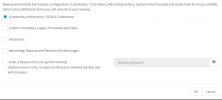
-on the backup setting only License Key Information, FQDN & Conference box is checked.
-Also checked if any old firmware exists from phone>options but there is none.
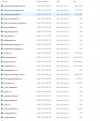
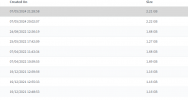
-downloaded the backupfile.zip and unzipped it to find that the DbTables folder contains .csv files with large size.
i attached couple of screenshots to clarify what I'm saying and in that case what would i do to reduce the backup file size because it takes so much time when we try to restore it

Thank you,
 

Attachments

  • Screenshot 2024-05-08 174009.png
    Screenshot 2024-05-08 174009.png
    18.2 KB · Views: 28
  • Screenshot 2024-05-08 174033.png
    Screenshot 2024-05-08 174033.png
    27.6 KB · Views: 28
  • Screenshot 2024-05-08 174116.png
    Screenshot 2024-05-08 174116.png
    78.5 KB · Views: 29
This can indicate that the database has a a lot of data depending on the load of the system.
But since you want this data this cannot be converted more to reduce size.
 
but is there a way to clear some of this data from the 3cx management console to reduce the backup size ?
 
Those files appear to be generated via call logs. You can try to make a backup of the 3CX state after hours, clear the logs via the management dashboard, and create another backup to check if the size is more manageable. But do bear in mind this does erase call history on the PBX.

Edit: Apparently V20 also handles backups more efficiently if upgrading is currently an option for you.
 
Last edited:
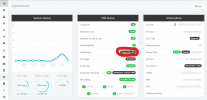
@shane_v can you please tell me from where I can delete call log from the MC ?
 
I've encircled the button on the attached screenshot. How many calls does your deployment show?

Screenshot 2024-05-09 135134.png
 
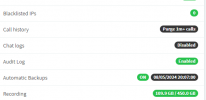
Here you go
 

Attachments

  • Screenshot 2024-05-09 145716.png
    Screenshot 2024-05-09 145716.png
    14.1 KB · Views: 27
Yeah, those are a ton of calls. Purging them will probably help with backup size, but do bear in mind that your call history up until that point will be erased entirely.
 
got it, okay thank you for helping, will try to erase and find out what will happen
 
From where i can delete the call logs please, pressed down the call log from the dashboard and it forwarded me to this but no delete option
Screenshot 2024-05-09 152845.png
 
Did you click the "Purge" button (it's black) or just in the line that says call history?
 
@SweetAction ah yes got it thank you and thank you all for helping appreciate it.
 
@k.hamza Keep in mind though that if you Purge the call history this can also affect your call reports as there will not be any data.
 
@TheodorosG_3CX yeah got it, I deleted two years data and backup size has been reduced for about 1GB so yeah problem has been solved, thank you.
 
Status
Not open for further replies.

Forum statistics

Threads
111,952
Messages
589,904
Members
164,845
Latest member
tdzski5