Solved Blacklisted IP

Status
Not open for further replies.

gvsoft

Customer
Joined
Nov 2, 2016
Messages
46
Reaction score
5
After some attempts to connect to the web interface for a specific extension trying to make a conference call I got a blacklisted IP error and since then everything is inactive.
I am trying to find someone but all my tickets are getting rejected. What am I supposed to do?
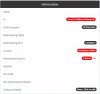
Untitled.jpg
 
Dont know what your set up is but can you get on to the machine where 3CX is installed? If so, access the MGMT console this way.
 
I can access the console. Everything on it is inactive.
 
I can see your license expired - What kind of license did you have?

Can you go in to the license page and try refreshing?

if this is a free license I would take a backup and exclude your license.

Register yourself for a new license and then restore with your new license.
 
It is an IP problem. My IP has got blacklisted because of the failures to connect to the web interface.
 
Then if you get in to MGMT console go to Security > IP Blacklist and remove your IP from the blacklist then add your IP to the admin management console restriction page under the same menu page.
 
Connect to the web interface from a different wan address, and then remove the blacklist.
 
  • Like
Reactions: TBWD
It got unblocked after 1800 seconds.
 
Status
Not open for further replies.

Forum statistics

Threads
111,974
Messages
590,081
Members
164,899
Latest member
mazet