Solved BLF not showing RingGroup

Status
Not open for further replies.

Song

Bronze Partner
Joined
Nov 12, 2018
Messages
379
Reaction score
24
How do I set a BLF to show ringgroup. Currently when I do add a BLF it only show the extension number.
Should I select speed dial? and just enter the extension of the ring group? is this the correct way of doing it?

Also how do you hit an extension from the directory? I went into the extension under option. I do not see hide user from the contact book anymore. Is it call hide user? now?

thank you
 
BLF keys will offer presence information only for the extensions and not for the system extensions.
You will need to create a Custom Speed dial and call the RG if needed.
 
  • Like
Reactions: Evolute IT
BLF keys will offer presence information only for the extensions and not for the system extensions.
You will need to create a Custom Speed dial and call the RG if needed.
got it.. so create a ring group and create a speed dial and add that ring group extension in there. Thank you!!.

Do you know how to hit an extension from the global phone book? or from the system.
 
Do you know how to hit an extension from the global phone book? or from the system.
Can you please elaborate?
 
Can you please elaborate?
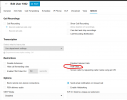
What I'm trying to do is some extension I want to hide from people reaching it meaning search by last name. the extension will not show up. Is this where you do it at? under the extension -> option -> hide user?
 

Attachments

  • Screenshot 2025-06-09 200012.png
    Screenshot 2025-06-09 200012.png
    56.9 KB · Views: 3
Yes this option will hide the extension from the phonebook but also hide presence information from others.
 
You are welcome
 
Status
Not open for further replies.

Forum statistics

Threads
112,293
Messages
591,750
Members
165,424
Latest member
38510