Block call from IP@IP

Status
Not open for further replies.

jader31

Free User
Basic Certified
Joined
Jan 22, 2020
Messages
6
Reaction score
2
Hi

I´m a 3CX newbie... just got my 1st my3cx installed and I´m receiving calls like this:

14023


I´d like to block all of them... Right now there are no reason to accept calls from any address with an @

So I went to Settings > BlackListed Numbers and add these rules:
@
[0-9]@
5060


There are any other ways ?
What will be side effects of this approuch ?

Regards,

Jader31
 
Last edited by a moderator:
  • Like
Reactions: nub
Yes, I´m aware is not a supported phone.
I´m asking how it can receive directly a call... it´s just this phone for all my 5 test devices who got this calls.
I have same problem with an old test I´ve done several years ago running on Asterisk (PIAF).
The same phone was getting strange calls from 10x@<class C invalid IP> source.
So I´m aware the phone is the problem. And I´d like to know if there are any workaround to this!

Sorry about no information about environment:
  • 3CX Version: latest on my3cx
  • IP Phone Make/Model/Firmware : Nortel 1535 running 0.2.93.0616 fw
  • Provisioning Method: Local / VPN / STUN / SBC : manual on phone, no web tool at all for this VERY OLD phone!
  • Trunk Provider or Gateway Make/Model : 2 SIP Trunks: FaleMais (local one here in Brazil) and GoTrunk
  • Has the Firewall Checker passed: YES (running on my3cx domain now)
  • Are custom Phone Templates being used: NO ... this is a NOT supported phone
 
What do you call "@" ? That's just telling you from which IP is coming the call. Can you send a screen of the blacklist numbers page ?
 
Phones can receive Direct SIP calls from outside your PBX.
If you disable this function on the phone itself, then the calls should stop.

It does not seem that the calls are coming from 3CX so in this case 3CX cannot block them for you.

  • You can verify this by looking at 3CX logs and not finding those IPs or numbers in our logs.
  • You can also grab one of your 5 phones, change the registration IP to something fake (so they no longer speak to 3CX) and see if it still receives these calls.
  • You can also run a pcap straight from the phone interface (if it has this feature) and confirm without any reasonable doubts what the true origin IP of these calls are.
  • If your phone does not do pcap, you can also use port mirroring if your switch allows it and achieve the same result
 
Last edited:
I do not want to receive call from any IP address...just from phone numbers.
So +1-305-791-3265 is fine but [email protected] or [email protected] is not OK!

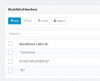
Below is my blacklisted numbers page :

14026
 
Arg I think you were speaking about phone blacklist.. Check first what John said, block direct SIP, you need to only have calls coming from 3CX. Then you can take off these filters.
 
How can someone talk to just ONE IP phone on LAN side, if just 5060 port is open in firewall and several phones registered on that my3cx central.

Can someone use a @INVALID_class.C_IP as source and dial to an extension number I do not have configurated on that phone and it rings ?
 
Block inbound traffic on port 5060 except from your VoIP Provider.
Mobile devices should be using tunnel 5090.

If you have handsets at remote locations - use an SBC or VPN.
 
  • Like
Reactions: nub
If the set itself, does not have the option to block direct SIP calls (calls not from the server it normaly registers with), and some phones do offer this, then you will have to block at your firewall/router..
 
Note that on 3CX supported phones we disable this for your via provisioning
How can someone talk to just ONE IP phone on LAN side, if just 5060 port is open in firewall and several phones registered on that my3cx central.

Can someone use a @INVALID_class.C_IP as source and dial to an extension number I do not have configurated on that phone and it rings ?

Hi @jader31

Rather than investigate this question which can lead down a long hypothetical path, I would first collect information using the methods in post #6

First get the evidence, then spend the appropriate time to address the issue at its root cause. I'm assuming your time is valuable to you, so find out where the traffic is coming from before you do anything else.
 
Phones can receive Direct SIP calls from outside your PBX.
If you disable this function on the phone itself, then the calls should stop.

It does not seem that the calls are coming from 3CX so in this case 3CX cannot block them for you.

  • You can verify this by looking at 3CX logs and not finding those IPs or numbers in our logs.
  • You can also grab one of your 5 phones, change the registration IP to something fake (so they no longer speak to 3CX) and see if it still receives these calls.
  • You can also run a pcap straight from the phone interface (if it has this feature) and confirm without any reasonable doubts what the true origin IP of these calls are.
  • If your phone does not do pcap, you can also use port mirroring if your switch allows it and achieve the same result
Ok. I figured it out. I've discovered same problem happens on any SIP phone with bad config.

It's port scan directly to telephone.
So I changed port 5060 --> other one... no result.

I need to enable "secure connections only" to stop receiving those calls. It's was done on a Yealink T28p (a supported phone) and now I'll try to replicate solution on OLD Nortel 1535.

If I find anything about how to do this on Nortel 1535 I'll post here... I promess!
Regards for all help.

See you on a 3CX call.
 
  • Like
Reactions: JohnS_3CX
Hi @jader31

Be careful. If they can reach the phone, then they can also probably steal the credentials from the phone and make calls using your PBX (older phones being more susceptible).

You need a better firewall to limit traffic between the phones and the PBX only, because now it looks like they are exposed to the internet which is not very safe for you..

It's a good idea to secure your network and use supported phones that will auto-provision with secure credentials from 3CX (minimum requirements for AuthID, Password, UI password) and make it harder for attackers to compromise your system.
 
Hi @jader31

Be careful. If they can reach the phone, then they can also probably steal the credentials from the phone and make calls using your PBX (older phones being more susceptible).

You need a better firewall to limit traffic between the phones and the PBX only, because now it looks like they are exposed to the internet which is not very safe for you..

It's a good idea to secure your network and use supported phones that will auto-provision with secure credentials from 3CX (minimum requirements for AuthID, Password, UI password) and make it harder for attackers to compromise your system.
I'll try to debug and find out how they can EVEN GET on the phone.
I'm sure port 5060 is not routed to a internal server.
This phone is on a home with an CABLE provider. They let all ports open by default (AFAIK).
I'll scan it from outside (all 64k ports) and find out how they get on phone.
If they're using a breach, I'll find it.

I don't think they can access the phone because even I have problems to get the TELNET (yes, no SSH on Nortel 1535) working. And after connect it's messy to do anything on CLI.
Thanks god, there are no web server on that old phone.

I'll use Fanvil, Yealink and Grandstream phone on production, but I have 2 Nortel 1535 and they've color display and video ... it's nice do demo all 3cx funcionalities/features. So I'll try hard to make them work as secure as possible.
I'll keep this post updated as I discover new things.

Regards,
Jáder
 
  • Like
Reactions: FS_Mathieu
Hi Jáder

I think it is best to use supported phones especially for demoing reasons (PnP works, all the BLF features works, dial plans etc). Supported phones are provisioned to ignore such requests in the first place so you would not even notice this problem in the first place.

You should use your own router behind the provider's box and have everything forwarded to your own router. You can then use that to open or close ports, or even capture traffic when needed like now.

The reason they find your phones now is probably because when the phone registers to your PBX or does a outgoing STUN request or anything SIP - the provider box sees it and opens the port temporarily to allow the traffic. From there, it's easy for someone with a scanner to find you until that open port expires. So don't assume that the provider box does not forwards the ports. Your scan might find nothing, especially if the ports have been closed for a while until the next event.
 
Status
Not open for further replies.

Forum statistics

Threads
111,935
Messages
589,823
Members
164,817
Latest member
Innovative Advisory