- Joined
- Apr 16, 2019
- Messages
- 4
- Reaction score
- 3
Hello,
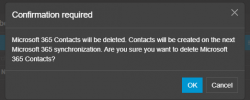
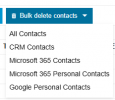
I know the option to bulk delete 365 contacts was released in Update 4, but I have a few questions before I delete them. I do understand that I first have to turn off syncing for 365 personal contacts.
1. It doesn't look like this can be done per user - is it accurate that doing this will delete personal 365 contacts for all users?
2. Kind of a dumb question, but what's the difference between the 365 Contacts and 365 Personal Contacts?
3. Will this in any way affect Personal (non-365, manually created in 3cx) contacts? I would assume not, but I noticed that 365 contacts are mixed in with my Personal contacts when I look at my contact list.
4. Is there still no way to export personal contacts? I believe it's always been the case that only company contacts can be exported.
Thank you!
I know the option to bulk delete 365 contacts was released in Update 4, but I have a few questions before I delete them. I do understand that I first have to turn off syncing for 365 personal contacts.
1. It doesn't look like this can be done per user - is it accurate that doing this will delete personal 365 contacts for all users?
2. Kind of a dumb question, but what's the difference between the 365 Contacts and 365 Personal Contacts?
3. Will this in any way affect Personal (non-365, manually created in 3cx) contacts? I would assume not, but I noticed that 365 contacts are mixed in with my Personal contacts when I look at my contact list.
4. Is there still no way to export personal contacts? I believe it's always been the case that only company contacts can be exported.
Thank you!