- Joined
- Nov 8, 2010
- Messages
- 101
- Reaction score
- 28
I've created users in the GUI and exported them into CSV to compare "live" settings.
Here is a sample part of the CSV:
Of course, there is more data than that in the whole CSV file. But this is an EXPORT of a user created in the GUI. If I take that template and add in random data for another user (Number, Names, Email) and then IMPORT that same CSV format, the CHAT functionality never gets turned on.
What is the magic word in order to import and actually have it set this for all the users correctly?
Yes, the master System -> Options -> System Settings -> Allow Chat is checked.
This appears to be the only hangup before actually doing the full import, but it is a hassle if we have to touch all of the users by hand just for this one screen repeatedly.
Here is a sample part of the CSV:
| Number | FirstName | LastName | EmailAddress | Role | Department | ClickToCallAuth | WMApprove | WebMeetingFriendlyName |
1234 | Test | User | [email protected] | <role name="users" /> | Test Department | 0 | 1 | testuser |
Of course, there is more data than that in the whole CSV file. But this is an EXPORT of a user created in the GUI. If I take that template and add in random data for another user (Number, Names, Email) and then IMPORT that same CSV format, the CHAT functionality never gets turned on.
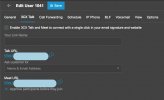
- I click on the "3CX Talk" tab, and the checkbox "Enable 3CX Talk and Meet..." is not checked.
- The WebMeeting "friendly name" is not set.
- The "Approve partiipants before they join" IS, however, checked. That's even with the whole feature showing as being turned off/disabled.
Yes, the master System -> Options -> System Settings -> Allow Chat is checked.
This appears to be the only hangup before actually doing the full import, but it is a hassle if we have to touch all of the users by hand just for this one screen repeatedly.