- Joined
- Feb 4, 2026
- Messages
- 3
- Reaction score
- 0
Hello everyone, I would like to create a call flow rule that automatically distinguishes whether the caller is a known number (present in the contacts) – if yes, perform one action; if not, perform another. I haven't found a specific guide; using tools like GPT/Grok etc., they propose solutions that use "Execute C# Code," but I can't apply the suggested implementations. Has anyone already developed a similar script? Thanks.
The standard approach uses an "Execute C# Code" component first to query the phonebook, setting a boolean variable like contactFound, followed by a "Create a Condition" checking session.contactFound == true for routing (e.g., known callers to IVR 800, unknown to extension 106).
text
<span><span>var tenant = PhoneSystem.Root.GetTenant();<br></span></span><span>var phoneBookEntries = tenant.FindContacts(callerNumber);<br></span><span>contactFound = phoneBookEntries.Count() > 0;<br></span><span></span>
This searches the 3CX company phonebook; if matches exist, sets contactFound to true.
The standard approach uses an "Execute C# Code" component first to query the phonebook, setting a boolean variable like contactFound, followed by a "Create a Condition" checking session.contactFound == true for routing (e.g., known callers to IVR 800, unknown to extension 106).
Working C# Script Example
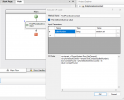
Paste this into your "Execute C# Code" component's code editor (pass session.ani as parameter "callerNumber"):text
<span><span>var tenant = PhoneSystem.Root.GetTenant();<br></span></span><span>var phoneBookEntries = tenant.FindContacts(callerNumber);<br></span><span>contactFound = phoneBookEntries.Count() > 0;<br></span><span></span>
This searches the 3CX company phonebook; if matches exist, sets contactFound to true.
Step-by-Step CFD Setup
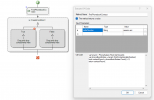
- Drag "Execute C# Code" to the canvas; set input parameter callerNumber = {ANI} and output contactFound (boolean).
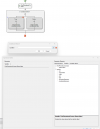
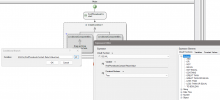
- Add "Create a Condition" below; click Fx button, select session.contactFound == true (use Fx to avoid "invalid expression" errors).
- True branch (known): "Transfer Call To" → select IVR or extension (e.g., "800").
- False branch (unknown): "Transfer Call To" → extension (e.g., "106").
- Build → ZIP → Upload to 3CX Admin Console > Advanced > Call Flow Apps; assign to Inbound Rule DID.