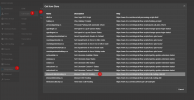
Call Forwarding Exception Error

PFSRick

SOHO User
Joined
Jun 3, 2022
Messages
36
Reaction score
3
I am trying to edit existing call forwarding rules and also add new call forwarding rules in the Users/Call Forwarding/Exceptions page. Any time I try to make an edit or add an existing exception, I get the following error: "ForwardingException: The field ForwardingExceptions must be a string or array type with a maximum length of '100'. Does this mean we can only have 100 exceptions listed here? I have used 3CX for several years and never encountered this and have used well over 100 exceptions during this time. I have roughly 220 exceptions in the list right now.
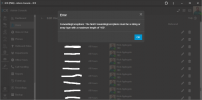
forward exception error.png

I am on hosted 4 SC version 20.0 update 5 (build 551 Release).

Thanks.
 
What are you trying to archive with this many rules under exceptions?
 
What are you trying to archive with this many rules under exceptions?

Long story, but the short version is that we are routing calls based on office hours and customer support plans (based on CID). This was the only solution available to us in v18 based on license, hosted, features available, etc. In v20 I now have access to CFD and am currently investigating how to handle my situation, but in the mean time, I am trying to keep our old way going. You can review this post for more info: https://www.3cx.com/community/threa...ased-on-cid-multiple-dids.124482/#post-598365
 
Better to use a script in this case then.

1742300231707.png

You will just need the CID and where it will need to go to .
 
I appreciate everyone's suggestions, but can anyone answer my specific question of why I am getting this error message? I am working on a scripting solution with CFD but in the meantime I need to keep our current process working. Thank you.
 
The excepions are intended for an individual user to be able to process certain numbers differently, not to be used as a routing tool for the entire PBX.

There used to be a limit of 15 exceptions in previous versions.

For what you need to do it will be best to use the script which is designed to handle that load.

You would just need the list of caller IDs in the contacts.csv file and define the destination.

https://www.3cx.com/blog/call-flow-scripts/call-routing-callerid/
 

Members Online Now

Forum statistics

Threads
111,835
Messages
589,289
Members
164,668
Latest member
Infinity Network