Call pickup confirmation

Status
Not open for further replies.

Alphabetic

3CX MVP
Silver Partner
Advanced Certified
Joined
Jul 1, 2016
Messages
6,574
Reaction score
2,585
Hi all

Can I just confirm that all these options have to be enabled for call pickup to work? (excluding limit call ....)
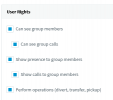
1627375464829.png

Customer doesnt want users to see who they're on the phone with but want to be able to pick up calls.
 
Hi @kieferschild,

Using the dial code to pick up, they'll be able to pick up a call that they're unable to see on the switchboard. All you'll need is the perform operations (divert, transfer, pickup) enabled.
 
Hi @kieferschild,

Using the dial code to pick up, they'll be able to pick up a call that they're unable to see on the switchboard. All you'll need is the perform operations (divert, transfer, pickup) enabled.
This did not work when performing on site tests.

Call pickup only started to work when I enabled "show calls to group members"
 
Hi @kieferschild,

You used the dial code to pick up the call?

I've just tested this internally and externally using the dial code in a web client and an IP phone and it worked fine for me.

What is the scenario you have there? What device are you using to answer and where is the call coming from?
 
Yealink T42S

I've tested with an external call and internal call.

It was also a BLF speed dial

"call forbidden by administrator" when trying the dial code.. almost like it was trying to ring out.

Enabling that option to show group calls let me pick up the call.
 
Hi @kieferschild,

Do you by chance have the option: Limit Call Pickup to calls received in their extension group, enabled under Settings >> General >> General Options?

To add to that, are the extensions in the same group?
 
Hi @kieferschild,

Is this a v16 or v18 PBX?

In the Dial Codes, can you ensure that nothing starts with *2 other than the *20* pickup code? If there is something else, temporarily change it to test.
 
The dial code is *202* and there's no other dial code in there with that.

I changed it back to *20* during testing and it made no difference.
 
Hi @kieferschild,

Have you checked if *2 is being matched by a rule?

If not, I suggest contacting 3CX Support to investigate further.
 
The dial code is *202* is not working for me. Have you fixed it?
 
Hi @kieferschild,

Have you checked if *2 is being matched by a rule?

If not, I suggest contacting 3CX Support to investigate further.
Are you telling me that the 4 rights in the screenshot i showed you earlier do not have to be enabled (Apart from call pickup) for a user to be able to pick up a call?
 
Hi @kieferschild,

That's correct. If you have Limit Call Pickup to calls received in their extension group disabled (default), then you don't need to worry about call pickup being enabled even. However if it's enabled then you need it enabled.
 
Hi @kieferschild,

To clarify:

If Limit Call Pickup to calls received in their extension group is enabled, you require presence and show calls between the extensions, as well as "perform operations" enabled.

If Limit Call Pickup to calls received in their extension group is disabled, the pickup should work just fine if you're using the dial code for pickup or a BLF key (which is the same thing in essence).
 
Hi @kieferschild,

To clarify:

If Limit Call Pickup to calls received in their extension group is enabled, you require presence and show calls between the extensions, as well as "perform operations" enabled.

If Limit Call Pickup to calls received in their extension group is disabled, the pickup should work just fine if you're using the dial code for pickup or a BLF key (which is the same thing in essence).
Thanks.

Im pretty sure the limit call pick up was disabled when I first started looking at this problem.

i'll come back to you once i've got a bit more time to test.
 
  • Like
Reactions: VasilisV_3CX
Status
Not open for further replies.

Latest Posts

Forum statistics

Threads
111,982
Messages
590,119
Members
164,908
Latest member
FarizQasimov