Call Queue hours for auto login missing?

Status
Not open for further replies.

mvandusen

Bronze Partner
Advanced Certified
Joined
May 8, 2020
Messages
22
Reaction score
1
We are running the newest software load, 18.0.5.418.

In the past I was able to set some users up to auto login/out of call queues based on hours, and other users could manually login/out. I cannot find these options. I believe they were located under Users > Forwarding Rules and from there you could make the changes.

I have looked around on forum and have not had any luck as well as checked around the system multiple times.
 
Hi @mvandusen,

Kindly note that the option that you are describing was the Auto Switch.
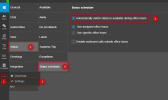
The specific option has been moved to the Web Client/Desktop App of the user. You can find it under Settings >> Status >> Status Scheduler.

1664296759824.png

Keep in mind though that this option will toggle the status of the extension between Available and Do not Disturb, therefore, you will have to enable the option "Log out from queues" for the Do not Disturb profile of the extension and disable it for the Available profile(Users >> Forwarding Rules >> Select Status to configure), in order to login/logout of the queue automatically.
 
Well that's an odd change.... No way for the admin/queue manager to set this up?
 
Not for it to automatically log them in/out based on time of day. And we also do not want the phone to be put in DND. Q manager can manually log them in/out of Q.

They way it worked in previous versions would great.
 
It concerns me that many of the administrative settings are being converted to user settings that cannot be controlled by the administrators.

In this specific example a user can disable their auto switch to avoid taking calls.

Please explain how this is manageable or preventable from the administrative role.
 
was this ever resolved ?
 
Help Please, I might be hijacking this thread and if so happy to open a new one.

Have noticed that we are having issues having just set up queues for the first time and Auto Login is one of them.

Hands up I may not have configured things correctly and any help gratefully accepted, however this is what I am seeing.
  1. First problem is that not all users are automatically logging into the queues when they set status to available.
  2. Second problem is that in the new style desktop client under Admin > Users > (username) > Call Forwarding the option to log out of queues is not shown in Away, Lunch, Do Not Disturb, or Business Trip. In the M.Console all four of those statuses in Forwarding Rules show the tick box for "log out of queues".
  3. Third problem is that the Panel view in my Admin enabled Desktop Client under Queue Logged In To it only shows queues that I am a also a member of against users that I know are members of other queues. Therefore there is no way for me to check they are logged into all the queues they are supposed to be in. Nor can I see abandoned calls for those queues I am not a member of. Not much of a Q Manager at all: a very watered down experience with little visibility and no control.
 
Help Please, I might be hijacking this thread and if so happy to open a new one.

Have noticed that we are having issues having just set up queues for the first time and Auto Login is one of them.

Hands up I may not have configured things correctly and any help gratefully accepted, however this is what I am seeing.
  1. First problem is that not all users are automatically logging into the queues when they set status to available.
  2. Second problem is that in the new style desktop client under Admin > Users > (username) > Call Forwarding the option to log out of queues is not shown in Away, Lunch, Do Not Disturb, or Business Trip. In the M.Console all four of those statuses in Forwarding Rules show the tick box for "log out of queues".
  3. Third problem is that the Panel view in my Admin enabled Desktop Client under Queue Logged In To it only shows queues that I am a also a member of against users that I know are members of other queues. Therefore there is no way for me to check they are logged into all the queues they are supposed to be in. Nor can I see abandoned calls for those queues I am not a member of. Not much of a Q Manager at all: a very watered down experience with little visibility and no control.
1. That depends on if they were logged in before switching to a status that logs them out automatically.
2. Maybe this feature hasn't been ported to Web Client admin yet?
3. You need to be a queue manager:
1692152524108.png
 
  • Like
Reactions: NickKulkarni
1. That depends on if they were logged in before switching to a status that logs them out automatically.
2. Maybe this feature hasn't been ported to Web Client admin yet?
3. You need to be a queue manager:
Hi and thanks for the info on this
1. needing to be manually logged in before the status change seems to be the behaviour I am seeing. How it works after that i.e. on a reboot of the PC is a question I am yet to answer.
2. I think you are right it isn't in the Desktop Admin layout for the GUI and needs to be added.
3. Bingo! added myself as Queue Manager and can now see all the Queues.
 
Hi and thanks for the info on this
1. needing to be manually logged in before the status change seems to be the behaviour I am seeing. How it works after that i.e. on a reboot of the PC is a question I am yet to answer.
2. I think you are right it isn't in the Desktop Admin layout for the GUI and needs to be added.
3. Bingo! added myself as Queue Manager and can now see all the Queues.
1. If you are logged into the queues, and you select a status that has log out of the queues as part of it, when you switch out of the status you will be logged back into the queues. You should remain logged into the queues until you manually log out OR select a status that logs you out. Rebooting the PC running the app should not change your queue status (while it reboots, because the extension is unregistered, you will be logged out during that time, but once you re-register it should work)
 
It concerns me that many of the administrative settings are being converted to user settings that cannot be controlled by the administrators.

In this specific example a user can disable their auto switch to avoid taking calls.

Please explain how this is manageable or preventable from the administrative role.
Hey there,

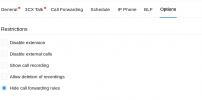
As an admin, you can restrict which users have access to the Forwarding Rules via your Admin console> Users> Options > Tick the option for Hide Call Forwarding Rules:

1692865486381.png

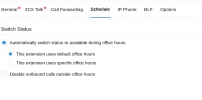
In addition as an admin you can set the User's schedule for the Autoswitch again via your Admin console> Users> Schedule:

1692865540866.png
 
  • Like
Reactions: GregG_3CX
Hey there,

As an admin, you can restrict which users have access to the Forwarding Rules via your Admin console> Users> Options > Tick the option for Hide Call Forwarding Rules:

View attachment 36914

In addition as an admin you can set the User's schedule for the Autoswitch again via your Admin console> Users> Schedule:

View attachment 36915
Hi would that override their manual setting of Available or Out of Office?
We customised the Available 2 and Out of Office 2 as Lunch and Business Trip so we could set forwarding options for those scenarios and if the user has set them does this override that?
 
Hi would that override their manual setting of Available or Out of Office?
We customised the Available 2 and Out of Office 2 as Lunch and Business Trip so we could set forwarding options for those scenarios and if the user has set them does this override that?
Autoswitch works like this:

During office hours > Available
During Break Time > Away
Outside of Office Hours > Do not Disturb.

Available 2 and Out of the Office 2 are persistent and do not get affected by the office hours or the auto switch. I.e if you are on holiday you can set your extension to Out of the Office 2 so that it does not switch to Available and you start receiving calls.
 
  • Like
Reactions: GregG_3CX
An agent can be automatically logged in or out of queues, depending on the extension's profile status or even based on the time of day. If the administrator has enabled the option in the PBX Management Console, the agent's Queue status will change, depending on the Extension's profile status.
 
An agent can be automatically logged in or out of queues, depending on the extension's profile status or even based on the time of day. If the administrator has enabled the option in the PBX Management Console, the agent's Queue status will change, depending on the Extension's profile status.
I hope that you understand..
 
Status
Not open for further replies.

Forum statistics

Threads
111,974
Messages
590,081
Members
164,899
Latest member
mazet