- Joined
- Oct 15, 2021
- Messages
- 8
- Reaction score
- 1
Hi,
I have a 3CX hosted PBX, configured for the first time in February 2021, the extensions (User-> Extension-> "General") have been configured with the Outbound Caller ID like "Name - Company Name" format, with the dash and spaces in the name, which were accepted last year.
Today I tried to change some parameters for the extension, but the PBX gives me the following error:
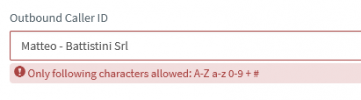
If I try to change the name, removing the spaces and giving ok, does not save the changes.
The problem is that, if I go to modify anything for the extension (like the Forwarding Rules), the change is not saved, it brings me back to the notice: Caller id is not it is more supported, but I can't change it.
I assume the change was made with an update, is there a way to "unlock" the extension from this "state"?
Thank you,
Matteo.
I have a 3CX hosted PBX, configured for the first time in February 2021, the extensions (User-> Extension-> "General") have been configured with the Outbound Caller ID like "Name - Company Name" format, with the dash and spaces in the name, which were accepted last year.
Today I tried to change some parameters for the extension, but the PBX gives me the following error:
If I try to change the name, removing the spaces and giving ok, does not save the changes.
The problem is that, if I go to modify anything for the extension (like the Forwarding Rules), the change is not saved, it brings me back to the notice: Caller id is not it is more supported, but I can't change it.
I assume the change was made with an update, is there a way to "unlock" the extension from this "state"?
Thank you,
Matteo.