Caller ID. How to set up correct From: Username

Status
Not open for further replies.

antonina_cmplte

Silver Partner
Basic Certified
Joined
Mar 15, 2021
Messages
6
Reaction score
3
The caller ID, that was set up with CNAM, is showing as unavailable.
I contacted the national provider, and they advised: For CNAM to work you must only send the 'from' number. The destination carrier will then query the CNAM repository and display the result.

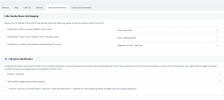
Can someone please tell where exactly should this part <sip:[email protected] be deleted from?

That is how the inbound parameters looks like.
1644257954429.png
Thank you
 
For CNAM to work you must only send the 'from' number. The destination carrier will then query the CNAM repository and display the result.
This statement refers to how CNAM works for (most) outgoing calls. Is your problem with incoming name /number display. or outgoing, as you make mention of inbound parameters. Did you modify anything, to do with the Flowroute settings?
 
The problem is with outgoing calls. It should be the company name, but it is unavailable.
@leejor How it can be updated?
 
Last edited:
It all depends at what point the name is being added to the number. In some cases it can originate from the PBX. Some providers, will add a name of your choosing. In most cases, if no name has been sent, it is added by the end provider, after doing a Database query. If no match is found, most providers will add something generic, like the state, or province. name databases are maintained by various companies. Sometimes the incumbent phone company has their own, but in many cases nowadays companies find it easier to simply pay per query, and let someone else maintain the database.

So... is your number showing at all, on outbound calls, and if so, is it in the standard PSTN format. (most providers, and government regulations, require this these days).
If the receiving party (have you tried a number of destinations?) gets the correct phone number, but no name, then there may not be a name, in a database, to send. Your provider should be able to help, I'm sure this is not the first time this has happened..
 
With Flowroute, you need to setup your outgoing CNAM with them.
DID / CNAM / then create a CNAM

Once it's approved
DID / check your DID / ACTION-> Set a CNAM

If you want incoming CNAM then ACTION -> Enable CNAM lookup
 
Thank you!
I did it for the first time when applied the company name for the first time. It looks like I should do it the second time also, once it is approved.
After set up the CNAM for the second time, I received a notification Please allow 5-7 business days for the CNAM value to propagate through the telephone network.
I will wait and see.
 
Yes, the first time you create a CNAM it needs to be manually approved, so you don't use anything forbidden (like a known company name, sexual words, etc...)

Once it's approved, then you can apply the CNAM to your number.
Good luck and have fun!
 
Status
Not open for further replies.

Forum statistics

Threads
112,326
Messages
591,901
Members
165,479
Latest member
Senergia