Caller ID Name doesn't work on incoming calls v20

MM1969

Premier Customer
Advanced Certified
Joined
Jul 19, 2023
Messages
68
Reaction score
15
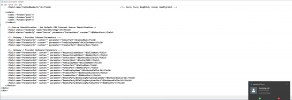
I don't get caller id name on incoming calls on default template in v20. i get calling number twice instead of name and number . i think the problem is in the no auth default template.
two FromUserPart:
<field name="ParameterIn" custom="" parameter="FromUserPart">$CallerName</field>
<field name="ParameterIn" custom="" parameter="FromUserPart">$CallerNum</field>

i think it should be this:
<field name="ParameterIn" custom="" parameter="FromDisplayName">$CallerName</field>
<field name="ParameterIn" custom="" parameter="FromUserPart">$CallerNum</field>

i am trying to fix the template but when i try and upload the template i get this error. can anyone tell me what i am doing wrong.
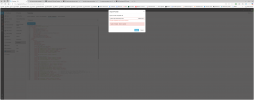
1740579660403.png
 

Attachments

  • 1740579319821.png
    1740579319821.png
    160.5 KB · Views: 54
  • 1740579366929.png
    1740579366929.png
    244.8 KB · Views: 53
Hello @MM1969

You need to export the template from an already created trunk, make your changes and upload the template you exported in that format. Anything else will fail.
 
  • Like
Reactions: David B. Kite
how do you export the template from a trunk on v20? i just went into provider templates copied and pasted to notepad++
 
Hello @MM1969

You need to export the template from an already created trunk, make your changes and upload the template you exported in that format. Anything else will fail.
i see the 3 dots to the right of the trunk, let me try that thanks,
 
  • Like
Reactions: YiannisH_3CX
i was able to export fix and import the provider template. i have 3 sip trunks that connect to 3 different sbcs 2 in orlando and one in vegas. i have this set up for all 11 3cxs that i presently have. They all have to be connected to the unsupported generic sip trunk templates since there isn't an approved tested template for an SBC. This is a lot of work exporting the trunk fixing the caller name line importing the trunk, importing hundreds of DIDs and assigning them for each site, changing all the routing to the new trunk etc. not to mention the hours it took to figure this out. any chance 3cx is going to fix the generic sip trunk template anytime soon? this is an obvious mistake that was made when making a template, calling name is mandatory it has to work.I have like 25 hospitality sites on my network that all plan on going to 3cx. we buy the most expensive enterprise license to get all the 3Cx features. you would think caller id and caller name should be easily installed with the sip trunks.
<field name="ParameterIn" custom="" parameter="FromUserPart">$CallerName</field>
<field name="ParameterIn" custom="" parameter="FromUserPart">$CallerNum</field>
 
Firstly the template is made that way for a reason. You are in the US that mainly supports name lookup and inbound calls have a name attached to them. This is not necessarily the case for the rest of the world. We can set it to read the display name from the From Display Name but for calls that do not include a display name there is nothing to read. T
Secondly even if we do update the template already created trunks will not be affected so you will need to delete and recreate them regardless.

A generic template cannot cover all possible configurations and outcomes that is why we recommend using a supported provider where templates are tailored to them.

Since you now have a working copy of the template you can use that import the trunk to all your instances.
 
I really can't believe this is not an editable field. You basically have to reconfigure half your phone system just to update this one config file?

Can a backup be edited and the restored?
 
I really can't believe this is not an editable field. You basically have to reconfigure half your phone system just to update this one config file?

Can a backup be edited and the restored?
 
Can I pay for support for this?
I can fix the issue in the backup file, however it doesn't look like I can upload the fix.
 
It is very disappointing that 3CX has not resolved this issue yet. It shows a lack of care and respect for their customers. I am a new customer on a hosted plan and, based on this experience, I will likely not renew if this is the level of service they provide. Even when using one of their supported providers like Twilio, we encountered problems with their template and had to spend several days troubleshooting and fixing the issue ourselves
 
It is very disappointing that 3CX has not resolved this issue yet. It shows a lack of care and respect for their customers. I am a new customer on a hosted plan and, based on this experience, I will likely not renew if this is the level of service they provide. Even when using one of their supported providers like Twilio, we encountered problems with their template and had to spend several days troubleshooting and fixing the issue ourselves
Have you tried contacting a partner to see if they can support you?
 
Have you tried contacting a partner to see if they can support you?
No, we ended up fixing it ourselves thanks to another thread and ChatGPT. We were able to resolve the issue with our Pro Hosted Plan (after spending hours figuring out the problem between our SIP Trunk and 3CX).

My point is that if 3CX made a mistake in the templates, they should correct it as soon as any team member sees these threads. Some of these posts are almost six months old, and the issue still has not been addressed.

I know this because we recently needed a second instance for a very small project and chose the Free Hosted Plan. Unfortunately, on the Free Plan, we cannot even import a corrected template, and there is no support available, so we are out of luck. I understand it is a free service, but this is a known issue. It really makes you wonder if this is part of their strategy to push customers toward upgrading to a paid Pro Plan with a Certified Partner, or if they simply do not care.
 

Latest Posts

Members Online Now

Forum statistics

Threads
111,831
Messages
589,276
Members
164,660
Latest member
RJenkinsROCK