Caller Information in V18 Web Client or Desktop App

Status
Not open for further replies.

chili

Free User
Intermediate Cert.
Joined
Jun 1, 2021
Messages
11
Reaction score
9
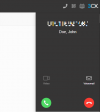
When a contact calls, is there any way to show the name of the company below the caller's name in the 'dialer window' that pops up in the top right corner of the web client?
In the old web client (V16) it just used to show up which was really convenient, but now I can only see the caller's name. Same thing for the new desktop app.
3cx.PNG
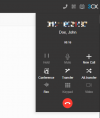
There would be enough space, even when the call is already active.
3cx.PNG
 
Hi @VasilisV_3CX

thanks for the info. I thought I had read about this issue on here before but I couldn't find the thread anymore.
Unfortunately I also can't access the link you posted.
 
Hi @chili,

Yes it was a link was to the Partners Forum, the gist at the time was:

Untitled.png
 
Hello,

I have somewhat the reverse issue :)

In V16 webclient, the "Company" info wasn't displayed on the phonebook, but it was (and still is) searchable;
so we used it to put "hidden" accent-less liases (eg; "Jerome" in Company field, and "Jérôme" in Name field, so it is possible to easily do searchs.
And the results were shown in tiles displaying "LastName Firstname"

But now, in V18, it displays Company, not at the end, but in the middle, like this:
"LastName ( - Company) Firstname"
(why the " - " ? no idea); and actually, due to string length limit, it only displays something like:
"LastName ( - Comp"
that is, the FirstName is lost.

It would be nicea to be able to select which fields to display (maybe trough CSS)

Thanks
 
Status
Not open for further replies.

Forum statistics

Threads
112,349
Messages
592,027
Members
165,514
Latest member
megalmazan