


- Joined
- Nov 7, 2018
- Messages
- 14
- Reaction score
- 1
I read the three other posts about this, but need an update and more precise and complete instructions.
My super simple call flow needs to limit the VALUE of the DTMF digits collected in CallerInput to a range between 1 and 108. But where do I place the conditional component?
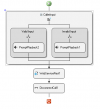
The condition...
AND(GREAT_THAN_OR_EQUAL(TO_INTEGER(CallerInput.Buffer),"1"),LESS_THAN_OR_EQUAL(TO_INTEGER(CallerInput.Buffer),"108")
Thanks in advance for any assistance.
My super simple call flow needs to limit the VALUE of the DTMF digits collected in CallerInput to a range between 1 and 108. But where do I place the conditional component?
The condition...
AND(GREAT_THAN_OR_EQUAL(TO_INTEGER(CallerInput.Buffer),"1"),LESS_THAN_OR_EQUAL(TO_INTEGER(CallerInput.Buffer),"108")
Thanks in advance for any assistance.


 igits=3. Then you can add your condition inside the Valid Input branch. The Valid Input branch will be executed when you enter between MinDigits and Ma


