CallFlow Outbound Dialer Not working after upgrade to Version 20.0 Update 0 (Build 1620 Beta)

Status
Not open for further replies.

Farteck_Solutions

Bronze Partner
Basic Certified
Joined
Jul 4, 2020
Messages
13
Reaction score
3
Dialer is giving errors:
Dialer - Error executing last component: Call control operation failed with result:
2024/02/28 08:20:56.636|1066677|0011|Trc|CallPair._9090_2.Callflow.628.[C:176.2]-From script: FILOutbound - Dialer 0 - Dialer - Error handler flow is empty...

What actually could cause this. Just after we upgraded v20 the callflow (makecall) stopped dialing outbound numbers.

 

Attachments

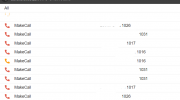
  • Screenshot 2024-02-28 082633.png
    Screenshot 2024-02-28 082633.png
    40.1 KB · Views: 26
In v20 you will need to swap the origin and destination, as the origin must be a 3CX extension number, not an external number. However, this will also not work in v20 final, and a hotfix will be released soon after this to fix the issue.
 
  • Like
Reactions: jed and Evolute IT
@edossantos grateful. After i swapped. Now all my outbound dialers are calling as expected. thank you.

For several days now my client lost the opportunity to call 1000 clients but i am good now..
 
  • Like
Reactions: edossantos
But i noticed that, MakeCall calls the agent, and now will attempt to call the customer. Not a good thing hoping the hot fix comes early to fix this.

Now i explained to agents that they shouldn't end the call. but they explained that when they get the call from makecall and try to pick up, they're unable to.

I suspect that make call will call the agent, then call the recipient, before the agent can pick up or what is the real action to take place. coz the agents can't pick up the calls from IVR(MakeCall) that's what they see.
 
If the call is going through a queue now, that's likely to cause issues. The hotfix comes to solve that. Meanwhile, a possible workaround is that you start the calls from each agent extension, and not from the queue.
 
  • Like
Reactions: Evolute IT
@edossantos i need further help.
Now after making the changes, the Makecall is sending multiple calls to the agents. So if make call calls the agent extension, multiple calls follow. what do i need to do to ensure only 1 call goes to the agent.

The previous callflow worked so fine. Using predictive dialer.
 

Attachments

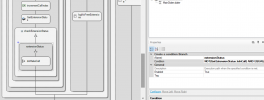
  • makecall.png
    makecall.png
    27.5 KB · Views: 23
You will need to add the logic to check if the agent is busy or not. You can use the Get Extension Status component to do that, which has the IsInCall property that tells you that.
 
  • Like
Reactions: Evolute IT
@edossantos I think I need a lil help.

I went back to the flow designer and added Get Extension Status and Added the extension number.

How do I set the IsInCall component property. This basic thing is pulling me. Kindly assist as my agents are suffering with the multiple calls.
 
You need to create a condition. In the branch where you want to make calls, you need to set the Condition property to the NOT(MyGetExtensionStatusComponent.IsInCall) expression.
 
Thank you. This condition/expression helped. At least now the makecall calls the agent one after the other and only when not on a call. however, the other challenge is that even when the agent is away or on do not disturb, make call still calls them. Any expression to add to NOT(MyGetExtensionStatusComponent.IsInCall) to mitigate this problem? like it will call only when their status is available.

Now this has become more interesting. We pray the hot fix will fix all these.

@edossantos kindly come to my rescue again.
 
The Get Extension Status component also tells you the current profile in property CurrentProfileName. The possible values for this are:
  • Available > "Available"
  • Away > "Away"
  • Do Not Disturb (DND) > "Out of office"
  • Lunch > "Custom 1"
  • Business Trip > "Custom 2"
 
@edossantos which of these is more appropriate: Kindldy advise to set in my condition property.

NOT(GetExtensionStatus.CurrentProfileName,"Away" OR GetExtensionStatus.CurrentProfileName,"Out of Office" OR GetExtensionStatus.CurrentProfileName,"Custom 1" OR GetExtensionStatus.IsInCall OR GetExtensionStatus.CurrentProfileName,"Custom 2")
---

NOT(GetExtensionStatus.IsInCall) AND EQUAL(GetExtensionStatus.CurrentProfileName,"Available")

All I want to achieve is that when the agent in on a call, Makecall shouldn't call another number for that agent. And if the agent status is only available that's when makecall should call.

Is the condition stated above make sense? or I should make a slight change in the above. Or you would rather suggest I make two branches to define each condition property? I wanted to put the NOT statement or condition under one property.

I am in production so kindly advise the best option so i implement Monday morning.
 

Attachments

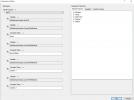
  • GetExtensionStatus.png
    GetExtensionStatus.png
    130.4 KB · Views: 12
I finally tried this option: Will apply it too and see tomorrow:
NOT(GetExtensionStatus.IsInCall,GetExtensionStatus.CurrentProfileName,"Away",GetExtensionStatus.CurrentProfileName,"Out of Office",GetExtensionStatus.CurrentProfileName,"Custom 1",GetExtensionStatus.CurrentProfileName,"Custom 2")


1709504862655.png
 
Those expressions are wrong. Use the Expression Editor to build the expression, use the logical functions EQUALS, NOT_EQUALS, etc.
 
  • Like
Reactions: Evolute IT
Hello @Farteck_Solutions,

In case you're still struggling with this dialer, you can consider SIP Caller as a replacement. This is a cloud based outbound call dialer which seamlessly integrates with your 3CX system. The integration is straightforward, you just need to define an extension in your 3CX server, and SIP Caller will connect remotely and make the calls you need. As this is not using a CFD app, you will not have the issue mentioned here. Calls will be made to external numbers, and you can transfer them to the queue, so the next available agent takes it. You don't need to check if the agent is in a call or not, the queue will automatically do this for you.

In addition, SIP Caller provides a bunch of very useful features. As I see that you're sending these calls to live agents, the answering machine detection is a feature that you will love, and will save you a lot of money. SIP Caller performs real time speech analysis to identify if the answering endpoint is a human or an answering machine, and lets you execute different actions depending on that. So for example, you can leave a message when a voicemail picks up, and transfer the call to your queue when a human is on the other side of the line. This will drastically improve your agents productivity, which translates to more money in your pocket.

Feel free to contact me in case of being interested in giving this a try.
 
However, this will also not work in v20 final, and a hotfix will be released soon after this to fix the issue.
Hello,

has this error already been fixed in the final version?
 
Hello,
has this error already fixed in V20?
Our customer needs origin must be an external number.
 
Status
Not open for further replies.

Forum statistics

Threads
111,952
Messages
589,904
Members
164,845
Latest member
tdzski5