Calls not routing correctly

DCB

Bronze Partner
Basic Certified
Joined
Oct 5, 2021
Messages
42
Reaction score
2
Calls coming into [Trunk 2 number] are supposed to route directly to an extension. I have pointed the trunk to the extension, setup a DID on the extension for the trunk number, separated everything by departments and created a CID rule for any calls from [Trunk 2 number] to be routed to that extension.
However, calls are still coming in and hitting the main ring group.
From the call logs, calls are inbound Via Trunk [Trunk 1]([Trunk2]) and being routed incorrectly. I don't understand why calls are coming in "Via Trunk [Trunk 1 number] (+[Trunk 2 number])" when they should all be "Via trunk: [Trunk name] (+[Trunk 2 number])"

We do see some calls coming and routing correctly... "Via trunk: [Trunk name] (+[Trunk 2 number])"... however, this is usually after the caller has hung up and called back in.
 
Hi,

Is the DID only configured on one trunk, or it got added to more than one in error?
Did you check if the DID is not coming in from the SIP provider in the format you have entered it, leading to the system choosing the Default route for the Trunk instead of the destination to which the DID is assigned (this might change call to call, needing wildcards)?

Best,
KS.
 
Hello KyriacosS. Thanks for responding!
To make sure I understand, I have the number programmed in the trunk in E164 format, IE +1234567890.
You're asking if the SIP provider (Bandwidth.com) is sending the number in E164 format?

I do not have any DID numbers programmed on the trunk. I'm just trying to route incoming calls on that specific number to an extension.
On the extension I DO have that trunk number listed as a DID for that extension.
 
Do you want all calls coming in on a specific trunk to route to one extension? If not, then you will have to setup a DID rule and confirm that it matches the format of the DID number being sent by your provider, or as suggested, use a leading wildcard.
 
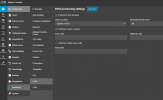
In some cases switching off the general E.164 processing will help, as that can alter DIDs in the way they are coming into the system.
1754373903230.png
 
Here's an example of a 'bad' call... aka, a call that gets mis-routed:
Inbound: +1xxxxxx5045 → Via trunk: xxx-xxx-2274 (+1xxxxxx7008) → +14022155045 was transferred to Support (8002)
 
@leejor: yes I do
@ks: Turns out e164 was already turned off. I turned it back on and placed a test call from my cell. No change.
 
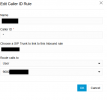
1754415592254.pngScreenshot of the CID I have setup. I can verify that the Trunk is the correct trunk.
 
Hi,

Any other caller id rules that might match the incoming DID closer than the wildcard? I believe this is a v18 system? I do not have one available to try any tests.
 
No other CID rules.

Version 20.0 Update 6 (Build 724 Release)
 
Do you have access to, or have you looked at, the 3CX Activity Log, for clues as to why the calls route the way they do?
 
Hi,

CID rules are for sending specific CALLERS to an extension, not for routing the DIDs (your numbers).
If you wish a whole trunk to just route to an extension just set that as the Default destination of the trunk, and nothing else should be needed.
If a specific DID needs to hit a specific extensions, then you add that DID to the extension, and that's it.

And CID rules you made should probably be deleted.
 
Hello @DCB

So you have 2 trunks, both from Bandwidth and all incoming calls go to the destination of one of those trunks? Is that correct?
created a CID rule for any calls from [Trunk 2 number] to be routed to that extension.
Delete that as it's only making things more confusing.

Did you use the supported template to add the trunks or did you use the Generic one? Is there a red exclamation mark next to your trunk?
 
CID rule has been deleted.
I didn't use a template per se'. I just filled out the fields needed when creating a new trunk. Nothing different than we normally do when setting up customers.
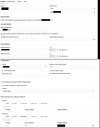
There is no red ! next to my trunk. Trunk pics attached
 

Attachments

  • f4.jpg
    f4.jpg
    119.3 KB · Views: 6
Hello all. I think this is a software bug.

I just had another customer call in, reporting the same problem. This setup is about as simple as it gets. All he has are cordless phones, so a single Yealink W60B. The setup was Trunk -> Default Route: User, user's extension. This stopped working for inbound calls.

I created a ring-group, put the phones in the ring group, the re-directed the trunk to the ring group.
Inbound calls started working again.
 
On the client that initially reported the issue, I created a ring group and put their only phone in there. Our main office is still getting random calls.
 
I would suggest creating a support ticket for this as we will need to look into the PBX configuration more closely to be able to determine the cause of the issue.
 

Latest Posts

Members Online Now

Forum statistics

Threads
111,831
Messages
589,276
Members
164,660
Latest member
RJenkinsROCK