Solved Calls rejected.

Status
Not open for further replies.

GageC

Free User
Joined
Dec 11, 2021
Messages
6
Reaction score
6
Calls out of Teams to any extension ring for a second or two, then fail with the message "Declined". I've attached several logs, I have removed a lot of redundent information from the following logs to reduce the overall size, there's a space between each log, if you want me to send the full version just ask. I'm sure I've misconfigured something, I don't have any trunks configured, and calls from any of my IP Phones or 3CX mobile clients to any extensions with teams configured don't respond on teams. For the phone numbers, I just put random numbers or personal cell numbers.

Photo of status of SBC inside Teams admin center.
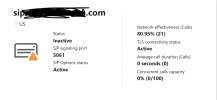
Screen Shot 2021-12-10 at 11.52.04 PM.png

Error inside Teams client.
Screen Shot 2021-12-10 at 11.40.02 PM.png

Image of the keypad inside Teams client, doesn't seem to include extension number at the end of it, despite adding it to the end of the number via power shell command.
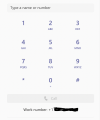
Screen Shot 2021-12-10 at 11.40.10 PM.png

Image to show that my three users are properly licensed.
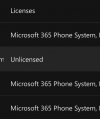
Screen Shot 2021-12-10 at 11.40.16 PM.png

Assigned User policies, exact same for each user.
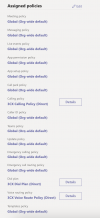
Screen Shot 2021-12-10 at 11.40.59 PM.png

Photo of 3CX Extensions.
Screen Shot 2021-12-10 at 11.41.08 PM.png

Code:
[Unknown:] Sending: OnSendResp Send 603/INVITE from 0.0.0.0:0
SIP/2.0 603 Decline
To: <sip:[email protected]:5061;user=phone>;tag=18c9ef27
From: "Gage"<sip:+PHONE NUMBER [email protected]:5061;user=phone>
Warning: 499 sip.REDACTED.com "Caller is forbidden"

Terminated from "Gage"<sip:+PHONE NUMBER [email protected]:5061;user=phone> to <sip:[email protected]:5061;user=phone> reason: Rejected

[Unknown:] is terminated: Cause: BYE from PBX

[CM503013]: Call(C:8): Incoming call rejected, caller is unknown
INVITE sip:[email protected]:5061;user=phone;transport=tls SIP/2.0
To: <sip:[email protected]:5061;user=phone>
From: "Gage"<sip:+PHONE NUMBER [email protected]:5061;user=phone>
User-Agent: Microsoft.PSTNHub.SIPProxy v.2021.12.1.4 i.USWE2.1
P-Asserted-Identity: <tel:+PHONE NUMBER REDACTED>
P-Asserted-Identity: <sip:[email protected]>
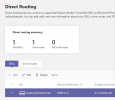
 
Also, my direct routing page in Teams has never been so clean! Effectiveness100.PNG
 
  • Like
Reactions: GageC
Just to add another update. I had a user jack with their work phone number properties in AD. That caused their outbound calls to start rejecting again. So, I ran the script again from NSH to repair their account with the correct phone number / extension and their calling was fixed almost immediately.
Microsoft is supposed to update this information across their systems, so I'm not sure we can do much about this.
I truly hope that MS does not expect everyone to have to run powershell commands to update their CID every time an admin changes something in Azure AD...
 
Hi,

we had the same problem. Everything works fine, until we add another user yesterday.
If we run the "map_users.ps1" Script, every Teams-User loses his "ext" after his phone number.
Without Ext, the Teams Users can't dial out.
Code:
Set-CsUser -Identity [email protected] -OnPremLineURI "tel:+49123987;ext=507" -EnterpriseVoiceEnabled $true -HostedVoiceMail $true
WARNUNG: OnPremLineURI will be deprecated. Please use LineURI to update user's phone number.
We try to use LineURI instead of OnPremLineURI - but the ext still missing.
Code:
Set-CsUser -Identity [email protected] -LineURI "tel:+49123987;ext=507" -EnterpriseVoiceEnabled $true -HostedVoiceMail $true
Get-CsOnlineUser | ft UserPrincipalName, LineURI

UserPrincipalName             LineURI
-----------------             -------
[email protected]                 tel:+49123987
If we set the Extension with the Command:
Code:
Set-CsPhoneNumberAssignment -Identity [email protected] -PhoneNumber "+49123987;ext=507" -PhoneNumberType DirectRouting

the ext will be successfully updated, see:
Code:
Get-CsOnlineUser | ft UserPrincipalName, LineURI

UserPrincipalName             LineURI
-----------------             -------
[email protected]                 tel:+49123987;ext=507
You have to completely close the Teams-Client. After restart the Client you see under the Dial-Pad the Number and Extension. And admin.teams.microsoft.com show the Extensions under "users".

Regards!
 
  • Like
Reactions: NickD_3CX
Hi, if you click voice-mail or phone settings it'll also update, just a tip to save a few seconds in testing.
 
@NickD_3CX just to add to this as others have experienced, running the set-csphonenumberassignment has also corrected it for me on my previously working teams client:

Set-CsPhoneNumberAssignment -Identity [email protected] -PhoneNumber "+442077777777;ext=100" -PhoneNumberType DirectRouting

from running the script, I had to close down and reopen Teams for the change to take effect... took approx 20-30mins.

I will test the same against my teams rooms equipment which also ceased to work after running the generated script.
 
  • Like
Reactions: NickD_3CX
Hello,

I had exactly the same problems and symptoms (but on a fresh install, purposedly created to integrate with Teams, argh).

Once the proper phone number (with extension) has been assigned thant to Set-CsPhoneNumberAssignment things started to work as intended.

It would be EXTREMELY helpfull if the FAQ could be updated with such information (or, even beetter, the generated script adapted).

Thanks
 
@NickD_3CX official word from microsoft. they're retiring set-csuser in april.

What you need to do to prepare:

Instead of using these cmdlets for phone number assignment:

  • Set-CsUser
  • Set-CsOnlineVoiceUser
  • Set-CsOnlineApplicationInstance
  • Set-CsOnlineVoiceApplicationInstance
we recommend you get familiar with and start to use the new cmdlets Set-CsPhoneNumberAssignment and Remove-CsPhoneNumberAssignment. These new cmdlets are already available in the latest Teams PowerShell


https://admin.microsoft.com/AdminPortal/home?ref=MessageCenter/:/messages/MC316139
 
@NickD_3CX official word from microsoft. they're retiring set-csuser in april.

What you need to do to prepare:

Instead of using these cmdlets for phone number assignment:

  • Set-CsUser
  • Set-CsOnlineVoiceUser
  • Set-CsOnlineApplicationInstance
  • Set-CsOnlineVoiceApplicationInstance
we recommend you get familiar with and start to use the new cmdlets Set-CsPhoneNumberAssignment and Remove-CsPhoneNumberAssignment. These new cmdlets are already available in the latest Teams PowerShell


https://admin.microsoft.com/AdminPortal/home?ref=MessageCenter/:/messages/MC316139
Thank you very much for the heads up!
I will make sure this reaches the right eyes straight away
 
Just a small update for everyone.

We have made changes to the Powershell scripts generated by the Management Console for the Teams integration and will now use the Set-CsPhoneNumberAssignment command the number assignment.

This change will be included in V18 Update 3.

Thank you everyone for your input on this!
I will now mark this as 'Solved'.
 
  • Like
Reactions: Evolute IT
Status
Not open for further replies.